Feature
Keep billing when the internet is down
Can I make bills without internet?
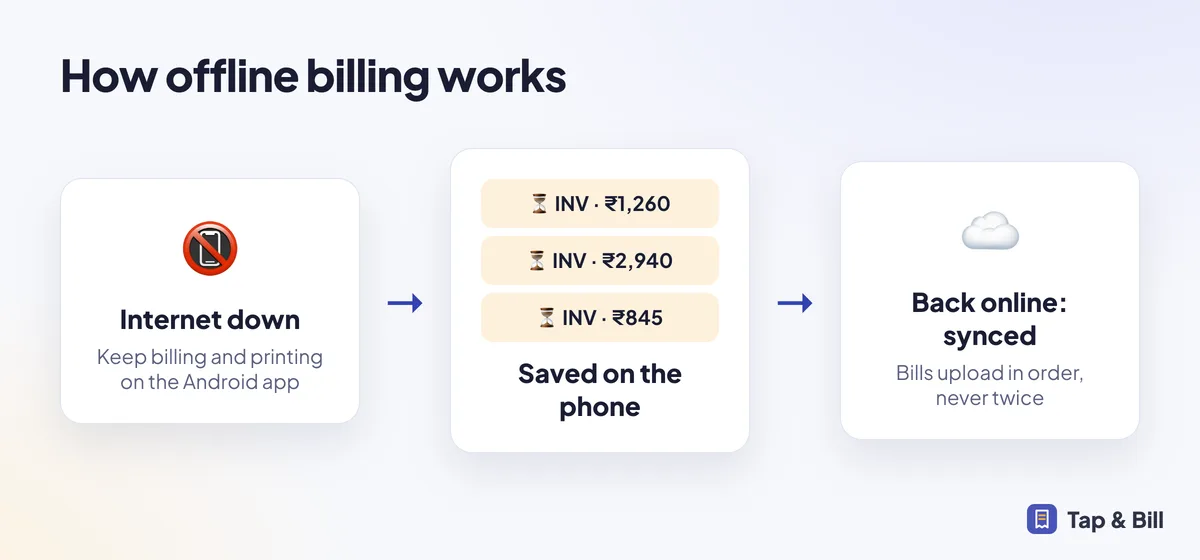
Yes. The Tap & Bill Android app saves bills on the phone when there is no internet, prints them as usual, and uploads them automatically when the connection returns. Each bill has a unique ID, so it is never saved twice.
Mobile data drops exactly when the shop is full: festival evenings, sale days, crowded markets. A billing app that stops when the internet stops costs you sales.
Tap & Bill keeps an offline queue on the phone. Your staff see which bills are waiting, and nothing is lost if the phone is closed.
What you get
- Bills saved on the phone when offline
- Automatic upload on reconnect
- No duplicate bills
- Pending bills shown to staff
How it works
Bill as usual
The app notices there is no internet and saves the bill on the phone.
Print and hand over
The receipt prints normally. WhatsApp can be sent once online.
Auto sync
Bills upload when the connection comes back, in the right order.
See it in Tap & Bill
Offline billing: questions
Does the computer (web) version work offline?
The web version needs internet. Use the Android app as the backup counter when the internet is unreliable.
What happens to bill numbers offline?
The bill gets its final number when it syncs, so numbering stays in order across phones.
Make your first bill today
Try every feature free for 14 days. No card, no setup fee.