Feature
Bill with your own UPI QR for the exact amount
How do I show a UPI QR with the bill amount?
Enter your shop’s UPI ID once in Tap & Bill Settings. When you pick UPI as the payment mode, the billing screen shows a QR code for the exact bill amount. The customer scans it with any UPI app and the amount is already filled in. The same QR prints on the thermal receipt and appears on the bill PDF, and the money goes to your own UPI ID.
A printed QR stand on the counter makes the customer type the amount, and a wrong amount means checking and asking again. A QR made for this bill carries the exact amount, so the customer only scans and enters their PIN.
Tap & Bill doesn’t touch the money. It uses your own UPI ID, takes no cut of the payment and is not a payment gateway. Check the credit on your UPI app or soundbox as you do today.
What you get
- QR with the exact amount on the billing screen (app and web)
- Printed on 58 mm and 80 mm thermal receipts with the printer’s own QR command
- On the bill PDF the customer gets on WhatsApp
- Split payment: QR asks only for the UPI part
- On an udhaar bill, the QR asks for the amount still due
- Not shown on cash, card or cancelled bills
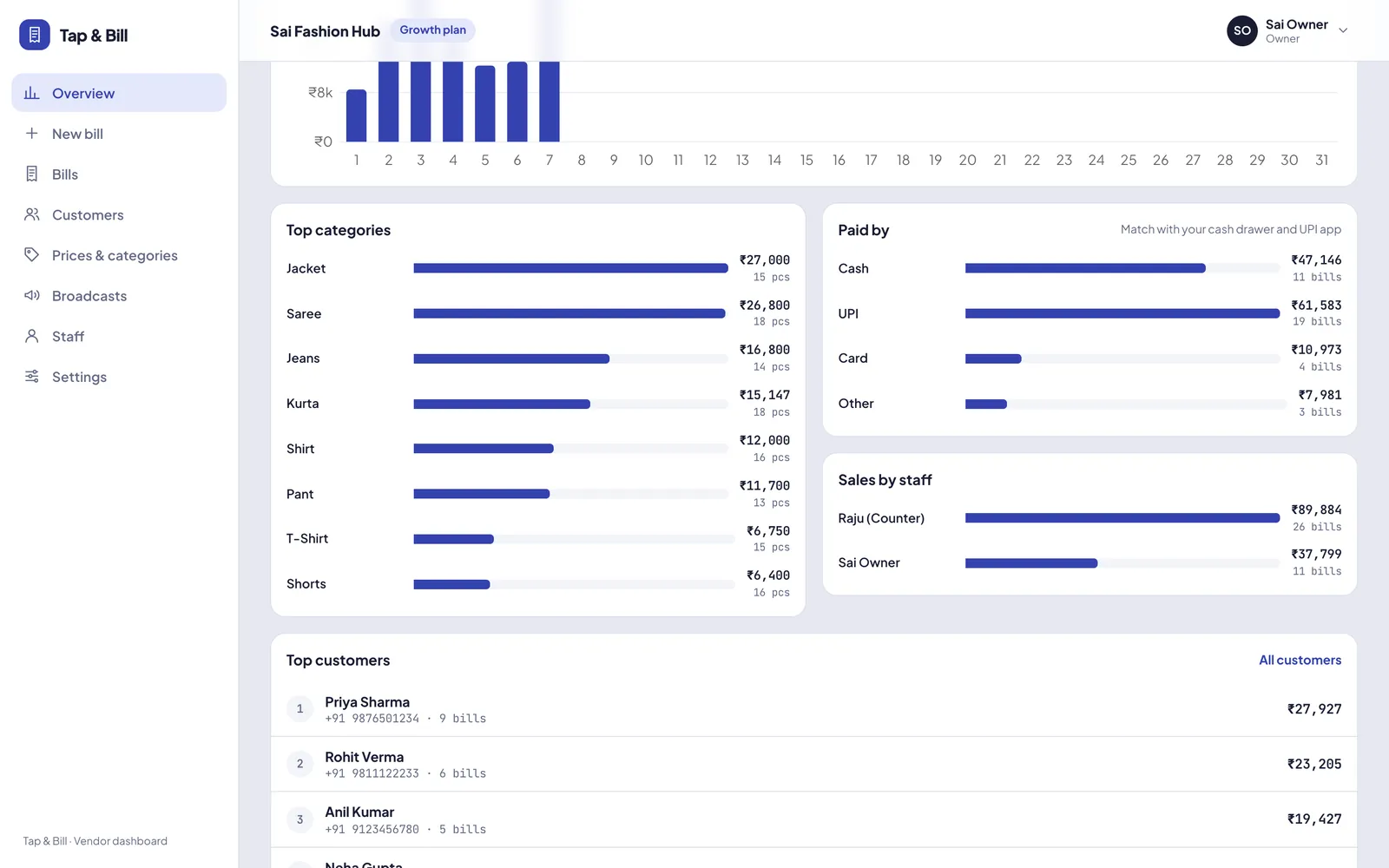
- UPI sales counted separately in reports
How it works
Add your UPI ID
Settings → UPI ID, once. Use the UPI ID where your shop receives money.
Pick UPI
Make the bill and choose UPI, or a split with a UPI part. The QR shows the amount.
Customer scans
Any UPI app reads the QR with the amount filled in.
Save and share
The QR prints on the receipt and sits on the bill PDF sent on WhatsApp.
Split payment: part cash, part UPI
Customers often pay a big bill in two parts. Record both on the same bill:
| Bill total ₹1,700 | Amount | What happens |
|---|---|---|
| Cash | ₹500 | Counted in today’s cash |
| UPI | ₹1,200 | QR shows ₹1,200; counted in today’s UPI |
The parts must add up to the bill total. A split can also include card or udhaar (pay later). Reports add each part to its own mode, so cash in the drawer matches the cash total.
Counter QR stand or a QR on the bill?
| Printed QR stand | Tap & Bill bill QR | |
|---|---|---|
| Amount | Customer types it | Already filled in |
| Wrong amount risk | Yes, at rush hour | Low |
| On the receipt and PDF | No | Yes |
| Linked to the bill | No | Yes, same bill number |
| UPI total in reports | Count by hand | Automatic |
Keep your QR stand as a backup. Many shops use both.
UPI sales in your reports
UPI QR on bills: questions
Is there a charge for the UPI QR?
Tap & Bill charges nothing for it and takes no share of payments. The customer pays from their UPI app straight to your UPI ID.
Which UPI ID should I use?
The UPI ID where your shop receives money, such as the business UPI ID from your bank or UPI app. You enter it once in Settings and can change it any time.
Does Tap & Bill confirm that the customer paid?
No. Tap & Bill is not a payment gateway and does not see your bank account. Check the credit on your UPI app or soundbox before handing over the goods.
Does the QR print on a thermal printer?
Yes. The receipt prints the QR with the printer’s built-in QR command on 58 mm and 80 mm printers. Tell us your printer model and we check it with you.
Can a customer pay part cash and part UPI?
Yes. Choose split payment, enter the cash part and the UPI part, and the QR asks only for the UPI amount.
Is the QR on the WhatsApp bill?
Yes, on the bill PDF the customer opens from the WhatsApp message, so they can pay later from the PDF if the bill is on udhaar.
See the UPI QR on your own bill
We call you within one working day and show Tap & Bill on your own items and prices.
- 10-minute demo on phone or video call
- 14-day free trial, no card
- We set up your categories and prices with you
Prefer to talk now? Call +91 73838 34343 or WhatsApp us.
Make your first bill today
Try every feature free for 14 days. No card, no setup fee.