Feature
Galla day close: count the cash and match it with sales
How do I match the cash in my galla with the day’s sales?
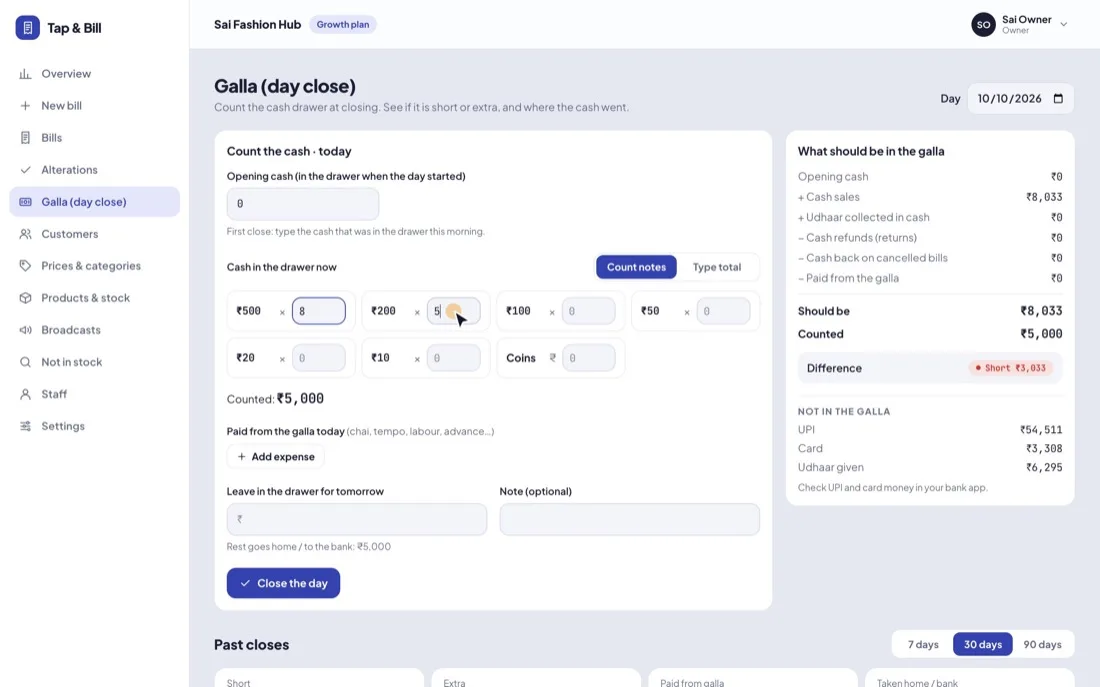
In Tap & Bill, open Galla (day close) at closing time: in the computer menu, or in the Android app from the History tab (Close the day (count galla)). Count the notes from ₹500 to ₹10 and the coins, add any cash paid from the galla today (chai, tempo, labour), and type what you leave in the drawer for tomorrow. The owner sees what should be in the galla (opening cash + cash sales + udhaar collected in cash − cash refunds − paid from the galla) next to what was counted, and whether it is short or extra. Staff count without seeing the expected figure.
Every shop counts the galla at night. Most do it on a slip of paper: add the notes, subtract the chai and tempo money, and compare it with a total that someone worked out from the bill book. When it doesn’t match, nobody knows whether a bill was missed, a UPI payment was marked as cash, or money went missing.
Tap & Bill already knows the day’s cash bills, the udhaar paid back in cash, the cash refunds and the bills cancelled. The galla close puts your count next to that figure, so the difference is a number, not a guess. It takes about two minutes, works on the Android app and the computer, and is part of every plan.
What you get
- Note count for ₹500, ₹200, ₹100, ₹50, ₹20 and ₹10, plus coins; or type the total
- Opening cash carried over from what you left in the drawer at the last close
- Cash sales, udhaar collected in cash, cash refunds and cash back on cancelled bills, worked out from your bills
- Up to 20 cash payments from the drawer, each with what it was for
- Should be, Counted and Difference: Matches, Short or Extra
- UPI, card and udhaar shown separately under Not in the galla
- Blind count for staff: they save once and never see the expected figure
- Past closes for 7, 30 or 90 days: short and extra totals, cash taken home, days not closed
- Android app (History tab) and computer; the owner’s Reports screen shows the last 7 days
How it works
Sync the bills
Before counting, let every phone upload its bills. The app warns you if bills on that phone are not synced yet.
Count the notes
Open Galla (day close) and type how many ₹500, ₹200, ₹100, ₹50, ₹20 and ₹10 notes you have, and the coins in rupees. Or switch to Type total.
Add what was paid out
Under Paid from the galla today, add each cash payment with what it was for: Chai ₹80, Tempo ₹300.
Leave cash for tomorrow
Type what stays in the drawer for change. The rest is shown as going home or to the bank, and tomorrow’s opening cash fills in by itself.
Check the difference
Tap Close the day. The owner sees Should be, Counted and the difference: Matches, Short or Extra.
Example: one evening at a clothing shop
The shop left ₹1,500 in the drawer last night. Today it made cash, UPI and card bills, a customer paid back ₹1,000 of old udhaar in cash, one piece was returned for a ₹650 cash refund, and ₹380 went on chai and a tempo.
| What should be in the galla | Amount |
|---|---|
| Opening cash | ₹1,500 |
| + Cash sales | ₹14,280 |
| + Udhaar collected in cash | ₹1,000 |
| − Cash refunds (returns) | ₹650 |
| − Cash back on cancelled bills | ₹0 |
| − Paid from the galla (Chai ₹80, Tempo ₹300) | ₹380 |
| Should be | ₹15,750 |
The count: ₹500 × 20, ₹200 × 12, ₹100 × 25, ₹50 × 10, ₹20 × 10, ₹10 × 8 and ₹20 in coins, so Counted ₹15,700. The difference shows Short ₹50. The owner leaves ₹1,500 in the drawer for tomorrow, and ₹14,200 is shown as taken home or to the bank. Tomorrow opens with ₹1,500 without anyone typing it.
| Not in the galla | Amount | Where to check |
|---|---|---|
| UPI | ₹16,900 | Your UPI app or soundbox |
| Card | ₹2,100 | Your card machine or bank |
| Udhaar given | ₹1,200 | The customer’s account in Tap & Bill |
A bill paid part cash and part UPI adds only its cash part to the galla. Cancelled bills are left out, and a bill from an earlier day that is cancelled today with cash given back shows as “Cash back on cancelled bills”.
Short or extra? What to check first
- Bills not synced. A phone that billed offline may not have uploaded yet. If it syncs after you closed, the owner sees “Cash bills changed by … after this count” with the new figure; save again to update.
- An expense you forgot. Chai, tempo, labour or an advance paid from the drawer and not written down.
- UPI saved as cash. Open today’s bills and check the payment mode of large cash bills.
- A return or a cancelled bill. Cash refunds and cash given back on cancelled bills are already taken off; check that the money really went back to the customer.
- Change given wrong at rush hour. A small, regular shortfall is often this. Look at Past closes to see if it happens on the same days or with the same person closing.
Owner and staff: who sees what
| Owner | Staff | |
|---|---|---|
| Count and close the day | Any day in the last 62 days, and correct a saved close | Today or yesterday, and save once |
| Opening cash | Can change it | Filled in from the last close (staff type it only on the shop’s first close) |
| Should be, Difference, Not in the galla | Yes | No: staff count blind |
| Past closes and totals | Yes: 7, 30 or 90 days on the computer, 7 or 30 in the app | No |
Staff never see the number they are supposed to match, so the count is what is really in the drawer. The close shows who saved it and when.
What it does not do
- It is not an expense book. “Paid from the galla” is for small cash paid out of the drawer that day. Rent, salaries, supplier payments and bank entries are not kept, and there is no profit and loss statement; use your CA or accounting software for those.
- It does not check UPI or card money. Tap & Bill is not a payment gateway; match UPI and card totals with your bank app.
- One galla close per shop per day. Shops with two cash counters count both drawers together.
- Closing the galla needs internet. Bills made offline in the Android app upload first, then you count.
- The galla is not part of the daily WhatsApp sales report.
Hindi: दुकान का हिसाब कैसे रखें: बिक्री, गल्ला, उधार walks through the same close in everyday shop Hindi.
Galla day close: questions
What is a galla in a shop?
Galla (गल्ला) is the cash drawer or cash box at the counter. “Galla milana” or “galla hisab” means counting it at closing and checking it against the day’s cash sales. In Tap & Bill this is the Galla (day close) screen.
Can my staff close the galla?
Yes. Staff can count and close today or yesterday, and save once; after that only the owner can change it. Staff don’t see what should be in the galla or the difference, only what they entered, so they can’t adjust the count to match.
Are UPI payments counted in the galla?
No. Only cash goes in the galla. UPI, card and udhaar given are listed separately under “Not in the galla” so you can check them in your bank app. On a split bill, only the cash part counts.
How is the opening cash worked out?
It is what you left in the drawer at the last close (“Leave in the drawer for tomorrow”). On the very first close you type the cash that was in the drawer in the morning. After that staff can’t change it; the owner can.
Can I correct an old day?
Yes, the owner can open any of the last 62 days, see the count and save changes. Past closes show each day’s should be, counted, difference, paid from galla and who closed it, plus days with bills that were never closed.
Does the galla close work without internet?
No. Billing works offline in the Android app, but closing the galla needs internet so it can use every synced bill. If a phone still has bills to upload, the app asks you to sync first.
Which plan has the galla day close?
Every plan: Starter ₹499, Growth ₹999, Pro ₹1,999 a month, with a 14-day free trial. There is no extra charge.
See the galla close on a demo
We call you within one working day and show Tap & Bill on your own items and prices.
- 10-minute demo on phone or video call
- 14-day free trial, no card
- We set up your categories and prices with you
Prefer to talk now? Call +91 73838 34343 or WhatsApp us.
Know if the galla matches, every night
Count in two minutes on your phone or computer. 14-day free trial, no card.