Feature
Online orders and courier parcel stickers (4 × 6 and A4) for shops
How do I keep online orders and print courier stickers from my shop?
In Tap & Bill open Online orders, add the customer’s name, mobile, address and PIN code (or tap Send by courier on their bill), and print a parcel sticker: 4 × 6 inch (100 × 150 mm) for a label printer, or A4 with 4 or 1 per page for any printer. Add the courier, tracking ID and date when you hand the parcel over, then share the tracking ID on WhatsApp from your phone. On the Android app and the computer, on every plan including Free. It does not book couriers or fetch tracking updates.
Shops that sell on Instagram and WhatsApp keep orders in a diary, a WhatsApp chat or their memory: who paid, whose parcel went, which tracking ID belongs to whom. Then a customer asks “mera parcel kab aayega?” and someone scrolls for ten minutes.
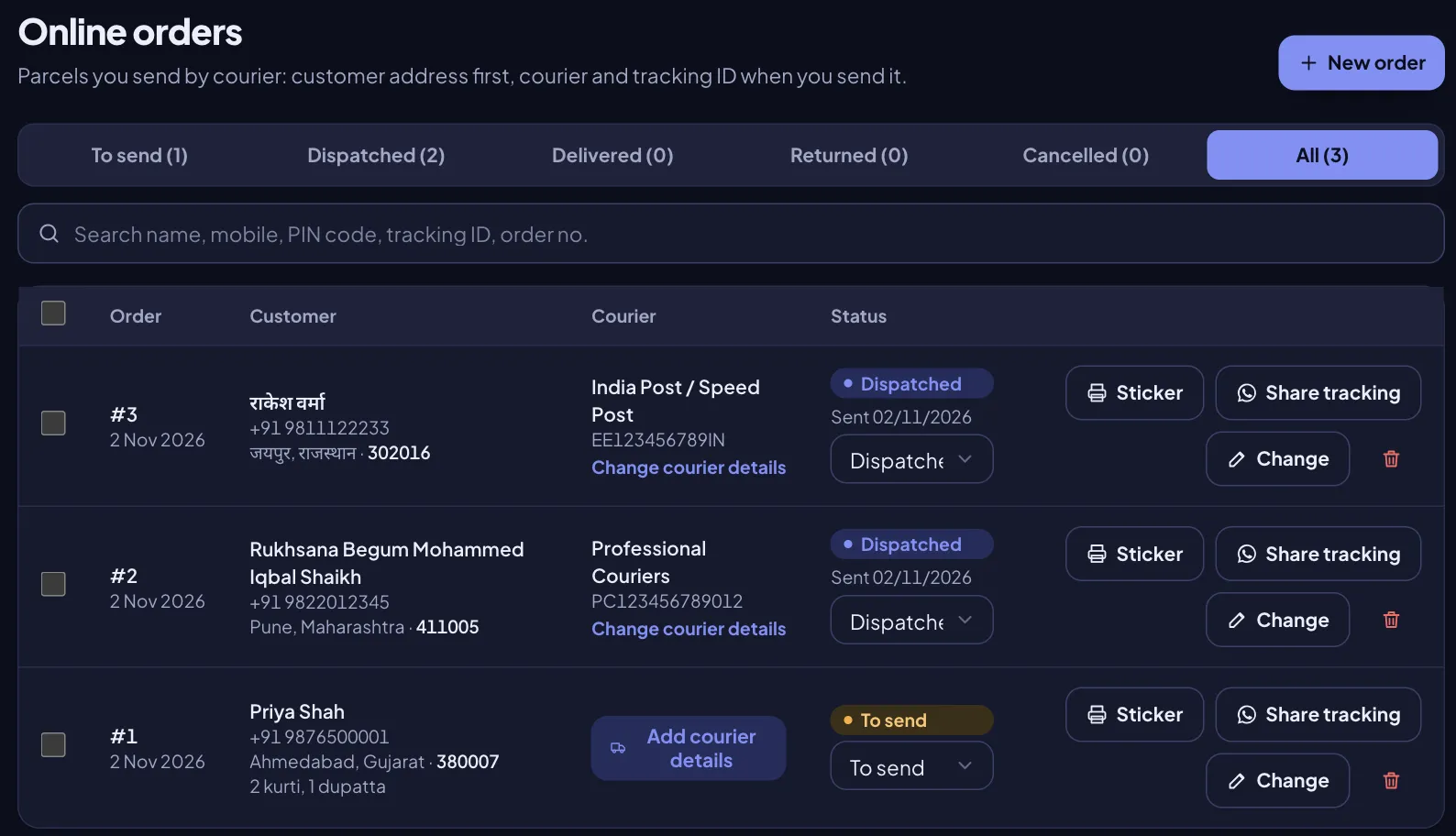
Online orders is one list for all of it, next to your bills. Each order has the customer’s address, the courier and tracking ID once you send it, and a status: To send, Dispatched, Delivered, Returned or Cancelled. Search by name, mobile, PIN code, tracking ID, order number or bill number.
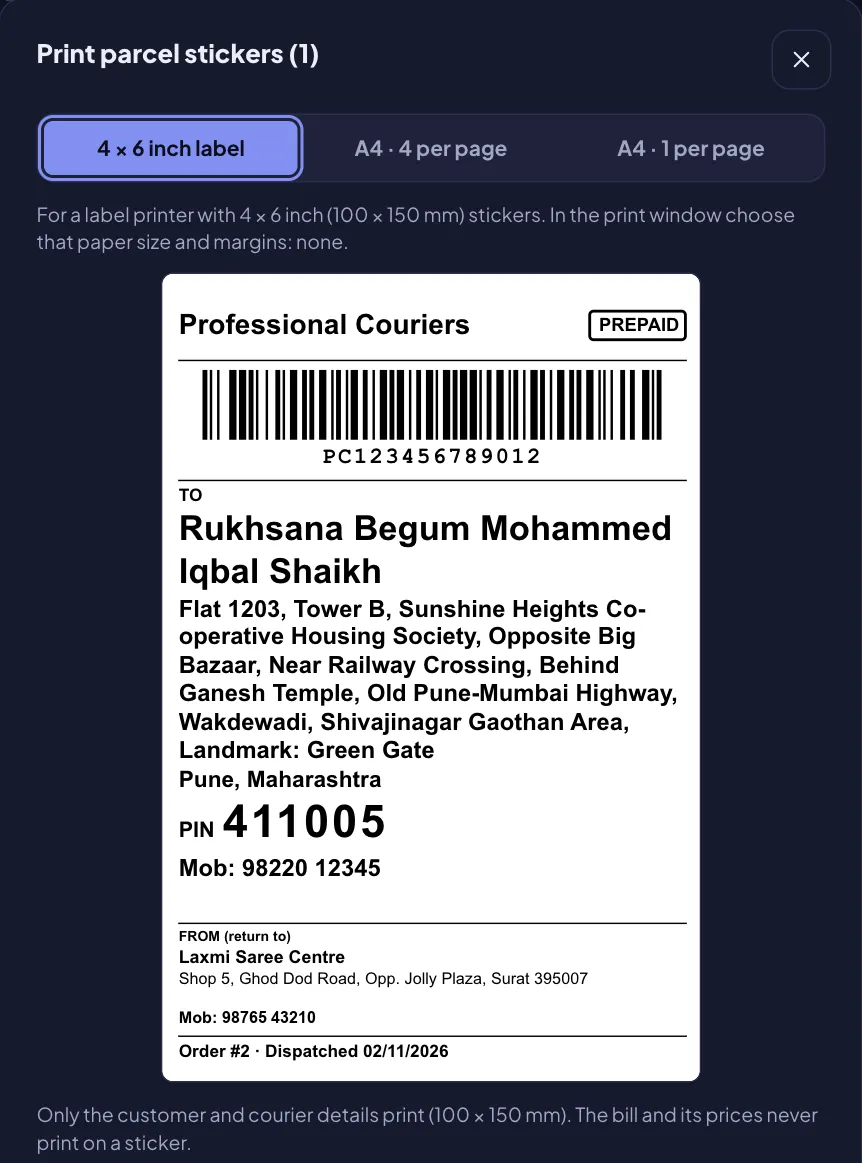
The parcel sticker prints in one tap with the customer’s address and a big PIN code, your shop as the return address, and the tracking barcode once you have it. It never prints the bill, the items or the prices.
What you get
- One list of online orders with tabs and counts: To send, Dispatched, Delivered, Returned, Cancelled, All
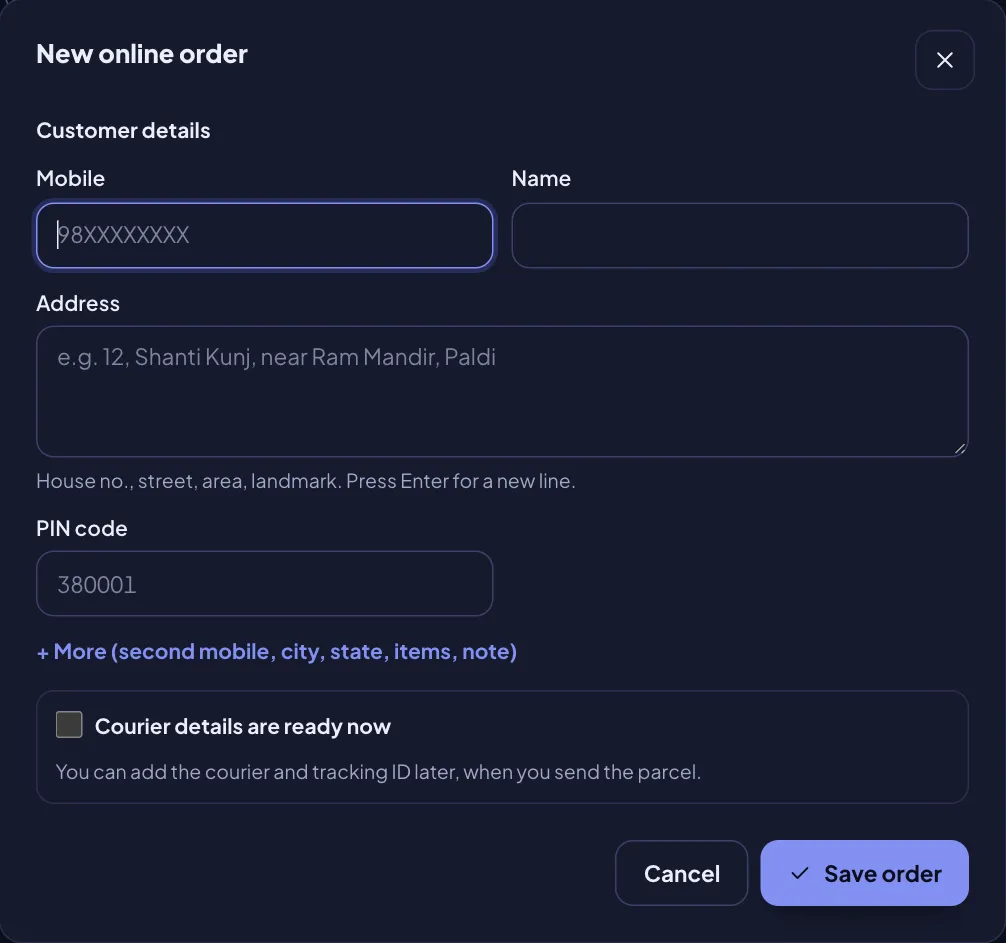
- Customer details first: mobile, name, address, PIN code; second mobile, city, state, items and a note if you want
- Repeat customer: the last address used for that mobile fills in by itself
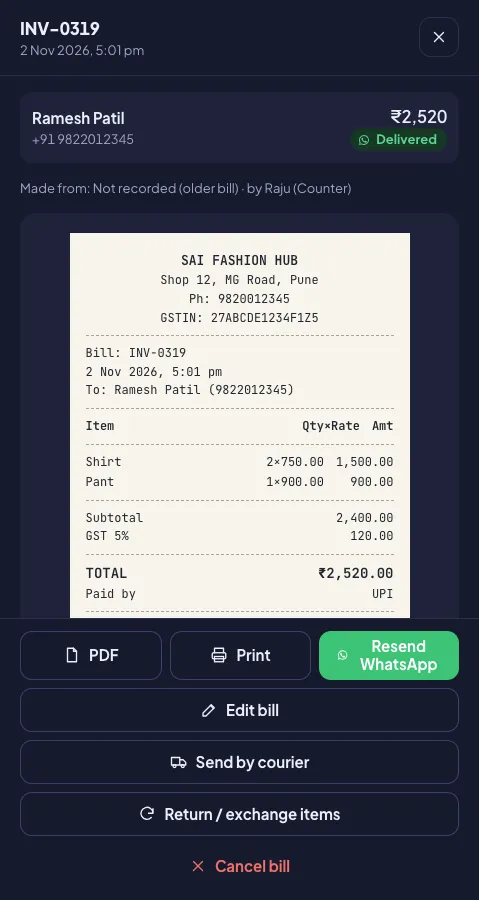
- From a bill: “Send by courier” fills the customer and items; the bill shows its online orders
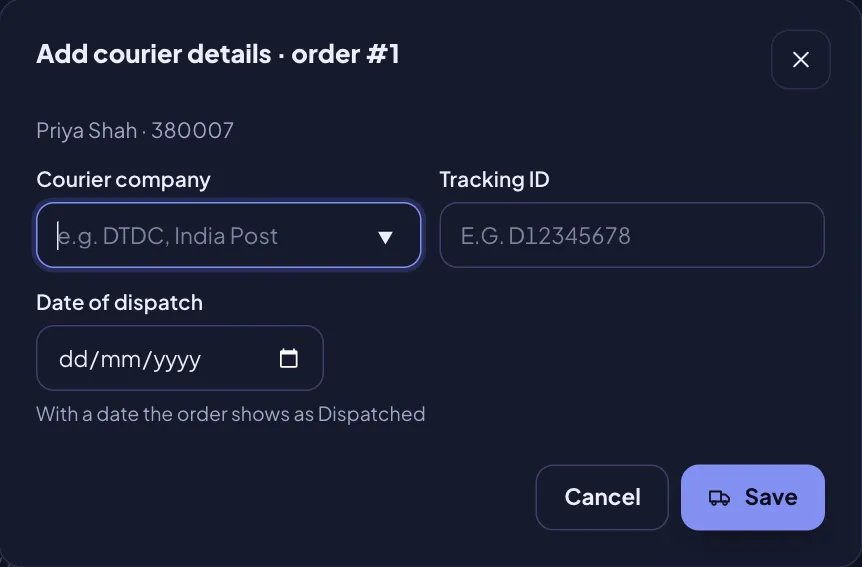
- Courier details later: courier company (pick from a list or type any), tracking ID and date of dispatch
- Parcel sticker: 4 × 6 inch (100 × 150 mm) label by default, or A4 with 4 or 1 per page; many orders at once
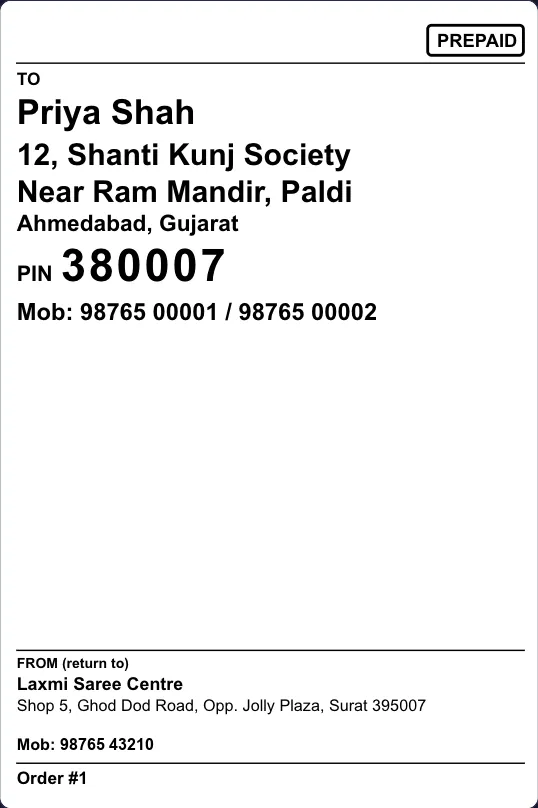
- On the sticker: courier, PREPAID, tracking barcode (Code 128), TO with a big PIN and mobile, FROM (your shop), order no. and date
- Never on the sticker: the bill, items or prices
- Share tracking on WhatsApp from your phone, free, with the message typed
- Search by name, mobile, PIN code, tracking ID, order or bill no.
- Android app and computer, every plan, Free included
How it works
Open Online orders
New clothing, saree, footwear and boutique shops have Online orders in the menu. Any other shop switches it on in My tools. Same on the Android app and the computer.
Add the order
Tap New order and type the customer’s mobile, name, address and PIN code. A customer who ordered before? Their last address fills in by itself. Made a bill already? Tap Send by courier on the bill and the name, mobile and items come from it.
Print the parcel sticker
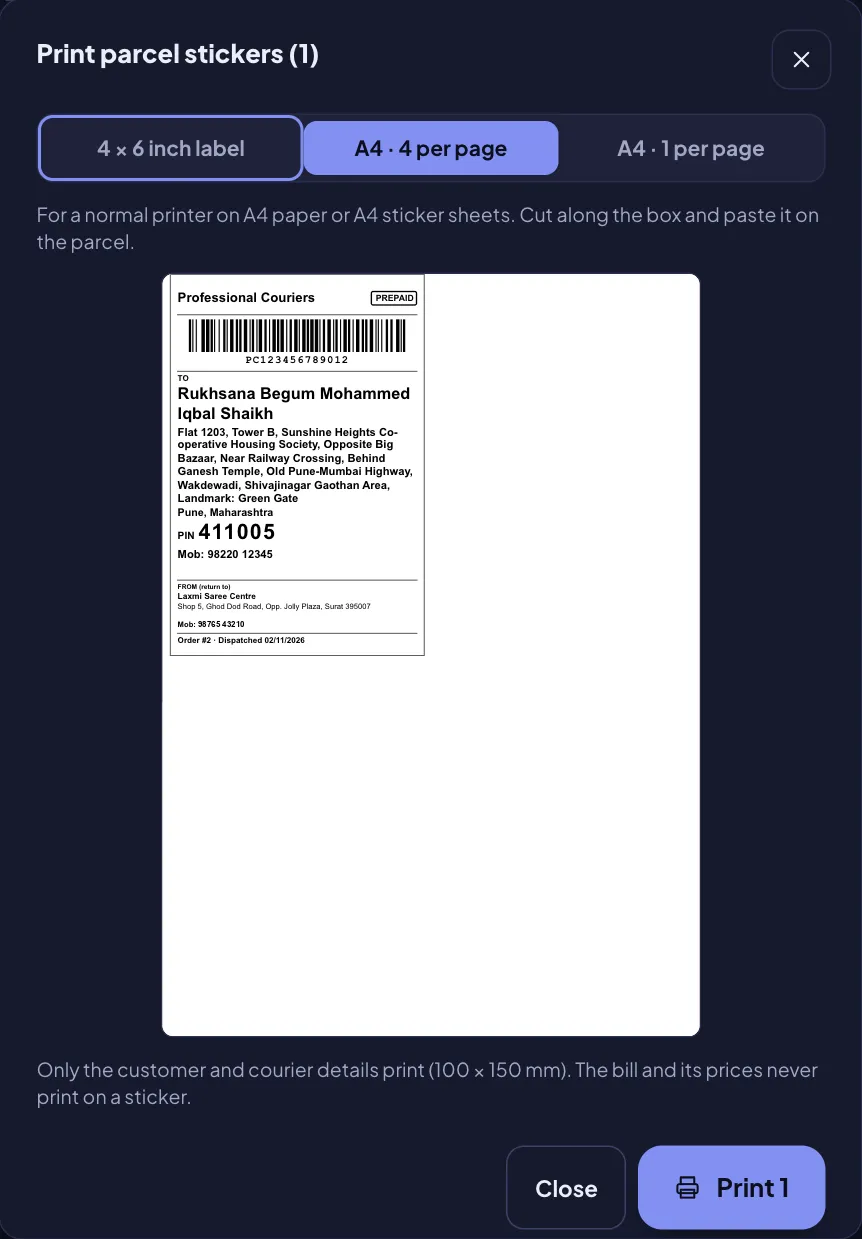
Tap Sticker, or tick many orders and print them together: 4 × 6 inch label, A4 with 4 per page, or A4 with 1 per page. Paste it on the parcel.
Add courier details when you hand it over
Tap Add courier details: courier company, tracking ID and date of dispatch. The order moves to Dispatched and the next sticker you print carries the courier name and tracking barcode.
Share tracking, then close it
Tap Share tracking: WhatsApp opens on your phone with the message typed. When the customer has it, mark the order Delivered (or Returned / Cancelled).
What prints on the parcel sticker
| Part of the sticker | What it shows |
|---|---|
| Top | Courier name (big, once added) and a PREPAID box |
| Barcode | The tracking ID as a Code 128 barcode with the number under it (left out until you add a tracking ID) |
| TO | Customer’s name in bold, address as typed, city and state, PIN in large digits, mobile (and second mobile) |
| FROM (return to) | Your shop’s name, address and phone, from Settings |
| Bottom line | Order no. and dispatch date |
| Watermark (optional, since 4 Nov 2026) | Your shop logo, shop name or your own text (up to 30 characters), light and diagonal behind the address; never over the barcode or the PIN. Off by default; the owner turns it on. PDF / A4 / browser print only |
Black only, no grey shading, so it prints sharp on a thermal label printer (the optional watermark is left off there and prints only on PDF / A4 / browser print). A long address shrinks to fit; nothing spills off the 100 × 150 mm sticker. The words (TO, FROM, PIN) follow your shop’s bill language with the English word next to them, because parcels cross states: “TO · पाने वाला”, “TO · મેળવનાર”.
Not on the sticker: bill number, items, prices or the total. The courier and the neighbours see an address, not what the customer paid. The items you type stay in the app for you.
4 × 6 label printer or A4: which sticker size?
| Sticker size | Printer | From the computer | From the Android app |
|---|---|---|---|
| 4 × 6 inch label (100 × 150 mm), default | 4 × 6 thermal label printer (the size courier labels use) | Browser print: pick the 100 × 150 mm paper size and margins “none” | Label printer over Wi-Fi or Bluetooth (English words), or a 4 × 6 PDF to share or print |
| A4 · 4 per page | Any printer, plain A4 or A4 sticker sheet | Browser print, A4 | PDF, A4 |
| A4 · 1 per page | Any printer | Browser print, A4 | PDF, A4 |
Hindi or Gujarati addresses: a label printer connected straight to the phone prints English letters only (its fonts are Latin). For a Hindi or Gujarati address, use the PDF from the app or print from the computer: both print any language on any printer, 4 × 6 included.
No label printer? Start with A4 sheets on the printer you have. Already have a TSPL label printer for barcode labels? Put a 4 × 6 roll in it.
A day of online orders: a boutique that sells on Instagram
Example (demo numbers). A customer in Pune likes two kurtis and a dupatta on the boutique’s Instagram, pays ₹1,850 by UPI on WhatsApp and sends her address.
| When | What the shop does in Tap & Bill | Result |
|---|---|---|
| 11:00 | Makes the bill: 2 kurti ₹1,400 + 1 dupatta ₹450 = ₹1,850, paid by UPI | Bill INV-0320, ₹1,850 |
| 11:01 | Taps Send by courier on the bill: name, mobile and “2 kurti, 1 dupatta” are filled in; types the address and PIN 411005 | Order #12, To send |
| 11:02 | Prints the 4 × 6 sticker and packs the parcel | Sticker with TO, PIN, mobile and the shop as FROM |
| 18:30 | Hands the day’s 6 parcels to the courier; on each order taps Add courier details and types the tracking ID | All 6 move to Dispatched |
| 18:40 | Taps Share tracking on each order and presses send in WhatsApp | Each customer has her tracking ID |
| 3 days later | Customer says it arrived: status Delivered | The To send tab is empty: nothing forgotten |
When she messages “parcel kab aayega?”, search her mobile or PIN code: the order, courier, tracking ID and dispatch date are there, and the bill is one tap away.
Order status: what each one means
| Status | Means | How it gets there |
|---|---|---|
| To send | Order saved with the customer’s address; not handed to a courier yet | Every new order starts here |
| Dispatched | Handed to the courier | Add a date of dispatch (with the courier and tracking ID), or pick it from the status list |
| Delivered | The customer has the parcel | Pick it from the status list |
| Returned | The parcel came back (refused, wrong address) | Pick it from the status list |
| Cancelled | The order will not go out | Pick it from the status list |
A dispatch date taken off a Dispatched order puts it back to To send. Staff can add orders, add courier details and change the status; only the owner can delete an order (the bill, if any, stays as it is).
Share tracking on WhatsApp
Share tracking opens WhatsApp on your phone (or the phone’s share list) with this typed, and you press send. It goes from your own number and costs nothing; it is not an automatic message:
Hello Priya, your order #12 from Riya Boutique is sent by DTDC. Tracking ID: D1234-5678X (sent on 02/11/2026). Thank you!
Before the parcel is sent, it says the order is being packed and the tracking ID will follow. The customer tracks it on the courier’s own website or app.
How to write a courier address (and a free sticker without the app)
The address the courier needs: the customer’s full name, house or flat number and building, street and area, a landmark, city and state, the 6-digit PIN code and a mobile number that picks up. Your shop’s name, address and phone go in FROM, so an undelivered parcel comes back to you. Only a few parcels, or want to try the sticker first? The free parcel sticker maker prints the same 4 × 6 or A4 sticker in your browser with no login (it saves nothing). In Hindi: कूरियर पार्सल स्टिकर कैसे बनाएं; in Gujarati: કુરિયર પાર્સલ સ્ટીકર.
What it does not do
- No courier booking or pickup and no courier rates: book with your courier as you do today, then type the courier and tracking ID.
- No automatic tracking updates: the status changes when you change it; the customer tracks on the courier’s site.
- Prepaid only: no cash-on-delivery amount on the order or the sticker.
- No automatic WhatsApp messages for orders: Share tracking opens WhatsApp on your phone with the text ready.
- No PIN code lookup: type the city and state yourself (optional).
- No link to any courier company, marketplace or online store. Courier names in the list are only suggestions to save typing.
- Needs internet in the Android app (bills still work offline).
See Online orders in Tap & Bill
Online orders & courier sticker: questions
Is Online orders free?
Yes. It is on every plan, the Free plan (₹0) included, with no limit on orders or stickers. Paid plans start at ₹199 a month for more bills, staff logins and other tools.
Does Tap & Bill book the courier or show live tracking?
No. It does not book pickups, compare courier rates or fetch tracking updates, and it is not linked to any courier company or online store. You book with your courier as you do today, type the courier and tracking ID, and the customer tracks the parcel on the courier’s own website or app.
Can I use cash on delivery (COD)?
No. Online orders are for prepaid parcels: the sticker carries a PREPAID mark and there is no COD amount on the order or the sticker.
Which printer and sticker size do I need?
The default sticker is 4 × 6 inch (100 × 150 mm), for a 4 × 6 thermal label printer. No label printer? Print A4 with 4 stickers or 1 sticker per page on any normal printer. Tick many orders to print all their stickers at once.
Can I print a Hindi or Gujarati address on the sticker?
Yes, as a PDF from the Android app or by printing from the computer, on any printer, 4 × 6 included. A label printer connected straight to the phone prints English letters only, so use the PDF for a Hindi or Gujarati address.
Does the sticker show the price or the bill?
Never. It shows the courier, PREPAID, the tracking barcode, the customer’s address, PIN and mobile, your shop as the return address, the order number and dispatch date. No bill number, items, prices or total.
Does it work on the phone app or the computer?
Both: the Android app and the web dashboard on a computer, with the same orders. New clothing, saree, boutique and footwear shops have Online orders in the menu; other shops switch it on in My tools. “Share tracking” opens WhatsApp on your phone with the message typed, and you press send (free, from your own number; not an automatic message).
Selling on Instagram or WhatsApp? Book a free demo of Online orders
We call you within one working day and show Tap & Bill on your own items and prices.
- 10-minute demo on phone or video call
- 14-day free trial, no card
- We set up your categories and prices with you
Prefer to talk now? Call +91 73838 34343.
Keep every online order in Tap & Bill
Online orders and parcel stickers are on every plan, the Free plan (₹0) too. Sign up free on the Android app or a computer; no card.