Feature
Simple billing app: easy view, large text, and only the tools your shop uses
Is there a simple billing app with only the features I need?
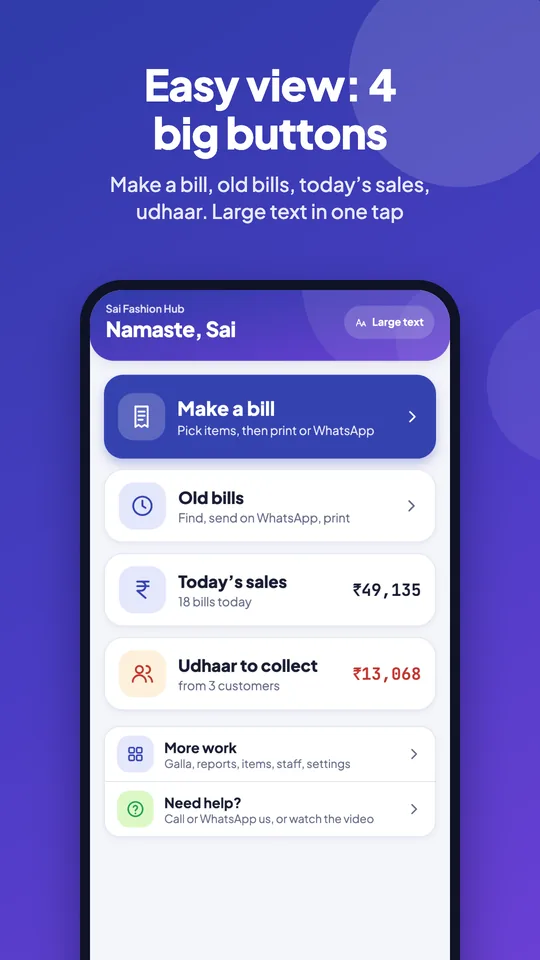
Yes. Tap & Bill has two things for this. The Android app’s Easy view opens on 4 big buttons (Make a bill, Old bills, Today’s sales, Udhaar to collect), has a Large text switch, finds any old bill by name, mobile, bill no or amount, and puts big WhatsApp, Print and Share PDF buttons on each bill, with a help button to call or WhatsApp us. And My tools lets the owner switch off the tools the shop doesn’t use, on the app and the computer; nothing is deleted. Every plan, from ₹199 a month.
Most billing apps grow a new menu every month, and the counter boy has to scroll past rent, challans and stock just to make a ₹350 bill. Shop owners ask for one thing: a simple app that does what their shop does.
Many owners who run a shop for 30 years are new to phone apps, and small grey text on a crowded screen is the first reason they give up. So the Android app has an Easy view: four big buttons for the four jobs of the day, larger text if you want it, and a help button that reaches a person who speaks Hindi.
In Tap & Bill, the owner decides. Switch off what you don’t use and the app and the computer show only the rest. If a tool hasn’t been used for 30 days, Tap & Bill asks once whether to hide it. Every tool says in one line what it is good for, so you know what you are switching off.
What you get
- Easy view (Android app): Home with 4 big buttons: Make a bill, Old bills, Today’s sales, Udhaar to collect
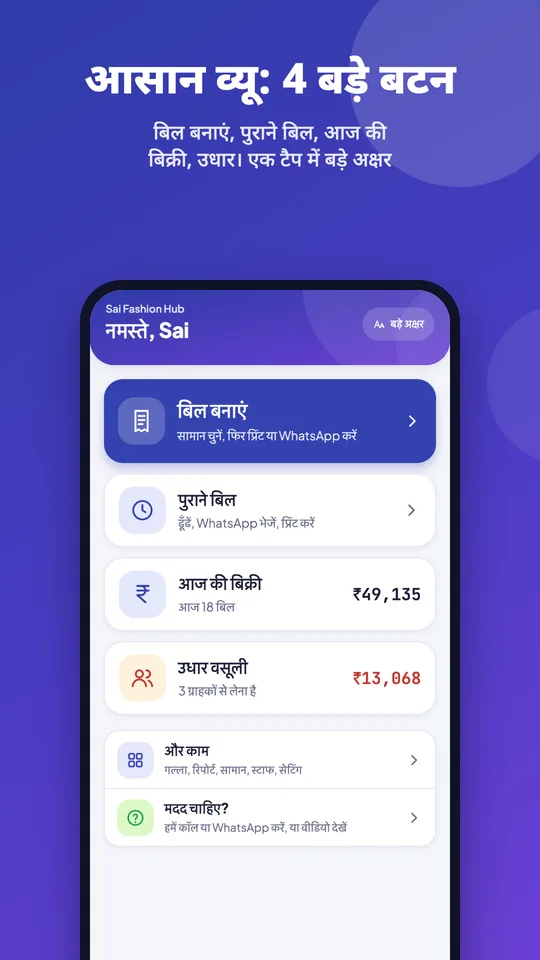
- Large text (बड़े अक्षर) switch on each phone: bigger words and buttons
- Easy bill search: name, mobile, bill no or amount; Today, Yesterday, This week
- Big WhatsApp, Print and Share PDF buttons on every bill; Need help? to call or WhatsApp us
- 15 tools you can switch off: rent, alterations, galla, salesmen, WhatsApp offers, stock & barcodes, udhaar, returns, quotations & challans, sizes, Mol-Bhav Guard, sections, not-in-stock list, supplier bills & cheques, kharcha & salary
- Switched-off tools disappear from the Android app and the computer, for the owner and staff
- Nothing is deleted: switch a tool on again and its data is back
- A one-time hint lists the tools not used in 30 days
- Each tool shows what it is good for
- Always on: make bill, bills, customers, items & prices, reports, WhatsApp bills, printer, settings
- Android app: a Customers tab in the bottom menu (list, udhaar, search, Send offer)
- Up to 10,000 items; small tiles fit more items on a screen, and 2,000+ items stay fast
- Only the owner changes My tools; every plan, no extra cost
How it works
Open My tools
As the owner, open My tools: on the computer in the menu, in the Android app under Settings. Each tool shows one line on what it is good for.
Switch off what you don’t use
Tap a tool to hide it. A cafe may hide sizes, alterations, rent and salesmen; a saree shop may hide rent and sections. Save.
Bill on a simpler screen
The hidden tools leave the menus, the bill screen, reports and settings on the app and the computer, for you and your staff. Bill, Items, Customers and Reports always stay.
Turn one back on any time
Need rent bills for the wedding season? Switch Rent back on: your old rent bills are still there. Show everything brings every tool back.
Easy view: a billing app for owners who want it simple
Made for shop owners who are new to apps, find small text hard to read, or simply want fewer buttons. Nothing is taken away: the rest of the app is one tap away under More work.
| In easy view | What you see |
|---|---|
| Home | 4 big buttons: Make a bill, Old bills, Today’s sales (₹ and number of bills), Udhaar to collect (₹ and from how many customers) |
| Bottom tabs | Home · Make bill · Old bills · Customers · More work; reports and settings one tap deeper |
| Large text | A Large text switch on each phone: bigger words and bigger buttons (at least 48 dp to tap) |
| Old bills | One big search for name, mobile or bill no. (or type the amount, like 1250), and chips: All, Today, Yesterday, This week; big cards with Paid / Udhaar / Cancelled |
| A bill | Three big buttons on top: WhatsApp, Print, Share PDF |
| More work | Everything else in groups: daily work, money and accounts, people, items and stock, shop and app |
| Need help? | On Home, More work and Settings: call or WhatsApp the Tap & Bill team, watch the Hindi how-to video or read the step-by-step guide |
How to switch it on
- New shops start in easy view.
- Older shops see a one-time card, Try the new easy view: tap Turn it on.
- Any time: Settings → How the app looks → Easy view (on or off), and Large text on the same screen. Large text is for that phone only, so the owner’s phone can have big text and the counter phone normal.
The tools, and what each is good for
These are the tools in My tools, with the one-line benefit the app shows next to each. Switch off any of them; the core of the app stays.
| Tool | What it is good for |
|---|---|
| Sizes | See which size sells, order the right sizes |
| Udhaar | No diary: every due with its date, WhatsApp reminder in one tap |
| Returns | Exchange in seconds; a credit note brings the customer back |
| Alterations | Nothing forgotten: what is pending, ready date and tailor slip |
| Rent (kiraya) | Know what is out, what is late and when it comes back |
| Quotations & challans | A neat quotation or challan in a minute; goods sent on approval are not forgotten |
| Stock & barcodes | Know what sold and what is left; bill by barcode scan (Growth and Pro) |
| Mol-Bhav Guard | Staff cannot sell below your lowest price without your PIN |
| Salesmen | See who sold how much; incentive worked out for you |
| Galla | Count the cash drawer at night; any shortage is caught the same day |
| Not in stock list | Note what customers asked for but you did not have; order what will sell |
| WhatsApp offers | Send sale offers to your customers on WhatsApp; bring them back |
| Sections | Items in groups (Shirts, Jeans…); find them and bill faster |
| Supplier bills & cheques | Every supplier’s bills and cheques in one place; know what you owe |
| Kharcha & salary | Every rupee paid out in one place; salary sheet and slip in a minute |
Three shops, three simple apps
| Shop | Might keep | Might switch off |
|---|---|---|
| Tea stall or cafe | Quick bill, UPI QR, galla, reports | Sizes, alterations, rent, quotations, salesmen, stock, sections |
| Saree shop | Udhaar, returns, alterations (fall-pico), salesmen, WhatsApp offers | Rent, sizes, not-in-stock list |
| Dress rental shop | Rent, udhaar, galla, alterations | WhatsApp offers, quotations, salesmen |
Long item list? Still simple
A simple app should not slow down when the list is long. Tap & Bill has up to 10,000 items on every plan. Item tiles come in a small size (switch to big any time), so many more items fit on one screen, and the tiles load in batches, so a shop with 2,000 items or more still opens the bill screen fast on an Android phone and on the computer. Search finds any item by name; with Stock & barcodes a barcode scan does too. Adding the list: paste or speak it, pick a ready pack, read a printed rate list from a photo, or import Excel (up to 1,000 items a file); see how to add items fast.
What it does not do
- Bill, Items, Customers and Reports can’t be switched off: they are the app.
- My tools is for the whole shop, not per staff member: what the owner hides is hidden for everyone.
- Switching off a tool hides it; it doesn’t cancel a plan or change your price.
- Stock & barcodes still needs the Growth or Pro plan to switch on.
My tools (simple app): questions
Which billing app is easy for older shop owners?
One with few, big buttons, large text and a person to call. Tap & Bill’s Easy view opens on 4 big buttons (Make a bill, Old bills, Today’s sales, Udhaar to collect), has a Large text switch, and a Need help? button to call or WhatsApp the team in Hindi or English.
Can I make the text bigger in the app?
Yes. Settings → How the app looks → Large text (बड़े अक्षर): bigger words and buttons on that phone. It is also on the Home screen in easy view.
How do I find an old bill quickly?
Open Old bills and type the customer’s name, mobile number or the bill number, or even the amount (like 1250). Tap Today, Yesterday or This week to narrow it. Open the bill for big WhatsApp, Print and Share PDF buttons.
Is easy view on the computer too?
Easy view and Large text are in the Android app. On a computer, use the browser zoom (Ctrl and +) for bigger text; My tools works on both.
What is the most simple billing app for a small shop?
One that shows only what your shop uses. In Tap & Bill you switch off the tools you don’t need in My tools, so the app is a bill screen, items, customers and reports, plus the few tools you keep.
If I switch off a tool, is my data deleted?
No. Nothing is deleted. Switch the tool back on and its old entries (rent bills, alterations, galla counts…) are there.
Can staff switch tools on or off?
No. Only the owner changes My tools, and the choice applies to everyone in the shop, on the Android app and the computer.
Which tools can’t be switched off?
Making bills, the bill list, customers, items & prices, reports, WhatsApp bills, the printer and settings.
How do I know which tools I don’t use?
Tap & Bill shows a one-time hint with the tools not used in the last 30 days and offers to turn them off.
Is there a limit on the number of items?
Up to 10,000 items on every plan. Small tiles fit many more items on one screen and load in batches, so 2,000+ items stay fast. Excel import takes up to 1,000 items a file.
Where are customers in the Android app?
In the Customers tab in the bottom menu: the customer list, udhaar and search, with a Send offer button.
Does a simpler app cost less?
The price depends on the plan, not on the tools you keep. Every plan has My tools, Free included; the lowest paid plan is Basic at ₹199 a month (or ₹1,499 a year), with a 14-day free trial.
Free demo: we set up Tap & Bill with only your tools
We call you within one working day and show Tap & Bill on your own items and prices.
- 10-minute demo on phone or video call
- 14-day free trial, no card
- We set up your categories and prices with you
Prefer to talk now? Call +91 73838 34343.
A billing app as simple as your shop
Keep only the tools you use. 14-day free trial, no card.