Wedding season 2026 · weddings from 21 Nov · fast bills in the rush, udhaar with limits · 14 days free, then the ₹0 Free plan or ₹199/month · Shop checklist · Free sale poster

Free tool · No login · Online sellers

Free parcel sticker maker: courier address label in 4 × 6 or A4

By the Tap & Bill team · Updated · हिंदी में पढ़ें · ગુજરાતીમાં

How do I make a courier parcel sticker for free?

Type the customer’s name, mobile, address and PIN code in the free sticker maker below, add your shop as the FROM address, and if you have them the courier and tracking ID (printed as a barcode). Pick a 4 × 6 inch (100 × 150 mm) label for a label printer or A4 with 4 or 1 per page for any printer, and press Print. It runs in your browser: no login, nothing sent, and no bill, items or prices on the sticker.

Tap & Bill Free plan: ₹0 (60 bills a month); paid plans from ₹199/month, no GST added. Online orders and stickers are on every plan.

Send TO (customer)

Press Enter for a new line. City and PIN code go below.

Courier (you can add it later)
Your shop (FROM: return address)

Your shop address is remembered in this browser only; it is not sent to us.

Sticker

Your sticker

In the print window pick paper size 100 × 150 mm and margins “None” for the 4 × 6 label, or A4. The bill, items and prices never print on the sticker.

What to write on a courier parcel sticker

PartWhat to writeWhy
TO: nameThe customer’s full nameThe courier asks for the person by name at the door
TO: addressHouse or flat no., building or society, street, area and a landmark, each on its own lineA landmark (“near Ram Mandir”) saves a phone call
City, stateFull names, e.g. Ahmedabad, GujaratParcels are sorted by city first
PIN codeAll 6 digits, printed bigThe courier sorts by PIN; a wrong PIN sends the parcel to the wrong office
MobileA number that picks up, and a second one if you have itThe delivery person calls before coming
FROMYour shop’s name, address and phoneAn undelivered parcel comes back to you
Courier, tracking IDFrom the courier’s receipt, when you hand the parcel overThe barcode is scanned at each step

Never put the price, the bill or the list of items on the outside of the parcel. Keep the bill inside the parcel or send it on WhatsApp.

5 steps to a parcel sticker

  1. Type the customer’s address

    Name, mobile, the full address with a landmark (press Enter for a new line), city, state and the 6-digit PIN code. The preview turns into your sticker as you type.

  2. Add your shop as FROM

    Shop name, address and phone: if the parcel can’t be delivered, the courier brings it back here. This browser remembers it for the next parcel.

  3. Courier and tracking ID, if you have them

    Type the courier and tracking ID to print them with a Code 128 barcode, or leave them empty: the sticker prints cleanly without them.

  4. Pick the sticker size

    4 × 6 inch label for a label printer, or A4 with 4 or 1 sticker per page for any printer. Sticker words in English, or Hindi / Gujarati with English next to them.

  5. Print, then paste

    Press Print. Many parcels? Press “Add to list, next parcel” after each one and print them all together. Paste the sticker flat on the biggest side of the parcel.

4 × 6 label printer or A4

StickerPrinterIn the print window
4 × 6 inch label (100 × 150 mm)4 × 6 thermal label printer installed on the computerPaper 100 × 150 mm (or 4 × 6 in), margins None, scale 100%
A4 · 4 per pageAny printer; plain A4 or an A4 sticker sheetA4, margins None, scale 100%; cut along the box
A4 · 1 per pageAny printerA4; one big sticker for a big box

Black only, no grey, so it prints sharp on a thermal label printer. A long address gets smaller letters to fit; nothing spills off the sticker.

Many online orders a day? Keep them in Tap & Bill

This tool forgets each sticker after printing. Shops that sell on Instagram and WhatsApp every day keep their orders in the Tap & Bill app instead, under Online orders:

  • Each order with the customer’s name, mobile, address and PIN code; the courier, tracking ID and dispatch date added when you send it
  • Your shop’s watermark (optional): the shop logo, name or your own text (up to 30 characters) light and diagonal behind the address, never over the barcode or PIN; on PDF / A4 / browser print, not on thermal label printers. This free tool has no watermark
  • Status: To send, Dispatched, Delivered, Returned or Cancelled, with a tab for each
  • “Send by courier” on any bill fills the customer; the bill shows its online orders
  • A repeat customer’s last address fills in by itself
  • Search by name, mobile, PIN code, tracking ID, order or bill no.
  • This same sticker in one tap, or many at once: 4 × 6, A4 4 per page or 1 per page
  • “Share tracking” opens WhatsApp on your phone with the message typed; you press send (free)
  • Android app and computer, on every plan, the Free plan (₹0) included
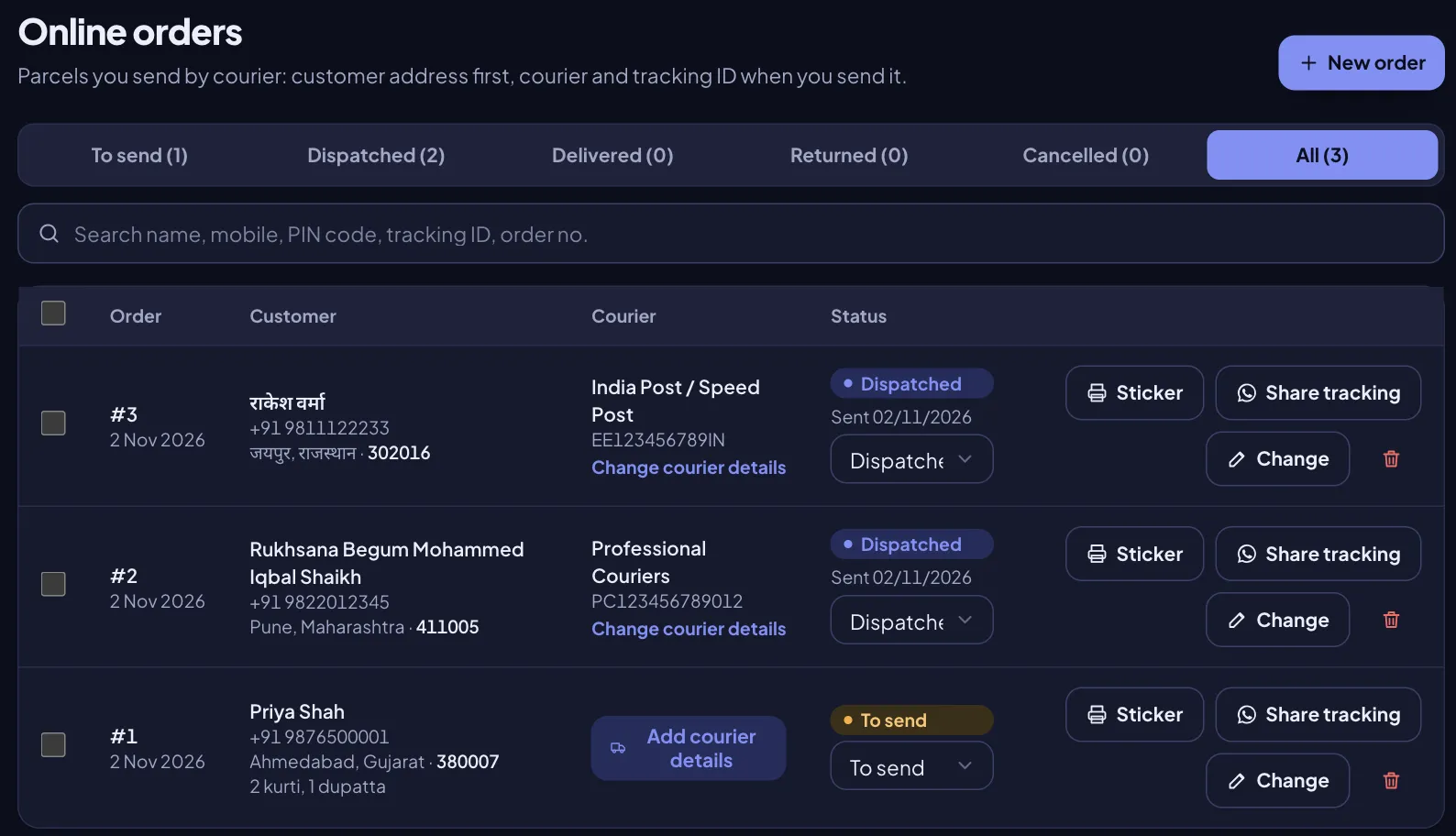
Online orders list in Tap & Bill on a computer: status tabs To send, Dispatched, Delivered, Returned, Cancelled, a search box, and orders with customer, PIN code, courier, tracking ID and Sticker and Share tracking buttons
Online orders in the app: every parcel, its courier, tracking ID and status. Demo data.
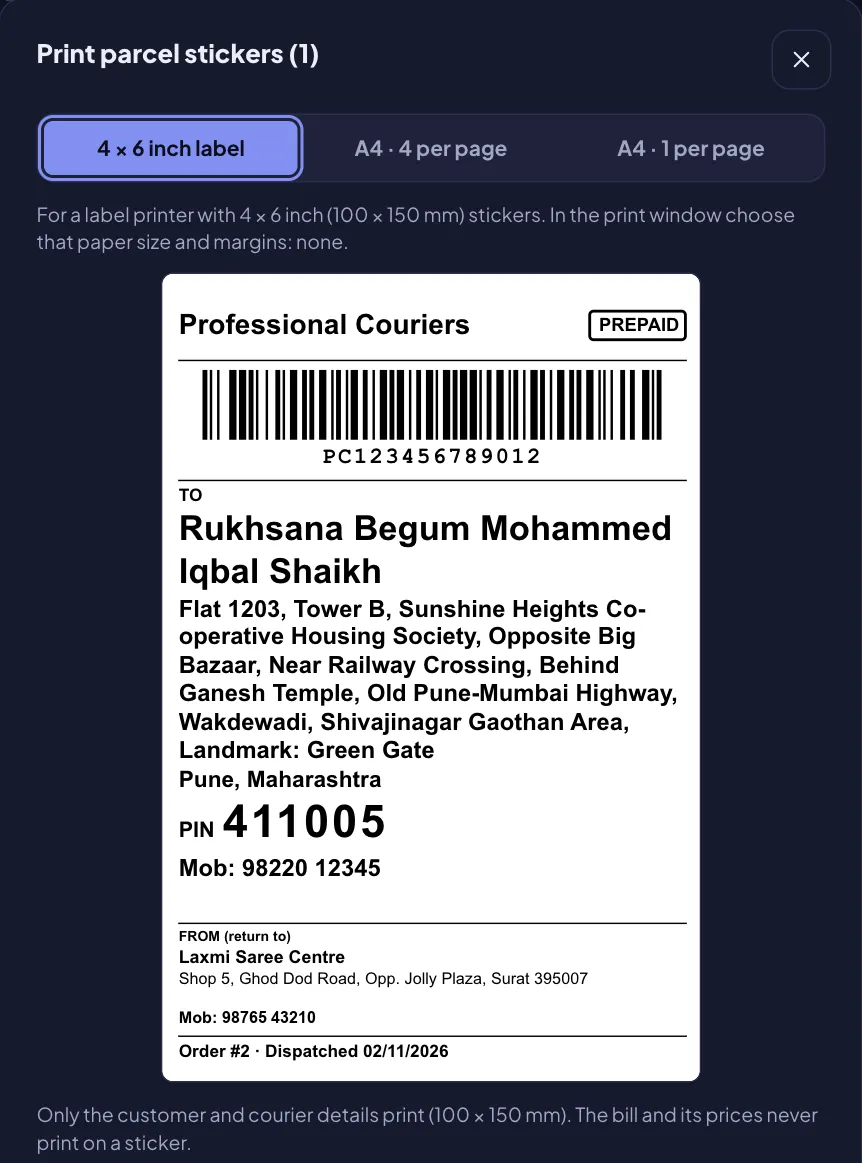
Print parcel stickers window in Tap & Bill with the 4 × 6 inch label chosen: courier name and PREPAID at the top, tracking barcode, TO with the customer, a big PIN code and mobile, FROM with the shop’s name, address and phone, order number and dispatch date at the bottom
The app’s 4 × 6 sticker with the courier added. Demo data.

From the Android app, a label printer connected straight to the phone prints English letters only; for a Hindi or Gujarati address use the app’s PDF, which prints on any printer. More: Online orders and courier parcel stickers. Start free.

What this tool and the app do not do

  • No courier booking, pickup or courier rates, and no tie-up with any courier company or online store.
  • No automatic tracking updates and no automatic WhatsApp messages.
  • No cash on delivery (COD) amount: prepaid parcels only.
  • No PIN code lookup: type the city and state yourself.

Frequently asked questions

Is this parcel sticker maker free? Do I need to log in?

Free, with no login and no limit. The sticker is made in your browser and nothing you type is sent to Tap & Bill; only your shop’s FROM address is remembered in this browser for the next parcel.

Which printer and label size should I use?

A 4 × 6 inch (100 × 150 mm) thermal label printer is the usual size for courier labels: pick 100 × 150 mm and margins “None” in the print window. No label printer? Choose A4 with 4 stickers per page on any printer, cut along the box and paste.

Can the sticker have a Hindi or Gujarati address?

Yes. Type the address in any language and choose the sticker words in Hindi or Gujarati (with English next to them, because parcels cross states). The browser prints any language, on A4 or on a 4 × 6 label printer installed on the computer.

Does this book the courier or track the parcel?

No. It only prints the sticker. Book the parcel with your courier as you do today (for example India Post / Speed Post, DTDC, Delhivery or Blue Dart), type the tracking ID they give you, and the customer tracks it on the courier’s own website or app.

Will the price or bill print on the sticker?

Never. The sticker carries only the courier, PREPAID, the tracking barcode, the customer’s address, PIN and mobile, your shop as FROM, and an order number and date if you type them. No items, prices or bill.

Can I print a cash on delivery (COD) amount?

No. The sticker has a PREPAID mark (you can untick it) and no COD amount; the Tap & Bill app’s Online orders are for prepaid parcels too.

Does Tap & Bill keep my online orders on the phone or the computer?

Both. In the Tap & Bill Android app and on a computer, Online orders keeps every order with the address, courier, tracking ID and status, prints this same sticker in one tap, and is on every plan, the Free plan (₹0) included.

Selling on Instagram or WhatsApp? See Online orders in Tap & Bill

We call you within one working day and show how orders, parcel stickers and tracking work in the app, on your own phone.

  • 10-minute demo on phone or video call
  • 14-day free trial, no card
  • We set up your categories and prices with you

Prefer to talk now? Call +91 73838 34343.

or leave your number and we call you

Your shop
Add more details (optional)
What do you need most? (optional)

The call is free. Nothing to buy, no card needed.