iPhone · iPad · How-to
Tap & Bill on iPhone and iPad: start in 1 minute
How do I use Tap & Bill on an iPhone?
There is no App Store app for iPhone. Open app.tapandbill.in in Safari, log in, and use “Add to Home Screen” to get an app-like icon. Bills, WhatsApp bills, PDFs, udhaar, reports and items all work there; Bluetooth thermal printing and billing without internet are only in the Android app.
Start on iPhone in 6 steps
Open Safari
Open the Safari app (the blue compass) on your iPhone. Safari makes the home-screen icon in the fewest taps.
Go to app.tapandbill.in
Type app.tapandbill.in in the address bar and tap Go, or tap the “Log in” button on this page.
Log in
Enter your shop’s mobile number and password and tap Log in. It is the same number and password as in the Android app. New shop? Tap “Start a free 14-day trial” below the button instead.
Tap the Share button (□↑)
In Safari the Share button is at the bottom in the middle (on iPad, at the top right). On iOS 26, tap the three dots (•••) next to the address first, then Share.
Tap “Add to Home Screen”
Scroll the list up a little and tap Add to Home Screen. On iOS 26 leave “Open as Web App” switched on.
Tap Add
Tap Add at the top right. The Tap & Bill icon appears on your home screen. Open it from there every day: full screen, like an app.
If the icon asks you to log in again the first time, enter the same mobile and password once more: iPhone keeps home-screen apps separate from Safari. The login page reminds you too (“Save Tap & Bill on your iPhone”). To change the language, tap the language button at the top right (EN / हि / ગુ).
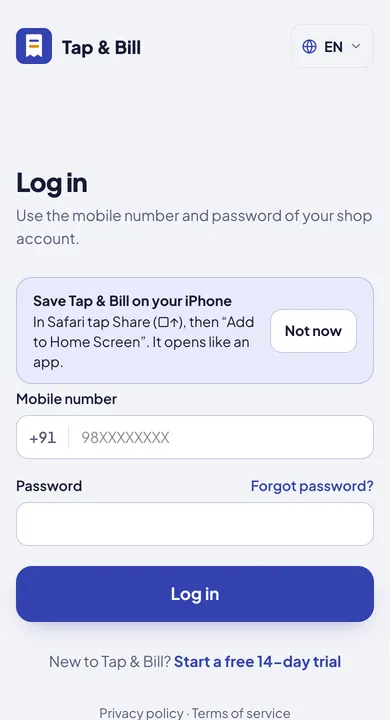
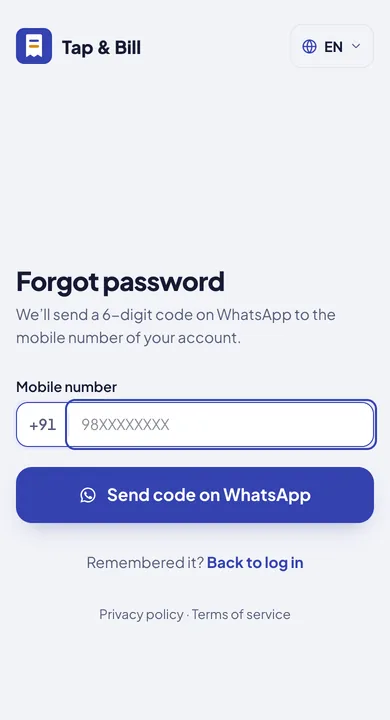
Forgot your password? A new one with a WhatsApp code
Tap “Forgot password?”
On the login page it sits just above the password box, on the right. Or open app.tapandbill.in/forgot.
Get the code on WhatsApp
Type the shop’s mobile number and tap Send code on WhatsApp.
Enter the 6-digit code
A 6-digit code comes from Tap & Bill on that number’s WhatsApp (by SMS if WhatsApp can’t send it). It works for a few minutes; the screen says how long. In WhatsApp tap “Copy code” and paste it.
Set a new password
Type a new password (at least 6 characters) twice, tap Set new password, then log in with it.
- No code? After 60 seconds tap “Send a new code”, and check that it is the number the shop was made with. Staff do the same with their own number.
- A new password logs that account out of every other phone and computer: log in there with the new password.
- Still stuck? WhatsApp us and we will help
What works on iPhone, and what doesn’t
On an iPhone you use the same Tap & Bill as on a computer (the web app), laid out for a phone with a menu at the bottom. The differences are printers, billing without internet and camera barcode scanning:
| Task | iPhone / iPad (Safari) | Android app |
|---|---|---|
| Log in, start a new shop (free trial) | ✓ Yes | ✓ Yes |
| Bill with item tiles or the Quick bill keypad, size and colour | ✓ Yes | ✓ Yes |
| Cash, UPI (shop QR with the bill amount), card, split, udhaar | ✓ Yes | ✓ Yes |
| WhatsApp bill | ✓ Yes: automatic WhatsApp, or “send from phone” opens WhatsApp on the iPhone | ✓ Yes |
| Bill PDF | ✓ Yes: open, save or share it | ✓ Yes |
| Old bills, cancel, return / exchange, owner edit | ✓ Yes | ✓ Yes |
| Customers and udhaar | ✓ Yes | ✓ Yes |
| Sales reports, GST report | ✓ Yes | ✓ Yes |
| Items and prices (paste a list, ready packs, rate-list photo) | ✓ Yes | ✓ Yes (items from a photo: in the browser) |
| Hold bill | ✓ Yes (stays on that phone) | ✓ Yes |
| Galla, kharcha, supplier bills, quotations and challans | ✓ Yes | ✓ Yes |
| Stock & barcodes (Growth, Pro) | ✓ Yes: type the code or search the item | ✓ Yes, camera scan too |
| Screens in English, हिंदी, ગુજરાતી | ✓ Yes | ✓ Yes |
| ◐ AirPrint printers only (many Wi-Fi A4 printers) | ✓ 58 / 80 mm thermal printers | |
| Bluetooth thermal printer | ✗ No | ✓ Yes |
| Wi-Fi / LAN thermal printer | ✗ No | ✓ Yes |
| Bill without internet | ✗ No: needs internet | ✓ Yes, syncs later |
| Scan barcodes with the phone camera | ✗ No | ✓ Yes |
| Easy view, large text | ✗ No (use Safari’s “aA” to make text bigger) | ✓ Yes |
| Download from App Store / Play Store | ✗ No, and not needed | APK from tapandbill.in (not on Play Store yet) |
How to print from an iPhone
- Easiest: the WhatsApp bill. The customer gets the bill PDF on WhatsApp; sending it from your own phone is free on every plan. Most customers don’t ask for paper.
- AirPrint printer: tap Print on the bill and the iPhone print screen opens. The bill is receipt width (58 or 80 mm), so an A4 printer prints a narrow receipt on the page.
- Need a thermal receipt printer? Keep any Android phone or tablet (Android 7.0 or newer) at the counter with the Tap & Bill Android app, logged in with the same mobile and password. The printer connects to it, and you keep billing from the iPhone too. Or use a printer installed on a computer (USB): billing on a computer. Printer guide: thermal printer billing.
iPhone, Android and computer: one shop
Yes, one shop. The owner’s mobile number and password work on the iPhone, the Android app and a computer, and every bill is saved online in one account: a bill made on the iPhone shows on the Android phone and the computer straight away. Each staff member logs in with their own number (on paid plans).
On an iPad, Mac or computer
On an iPad, the same steps: Safari, app.tapandbill.in, log in, then Share (□↑) at the top right → Add to Home Screen. Billing is even easier on the bigger screen. On a Mac or Windows computer, open app.tapandbill.in in Chrome, Edge or Safari; nothing to install. Print sends the receipt to the printer installed on the computer. More: billing on a computer.
What does it cost on iPhone?
Nothing extra for iPhone: the same plans as on Android. New shops get 14 days free with no card. After that, the Free plan at ₹0 (60 bills a month, owner only), or paid plans from ₹199 a month (Basic also ₹1,499 a year). What the Free plan includes · All plans