What the printed cards look like
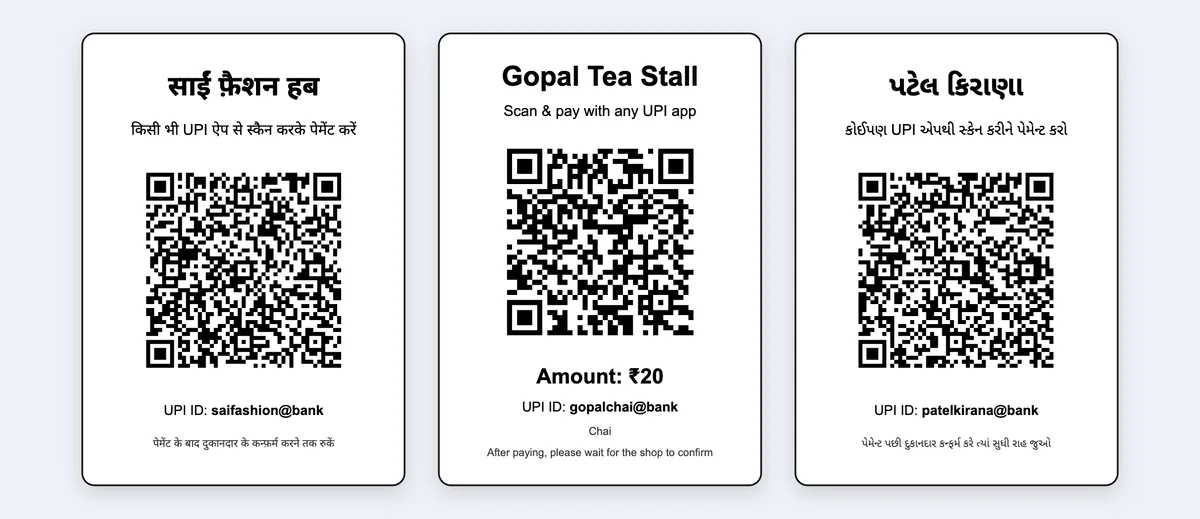
Open amount, fixed amount or a QR for each bill?
| QR type | What the customer does | Good for | Make it with |
|---|---|---|---|
| Open amount (no amount in the QR) | Scans and types the amount | The counter standee: every bill is different | This tool, amount empty |
| Fixed amount | Scans; the amount is already filled in | One price: entry fee, a ₹20 chai, a set thali, one pending udhaar amount | This tool, with the amount |
| Exact amount of each bill | Scans; the bill amount is filled in | Shops with different bills all day; fewer “sir, how much?” moments and typing mistakes | A billing app that makes a QR per bill (how it works in Tap & Bill) |
A counter QR with no amount is the most common setup, and it works well when the counter is quiet. At rush hour the customer can type ₹1,250 instead of ₹1,520; a QR made for the bill removes that step.
How to make your shop’s UPI QR, step by step
Find your UPI ID
Open the UPI app where your shop gets paid (Google Pay, PhonePe, Paytm, BHIM or your bank’s app) and tap your profile: the UPI ID looks like 9876543210@ybl or shopname@okaxis. A business app (PhonePe Business, Paytm for Business, Google Pay for Business) shows it on its QR screen.
Type it with your shop name
Paste the UPI ID above and type the shop name for the card. Leave the amount empty for a counter QR where the customer types the amount.
Pick the card language and size
English, Hindi or Gujarati words on the card. A6 cards (4 on an A4 sheet) fit a small acrylic stand; A5 and A4 suit a wall; 9 small stickers go on a weighing scale, a cash box or a delivery bag.
Test with ₹1
Scan the QR on the screen with another phone and pay ₹1. Check the money reaches your bank account (your UPI app, soundbox or bank SMS) before you print many.
Print and put it up
Print on A4 at 100% scale, cut on the dashed line, laminate it or slide it into a stand. Or download the image and send it on WhatsApp.
Which UPI ID should the QR use?
| Personal UPI ID | Business (merchant) QR | |
|---|---|---|
| Where you get it | Google Pay, PhonePe, Paytm, BHIM or your bank’s UPI app | PhonePe Business, Paytm for Business, Google Pay for Business, BharatPe or your bank’s merchant service |
| What it needs | A bank account linked to your mobile number | Shop details and the KYC the app asks for |
| Payment alert | Notification and bank SMS on your phone | Also on a soundbox that speaks each payment (usually rented; see the app’s terms) |
| Reports | Your bank statement | Daily settlement report in the business app |
| Print a QR with this tool | Yes | Yes: copy the UPI ID shown on the business app’s QR screen |
Both work with any UPI app. If your daily UPI sales are large, ask your bank whether your account type suits shop payments. PhonePe describes its merchant sign-up on business.phonepe.com.
Print sizes
| Size | On an A4 sheet | Where it goes |
|---|---|---|
| A6 standee card | 4 | A small acrylic stand on the counter (A6 stands take 105 × 148 mm cards) |
| A5 standee card | 1 | A bigger stand, or the glass of the counter |
| A4 poster for the wall (190 × 270 mm) | 1 | The wall behind the counter, a stall board or a shop front |
| Small stickers | 9 | A cash box, a weighing scale, a billing desk, a delivery bag |
Print at 100% scale (not “Fit to page”), so the QR stays sharp. A QR of 4 to 5 cm and more scans quickly from arm’s length; the A6 card prints it at about 7 cm.
Keep counter payments safe
- Check the money on your side: your UPI app, soundbox or bank SMS. A customer’s “payment done” screen can be old or fake.
- You never enter a PIN to receive money. A “collect request” or a QR someone sends you “to receive a refund” is a trick: decline it.
- Check your printed QR now and then: scan it and see that your name comes up. Replace a torn or faded card, and make sure nobody has stuck another QR over it.
- One QR, one account. When you change the bank account or UPI ID, take the old QR down the same day.
Sending the QR on WhatsApp: the ₹2,000 limit
Many UPI apps don’t let a customer pay more than ₹2,000 when the QR is uploaded from the phone gallery, for example a QR image you sent on WhatsApp (Gadgets To Use, 2024). Scanning a printed or on-screen QR with the camera is not capped that way. So for pending udhaar above ₹2,000, send your UPI ID as text along with the image: the customer pays by typing the UPI ID.
Counter QR or a QR on every bill?
A printed QR is free and enough for many shops. A billing app adds a QR with the exact amount for each bill, prints it on the receipt and puts it on the bill PDF, and counts UPI separately from cash so the day’s cash matches the drawer. In Tap & Bill a split bill (say ₹500 cash + ₹1,350 UPI on a ₹1,850 bill) shows a QR for only the ₹1,350, and an udhaar bill’s QR asks for what is still due. See UPI QR billing and udhaar on bills.