Guide
Quotation format for shops: free estimate format in Excel, Word and PDF
What should a quotation for a shop include?
A quotation (or estimate) is a written price offer, not a bill. Put “Quotation” or “Estimate” at the top, your shop’s name, address and GSTIN (if registered), a quotation number from its own series (like QT-0001), the date and a valid-till date, the customer’s name and mobile, each item with quantity, rate, discount, GST and amount, the total, and your terms (delivery, advance, alterations). Download a ready format below in Excel, Word or PDF, in English, Hindi or Gujarati.
No card · no ads in the app · your bills, customers and udhaar stay yours: nothing is deleted if you stop paying
Download the quotation format (free, no sign-up)
| Format | English | हिंदी | ગુજરાતી |
|---|---|---|---|
| Quotation / estimate: A4, print and fill by hand (16 lines, valid till, terms) | PDF · 144 KB | PDF · 215 KB | PDF · 233 KB |
| Excel with formulas: discount, GST 5% / 18% for clothes, total, and a filled example | Excel · 8 KB | Excel · 9 KB | Excel · 9 KB |
| Word: type your shop name, logo and terms once and print | Word · 4 KB | Word · 4 KB | Word · 4 KB |
The PDF is a blank A4 form to fill by hand, or to take to your printer for a quotation pad. In the Excel file, type the quantity, rate and discount and the taxable value, GST and amount fill in; for clothes the GST % is set by itself (HSN 50 to 59, fabric and sarees, 5%; other clothes 5% if one piece is ₹2,500 or less after discount, 18% above). Type over it for other goods, or type N at the top if your shop is not registered for GST. The second sheet is the filled example below. The Word file is for typing your shop name, logo and terms once.
Quotation, estimate, proforma invoice or bill?
| Quotation | Estimate | Proforma invoice | Bill (tax invoice) | |
|---|---|---|---|---|
| What it is | A firm price offer | An approximate price | A draft bill, often to ask for an advance | The record of a sale |
| Price | Fixed till the valid-till date | May change a little | As the final bill will be | What was charged |
| Number series | Own series (QT-0001…) | Own series | Own series | Bill series (INV-0001…) |
| Goods and money | Not yet | Not yet | Not yet (advance maybe) | Goods given, paid or on udhaar |
| In sales, GST return, galla | No | No | No | Yes |
At a shop counter a quotation is usually enough. Never hand one over as if it were a bill: the word “Quotation” or “Estimate” at the top and a line such as “This is a price offer, not a bill” keep it clear.
What to write on a quotation
- Top: Quotation or Estimate, shop name, address, phone; GSTIN if you are registered.
- Number and dates: quotation number (QT-0001), date, and valid till (for clothes, 7 to 15 days is common, because prices change with new stock).
- Customer: name and mobile; for a school, company or trust, the address and their GSTIN.
- Items: item, size or colour, HSN, quantity, rate, discount, taxable value, GST % and amount.
- Bottom: total, amount in words, terms, “not a bill”, your signature and a line for the customer to accept.
Worked example: a ₹29,602 wedding order
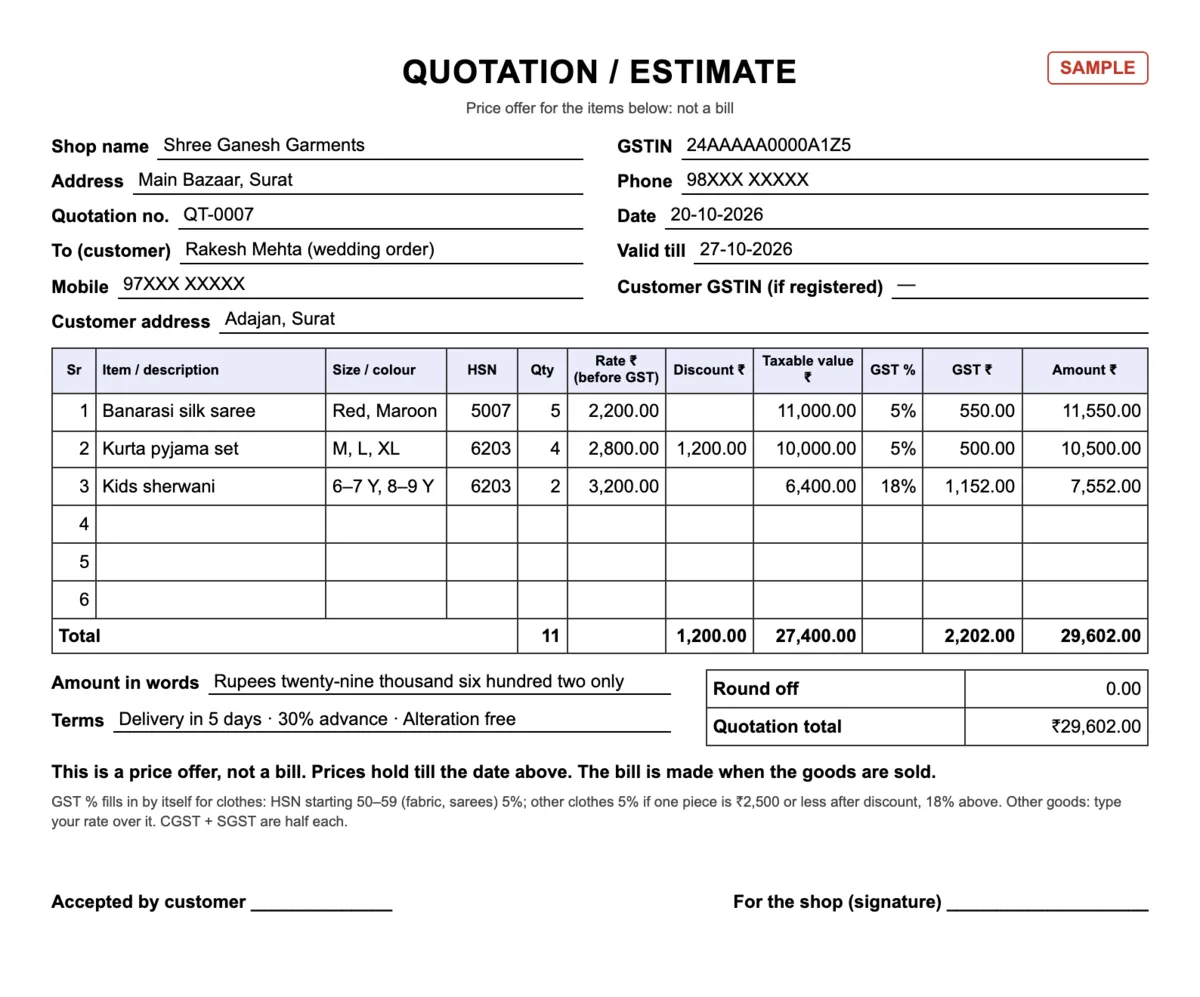
Rakesh Mehta asks for a price for his son’s wedding: 5 Banarasi silk sarees, 4 kurta pyjama sets and 2 kids sherwanis. The shop makes QT-0007, valid for 7 days, with ₹300 off each kurta set:
| Item | Qty × rate | Discount | Taxable | GST | Amount |
|---|---|---|---|---|---|
| Banarasi silk saree (HSN 5007) | 5 × ₹2,200 | – | ₹11,000 | 5% = ₹550 | ₹11,550 |
| Kurta pyjama set (6203) | 4 × ₹2,800 | ₹1,200 | ₹10,000 | 5% = ₹500 | ₹10,500 |
| Kids sherwani (6203) | 2 × ₹3,200 | – | ₹6,400 | 18% = ₹1,152 | ₹7,552 |
| Total | 11 pieces | ₹1,200 | ₹27,400 | ₹2,202 | ₹29,602 |
The ₹300 discount brings each kurta set to ₹2,500, so its GST drops from 18% to 5%: without the discount the four sets would cost ₹11,200 + 18% = ₹13,216; with it, ₹10,500. That is ₹300 off and ₹379 less GST on each set, ₹2,716 in all. Sarees are fabric, 5% at any price; a ₹3,200 sherwani is 18%. The full rule: GST on clothes: 5% or 18%.
Terms worth writing on a clothing quotation
- Valid till: “Prices valid till 27-10-2026; new stock may be priced differently.”
- Delivery: “Ready in 5 days from confirmation”, or a date for wedding orders.
- Advance: “30% advance to confirm the order; balance on delivery.”
- Alterations: free or at a charge, and how many days they take.
- Colour and size: “Shades may differ slightly from photos; sizes as per the size chart.”
- Exchange: your exchange policy for confirmed orders (why a blanket “goods once sold will not be taken back” line is a risk, in Hindi: goods once sold का मतलब).
Make the quotation in Tap & Bill and turn it into a bill
Open Quotations
Android app: Settings tab → Quotations and challans → Quotations → New quotation. Computer: Quotations in the left menu → New quotation.
Customer and items
Name, Mobile (optional) and Address (optional). Tap item tiles or Find item, pick a size, or add an Other item. A discount for the whole quotation goes in Discount ₹. GST is worked out like a bill, from your shop’s GST setting.
Valid till, then Save
Pick 3, 7, 15 or 30 days, or No date, and Save. The quotation gets its own number, QT-0001, QT-0002…, separate from bill numbers.
Send the PDF
PDF opens an A4 PDF to print from the computer or save. WhatsApp opens WhatsApp on your phone with the customer’s number and a link to the PDF; you press send.
Customer says yes: Make bill
Make bill loads the same items, discount and customer into the billing screen. Change a price if you agreed on one, choose the payment and save. The quotation shows Bill made with the bill number.
The Quotations screen has tabs for Open, Date passed, Done, Cancelled and All, and a search by number, name or mobile. An open quotation can be changed (staff change only their own); a cancelled one keeps its number and the PDF says CANCELLED. The owner’s reports show open quotations, their value and how many became bills in the last 30 days. The heading (Quotation or Estimate) is an owner setting; on the computer you can also pick it per quotation and add the customer’s GSTIN. The PDF comes in the customer’s language: English, Hindi or Gujarati.
| In Tap & Bill | |
|---|---|
| Where | Android app and any computer browser, one shop account; needs internet (bills still work offline) |
| Numbers | QT-0001… per shop, never reused, separate from bills |
| A4 in English, Hindi or Gujarati, “This is a price offer, not a bill.”; not printed on the thermal receipt printer | |
| From your own phone or browser with a link to the PDF, free; not sent automatically | |
| Reports | Quotations are not sales: never in sales, the galla or the GST report until they become a bill |
| Plans | Every paid plan, from ₹199 a month or ₹1,499 a year, no GST added; 14-day free trial |
Sending clothes out without a bill instead, on approval or to the tailor? That is a delivery challan. Everything about both: quotation & delivery challan. Hindi: कोटेशन कैसे बनाएं.