Feature
Supplier ledger app: a khata for every supplier, with bills, payments and baaki
How do I keep a supplier ledger for my shop?
A supplier ledger (party khata) is one account per supplier: their bills add to what you owe, your payments and goods sent back take it away, and the last line is the baaki. In Tap & Bill, Supplier folders keep it on the Android app and the computer: a folder per supplier with the baaki, a date-wise khata with the running baaki, old baaki (opening balance) paid first, one payment or cheque split over the oldest bills, maal wapas, and a statement to print or send on WhatsApp. Bills fill in from a photo or PDF. Owner only, every paid plan from ₹199 a month. Free supplier ledger format below.
A clothing shop buys from ten or twenty wholesalers and companies on credit. Each one’s account lives on a few pages of a khata or in the back of the cheque register, and the question that matters, “how much do I owe Raj Textiles today?”, means adding up bills and cheques by hand while their agent waits at the counter.
Tap & Bill keeps that party ledger by itself. You write each supplier bill and each payment once (in the supplier bills & cheques register), and every supplier gets a page with the full story and the balance. Only the owner sees it.
What you get
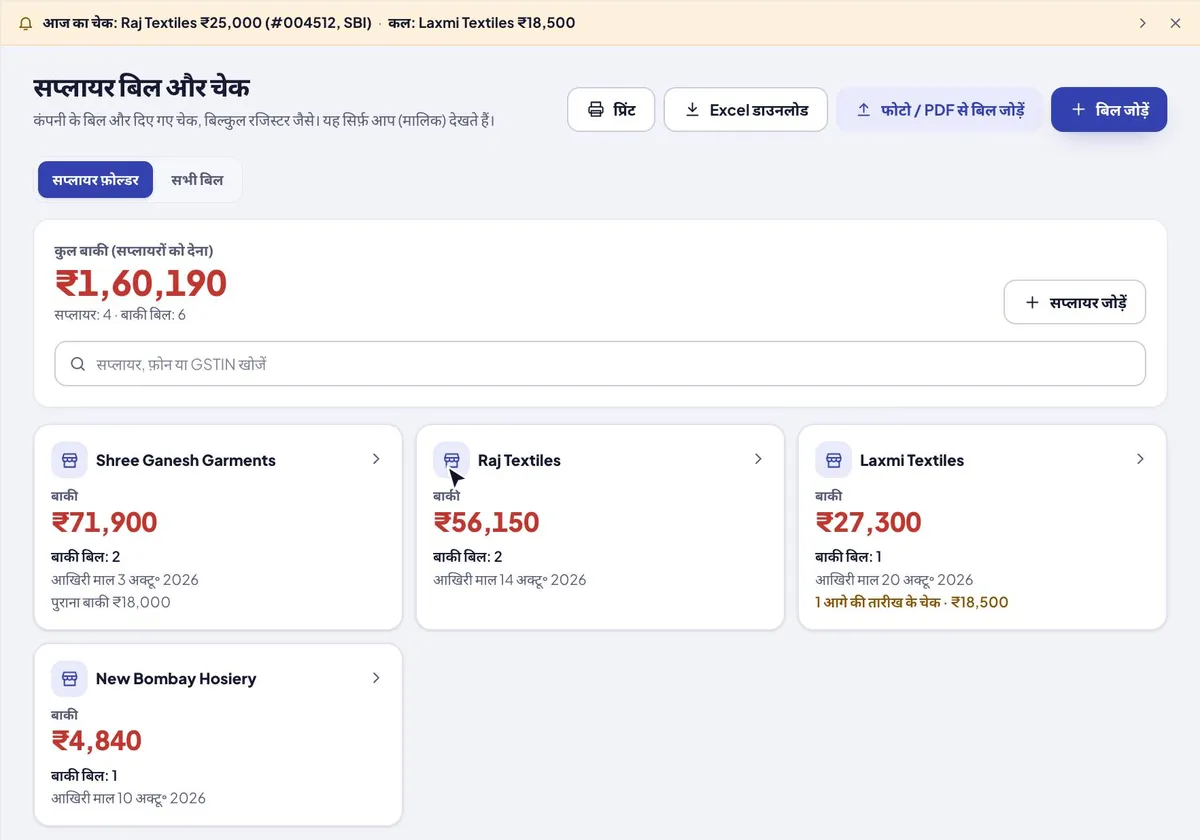
- Supplier folders: a card per supplier with the baaki, bills to pay, last maal date, old baaki and post-dated cheques; total baaki on top
- Khata by date with the running baaki; this month, last month, this year (from April), all, or pick dates
- Old baaki (what you owed before Tap & Bill) always comes first and is paid first
- Payment against the supplier, split over the oldest bills first; change the split; anything extra kept as advance for the next bills
- One cheque for many bills, shown once in the cheque reminder
- Maal wapas: goods sent back or a debit note lowers the baaki
- Share statement: print or PDF, or the text on WhatsApp from your phone
- Suppliers list: name, phone, GSTIN and address; search by name, GSTIN or phone
- A supplier is added by itself with its first bill; no separate setup
- Supplier page: every bill, cheque and payment, and the balance owed
- Call and WhatsApp the supplier from the page in one tap
- Payments by cheque (post-dated too), cash, UPI or bank transfer; bounced cheques don’t count as paid
- Bill photos and PDFs kept with each bill (up to 5 a bill, 5 MB each)
- Bill from photo / PDF: bill no, date, total and the supplier’s GSTIN filled in for you to check (from the GST e-invoice QR when the bill has one); many bills at once on Growth and Pro
- Cheques due list, print and CSV (Excel) export on the computer
- Owner only; every paid plan and the free trial, no extra cost
How it works
Open Supplier folders
In Supplier bills & cheques (owner login, Android app or computer) open Supplier folders: one card per supplier with the baaki, bills to pay and the last maal date, and the total baaki on top. Add a supplier with name, phone, GSTIN and any old baaki you already owed.
New bill (maal aaya)
Open the folder and add the bill: date, bill no, amount. Type it, or fill it from a photo or PDF of the bill (purchase bill scanner).
Payment or maal wapas
Tap Payment and enter the cheque, cash, UPI or bank transfer: it is split over the oldest bills first (old baaki first), so one cheque can clear many bills. Goods sent back? Maal wapas lowers the baaki.
Read the khata, share it
The khata lists every bill, payment and return by date with the running baaki. Tap Share statement to print it, save a PDF or send it on WhatsApp when the supplier’s agent asks.
A supplier khata in Tap & Bill, with an example
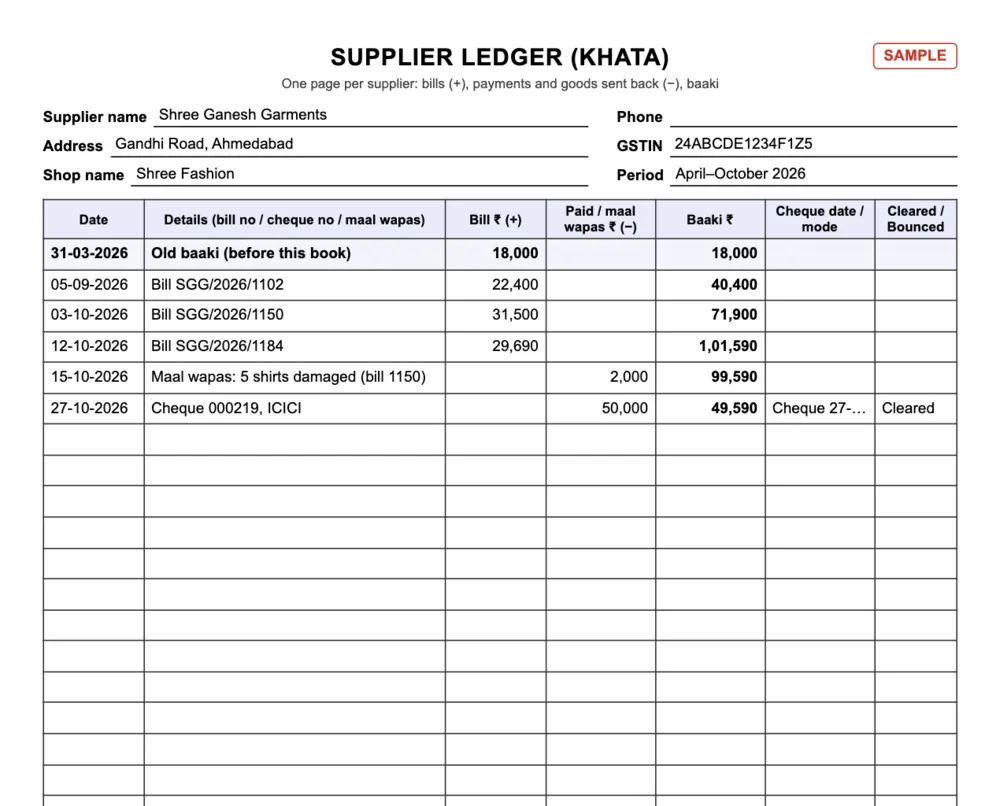
Shree Ganesh Garments supplies a clothing shop on credit. The shop owed ₹18,000 before it started with Tap & Bill, so that went in once as the old baaki. Then three bills came, five shirts went back damaged, and on 27 October the owner gave one ICICI cheque of ₹50,000. This is the supplier’s khata, as the app shows it:
| Date | Details | Bill (+) ₹ | Paid / maal wapas (−) ₹ | Baaki ₹ |
|---|---|---|---|---|
| 31-03-2026 | Old baaki (before Tap & Bill) | 18,000 | 18,000 | |
| 05-09-2026 | Bill SGG/2026/1102 | 22,400 | 40,400 | |
| 03-10-2026 | Bill SGG/2026/1150 | 31,500 | 71,900 | |
| 12-10-2026 | Bill SGG/2026/1184 | 29,690 | 1,01,590 | |
| 15-10-2026 | Maal wapas: 5 shirts damaged (bill 1150) | 2,000 | 99,590 | |
| 27-10-2026 | Cheque 000219, ICICI: old baaki ₹18,000 + bill 1102 ₹22,400 + bill 1150 ₹9,600 | 50,000 | 49,590 |
The ₹50,000 cheque was split oldest first: the old baaki (₹18,000), bill 1102 (₹22,400) and ₹9,600 of bill 1150. Still to pay: bill 1150 ₹19,900 (₹31,500 − ₹2,000 maal wapas − ₹9,600) and bill 1184 ₹29,690, so the baaki is ₹49,590. Want the cheque on bill 1184 instead? Tap Change split. Pay more than the baaki and the rest is kept as advance for the next bill.
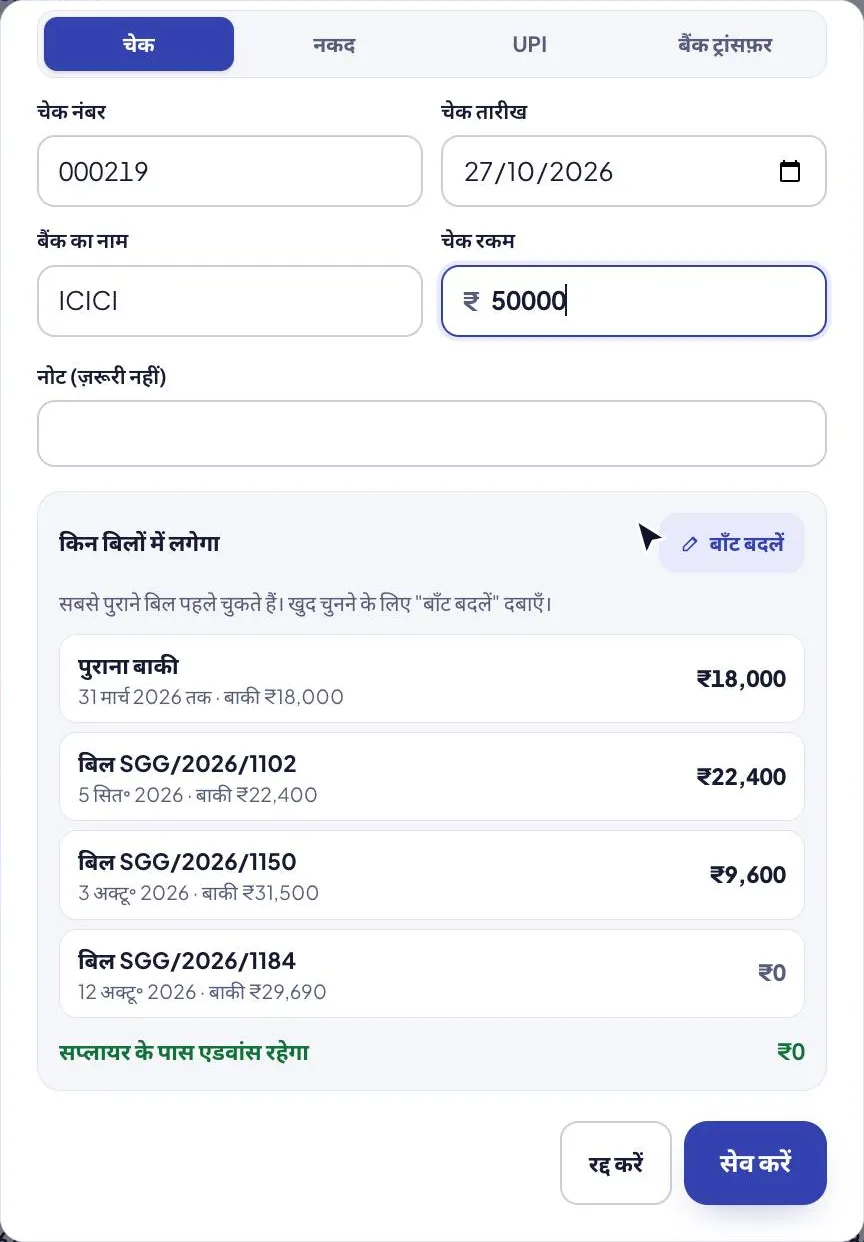
On the supplier’s page: Call and WhatsApp, total maal, paid, maal wapas and baaki, the still-to-pay list, and buttons for New bill (maal aaya), bill from photo / PDF, Payment, Maal wapas and Share statement. Cheques you give show on the cheque reminder bar on the day before they are due.
Free supplier ledger format (PDF, Excel)
One page per supplier: supplier name, phone, GSTIN and address on top, the old baaki as the first line, then date, details, Bill (+), Paid / maal wapas (−), the running baaki, cheque date and Cleared / Bounced. The Excel keeps the running baaki by itself (a bounced cheque is left out of paid) and has the example above filled in.
| Format | English | हिंदी |
|---|---|---|
| Supplier ledger (khata): A4, old baaki line, bills (+), paid / maal wapas (−), running baaki, cheque status | PDF · 127 KB | PDF · 190 KB |
| Excel with formulas: running baaki with bounced cheques left out, totals, and a filled example | Excel · 13 KB | Excel · 14 KB |
Supplier ledger format in accounting terms (Dr / Cr)
On paper, a supplier (creditor) ledger has one page per supplier. The supplier’s bills go in the Credit column (you owe more), your payments in the Debit column (you owe less), and the last column is what you still owe. Here is Raj Textiles, one of three wholesalers of a clothing shop, for October 2026:
| Date | Particulars | Paid (Dr) ₹ | Bill (Cr) ₹ | Balance owed ₹ |
|---|---|---|---|---|
| 02-10-2026 | Bill RT/1185 | 48,500 | 48,500 | |
| 15-10-2026 | Cheque 004521, SBI (cleared) | 25,000 | 23,500 | |
| 20-10-2026 | Bill 0912 | 21,600 | 45,100 | |
| 10-11-2026 | Cheque 004525, SBI (post-dated, given 20 Oct) | 15,000 | 30,100 | |
| 15-11-2026 | Cheque 004522, SBI (post-dated, given 2 Oct) | 23,500 | 6,600 |
Two bills of ₹70,100 in all, ₹63,500 paid or promised by cheque, ₹6,600 still owed on bill 0912. The two post-dated cheques are written with the date on the cheque; you have given them, so they count as paid, but the money must be in your SBI account by 10 and 15 November.
The same supplier in Tap & Bill
| On Raj Textiles’ page | What you see |
|---|---|
| Supplier | Raj Textiles · phone · GSTIN · Call · WhatsApp |
| Bills | RT/1185 ₹48,500 (fully paid, 1 cheque not cleared yet) · 0912 ₹21,600 (₹6,600 to pay) |
| Cheques and payments | 004521 ₹25,000 cleared · 004522 ₹23,500 dated 15 Nov · 004525 ₹15,000 dated 10 Nov |
| Balance owed | ₹6,600 |
All three wholesalers together: bills ₹1,20,850, paid ₹1,14,250 (a bounced ₹32,000 cheque to Mahavir Sarees left out), balance ₹6,600. The full register with every cheque is on the supplier bills & cheques page, with a free cheque register format in PDF and Excel (balance per company worked out).
Paper khata or app?
| Paper party ledger | Tap & Bill | |
|---|---|---|
| A page per supplier | Yes, if you remember to post each bill and cheque to it | Made by itself from the bills and payments you write |
| Balance owed | Add it up by hand | Always worked out; bounced cheques left out |
| Supplier’s phone and GSTIN | On their visiting card, somewhere | On their page; Call and WhatsApp in one tap |
| The bill itself | In a file | Photo or PDF attached to the bill |
| Typing a new bill | By hand | Or filled from a photo / PDF of the bill |
| Copy for your CA | Photocopy | Print or CSV (Excel) |
What it does not do
- It is not accounting software: no double-entry books, trial balance or GST input tax credit. Your CA still keeps the books; give them the printout or CSV.
- A supplier bill does not add stock. Stock shops (Growth and Pro) receive goods with stock in, which can add the same bill to supplier bills in one go.
- No payment reminders on WhatsApp or SMS: the Cheques due list is inside the app and on the computer.
- It does not read your bank account: mark each cheque Cleared or Bounced yourself.
- Staff can’t see suppliers or bills: owner only.
Supplier ledger: questions
What is a supplier ledger?
The account of one supplier in your books: every bill they gave you, every payment you made, and the balance you owe them. Because you owe the supplier, it is a creditor’s account: bills are credited and payments debited. Shop owners also call it a party ledger or “party ka hisab”.
What columns does a supplier ledger format have?
Date, Particulars (bill no or cheque no), Debit (what you paid), Credit (the bill amount) and Balance. Add the supplier’s name, phone and GSTIN at the top of the page. The example above shows the format filled in.
Is there a supplier ledger format in Excel?
Yes, free, above on this page: a supplier ledger (khata) in Excel with a running baaki formula (bounced cheques left out) and a filled example, and a PDF to print, in English and Hindi. For many suppliers on one sheet, the cheque register Excel works out the balance per company.
How do I enter what I already owed a supplier?
Add it as Old baaki when you add the supplier (or later from their folder), with the date if you know it. It is the first line of the khata, and payments clear it before any bill.
Can one payment or cheque clear several supplier bills?
Yes. Tap Payment in the supplier’s folder: the amount is split over the oldest bills first (old baaki first). Tap Change split to choose the bills yourself. Anything above the baaki is kept as advance for the next bills.
How do I record goods sent back to a supplier?
Tap Maal wapas in the supplier’s folder: date, amount, which bill (if any) and what went back. It lowers the baaki, and the hisaab counts it against that month’s purchases.
Can I send a supplier their statement?
Yes. Share statement: pick a period, then print or save the PDF, or send the text on WhatsApp from your phone (free).
How do I keep a party ledger on my mobile?
In Tap & Bill, open Supplier bills & cheques → Suppliers on the Android app or the computer. Write each supplier bill and each payment; the supplier’s page shows all of them and the balance owed.
Can I add a supplier bill from a photo?
Yes. Take a photo of the bill in the Android app or pick its PDF (Bill from PDF), or upload a photo or PDF on the computer. The bill no, date, total and the supplier’s GSTIN are filled in; you check them and save. See the purchase bill scanner.
Can I call or WhatsApp a supplier from the app?
Yes. The supplier’s page has Call and WhatsApp buttons that use the phone number you saved for them.
Can my staff see supplier balances?
No. Suppliers, supplier bills and cheques are owner only.
Is it the same as a customer udhaar ledger?
No. Udhaar is what customers owe you, made from your bills. The supplier ledger is what you owe your suppliers. Both are in Tap & Bill, kept apart.
Which plan has the supplier ledger?
Every paid plan, and the 14-day free trial, at no extra cost: from Basic at ₹199 a month (or ₹1,499 a year).
Free demo: set up your suppliers in Tap & Bill
We call you within one working day and show Tap & Bill on your own items and prices.
- 10-minute demo on phone or video call
- 14-day free trial, no card
- We set up your categories and prices with you
Prefer to talk now? Call +91 73838 34343.
Know what you owe every supplier
Write each bill and payment once; Tap & Bill keeps every supplier’s balance. 14-day free trial, no card.