Feature
Cheque reminder app: post-dated cheques due today and tomorrow, on top of every screen
How do I get reminded of post-dated cheques I gave to suppliers?
Write every cheque you give with the date written on it, and look at what is due before you go to the bank. In Tap & Bill a reminder bar does the looking: on the computer and the Android app, the owner sees cheques due today, tomorrow and those whose date has gone without being marked cleared, with the supplier’s name, amount, cheque no and bank. Tap it to mark Cleared or Bounced, open the supplier’s folder, or hide it till tomorrow. It is inside the app (no WhatsApp or SMS), on every paid plan from ₹199 a month.
A clothing shop pays wholesalers with cheques: part now, a post-dated cheque (PDC) for the 10th, another for the 15th. Each one is a promise that the money will be in the account on that date. The register is in the drawer, and nobody opens it until the bank calls about a cheque that bounced, with a charge, an angry supplier and, if it keeps happening, a legal notice.
Tap & Bill already has those cheques if you keep supplier bills in it. The reminder bar puts the ones that matter today where you can’t miss them: on top of the screen you bill from.
What you get
- A reminder bar at the top of every page on the computer and the main tabs of the Android app
- Shows cheques due today, tomorrow, and date gone (check the bank) that are not marked yet
- Each with the supplier’s name, amount, cheque no and bank; the total to keep in the bank
- Cleared or Bounced in one tap; a bounced cheque stops counting as paid and the supplier’s baaki goes back up
- One cheque for many bills shows once, with how many bills it pays
- Open supplier folder from the reminder; Hide till tomorrow (a new cheque still shows)
- The register’s Cheques due list also shows the next 7 days
- Owner only; every paid plan and the free trial, no extra cost
How it works
Write the cheque once
When you give a supplier a cheque, add it as a payment in the supplier bills & cheques register or the supplier’s folder: cheque no, date written on it, bank and amount. A post-dated cheque gets its future date.
See the bar
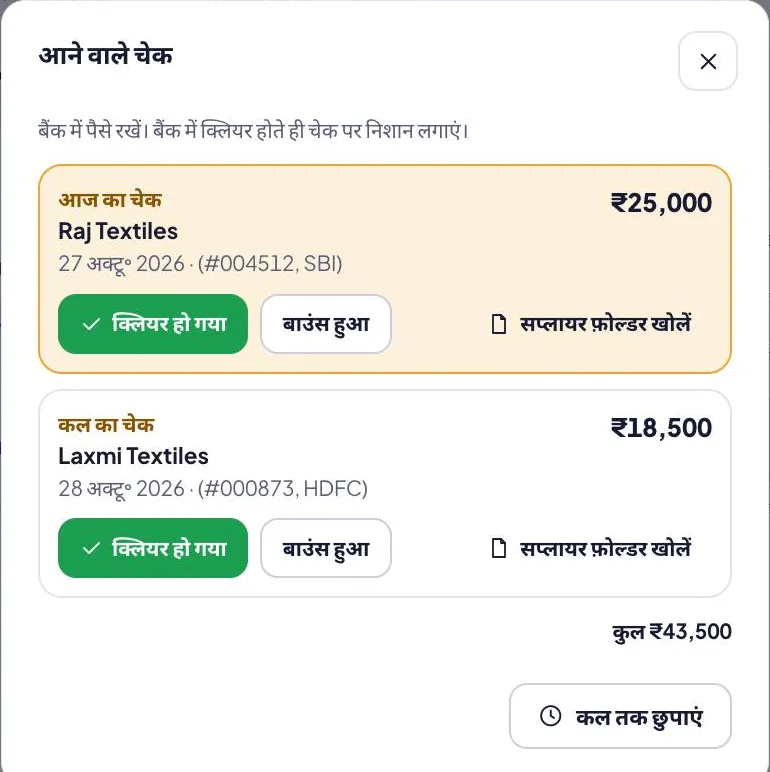
From the day before its date, a reminder bar sits at the top of every page on the computer and on the main tabs of the Android app: “Cheque today: Raj Textiles ₹25,000 (#004512, SBI) · Tomorrow: Laxmi Textiles ₹18,500”. Only the owner sees it.
Keep the money ready
Tap the bar for the list: today, tomorrow and cheques whose date has gone, with the total. That is the money that must be in the bank.
Mark it
When the bank clears it, tap Cleared; if it comes back, Bounced (it stops counting as paid). Or open the supplier’s folder, or hide the bar till tomorrow.
Example: what the bar shows on 27 October
| Cheque | Supplier | Amount | On the bar |
|---|---|---|---|
| #004512, SBI, dated 27 Oct | Raj Textiles | ₹25,000 | Cheque today |
| #000873, HDFC, dated 28 Oct | Laxmi Textiles | ₹18,500 | Tomorrow |
| #004498, SBI, dated 20 Oct, not marked | Mahavir Sarees | ₹32,000 | Date gone – check bank |
| #004530, SBI, dated 10 Nov | Kids Corner Garments | ₹13,750 | Not yet (shows on 9 Nov); in Cheques due from 3 Nov |
On 27 October the owner needs ₹25,000 in SBI today and ₹18,500 in HDFC by tomorrow, and must check why the 20 October cheque to Mahavir Sarees was never marked: cleared and forgotten, or bounced? One tap on Cleared or Bounced fixes the register and the supplier’s baaki.
A simple PDC routine for a shop
- Write the date on the cheque, not today’s date, the moment you hand it over.
- Every morning: glance at the bar. Today and tomorrow = money in the bank now.
- Every week: open Cheques due for the next 7 days, and move money between accounts if needed.
- When the statement comes: mark each cheque Cleared, or Bounced and give a new cheque or UPI the same week.
- A cheque is valid for 3 months from the date written on it (RBI rule since 1 April 2012); a PDC’s 3 months start from its future date.
What a bounced cheque can lead to (bank charges, a notice under section 138 of the Negotiable Instruments Act) is explained on the supplier bills & cheques page.
Free PDC / cheque register format (PDF, Excel)
Keeping cheques on paper for now? The free cheque register has the columns shops use (date, bill no, company, bill amount, cheque date, cheque no, bank, cheque amount, cleared / bounced); the Excel adds the cheques due in the next 7 days and those whose date has passed, so it works as a post-dated cheque register.
| Format | English | हिंदी | ગુજરાતી |
|---|---|---|---|
| Cheque register: A4 landscape, 18 lines (date, bill no, company, bill amount, cheque date, cheque no, bank, cheque amount, cleared / bounced) | PDF · 126 KB | PDF · 174 KB | PDF · 200 KB |
| Excel with formulas: balance per bill and per company, bounced cheques left out, cheques due in 7 days, and a filled example | Excel · 16 KB | Excel · 17 KB | Excel · 17 KB |
What it does not do
- No WhatsApp or SMS reminders: the bar is inside the app and on the computer, and the owner’s Android app (latest version from the download page) also shows a phone notification the evening before a cheque date and on the day (or while it is overdue); the app usually sends at most one notification a day.
- It does not read your bank account: you mark each cheque Cleared or Bounced.
- It is for cheques you give to suppliers. Cheques customers give you are not tracked (customer payments are cash, UPI, card or udhaar).
- Staff don’t see it: owner only.
Cheque reminder (PDC): questions
What is a post-dated cheque (PDC)?
A cheque with a future date. The bank pays it only on or after that date, so you must have the money in your account by then. Wholesalers often take one for the rest of a bill.
Is there an app that reminds me of cheques due?
Yes. In Tap & Bill, cheques you gave suppliers show on a reminder bar on top of the app and the computer when they are due today or tomorrow, or when their date has gone and you haven’t marked them. Every paid plan, from ₹199 a month.
Does Tap & Bill send cheque reminders on WhatsApp or SMS?
No. The reminder is a bar inside the Android app and on the computer, for the owner, and since 4 November 2026 a phone notification on the owner’s Android app: the evening before the cheque date (from 6 pm) and on the day or when overdue (from 9 am). Nothing is sent on WhatsApp or SMS.
How do I track post-dated cheques in Excel?
Use the free cheque register Excel above: one line per cheque with its date; it adds up the cheques due in the next 7 days and those whose date has passed and are not marked cleared.
What happens when I mark a cheque Bounced?
It stops counting as paid: the bill and the supplier’s baaki go back up until you add a new cheque or another payment.
Can one cheque pay several supplier bills?
Yes. Pay against the supplier and the amount is split over the oldest bills first (you can change the split). The reminder shows the cheque once, with how many bills it pays.
Can I hide the reminder?
Yes, Hide till tomorrow. A new cheque that becomes due still shows.
Which plan has the cheque reminder?
Every paid plan and the 14-day free trial, with supplier bills & cheques: from Basic at ₹199 a month.
Free demo: never miss a cheque date again
We call you within one working day and show Tap & Bill on your own items and prices.
- 10-minute demo on phone or video call
- 14-day free trial, no card
- We set up your categories and prices with you
Prefer to talk now? Call +91 73838 34343.
Know which cheque is due today
Write each cheque once; Tap & Bill puts today’s and tomorrow’s on top of your screen. 14-day free trial, no card.