Feature
Shop expense register: write every kharcha, see the month’s rough profit
How do I keep a record of my shop’s daily expenses?
Write each expense the day you pay it: date, what for (rent, light bill, chai, transport, salary…), cash, UPI or bank, and the amount; at month end add each category. In Tap & Bill, Kharcha does this on the Android app and the computer: built-in and your own categories, the month total by category and by cash / UPI / bank, salary and advances added by themselves, and a Month profit (Hisaab) card: sales after returns − supplier bills − kharcha = rough profit. Owner only, on every paid plan from ₹199 a month. Free expense register format (PDF, Excel) below.
Most shop owners know the day’s sale to the rupee and have no idea where ₹50,000 went last month. Rent and the light bill are remembered; the chai, the tempo, the carry bags, the AC repair and the advance given to a salesman are not. At month end the only question that matters, “did the shop actually make money?”, has no answer.
Kharcha in Tap & Bill is the expense book of the shop, kept on the same phone you bill from. Every entry has a category and how it was paid, so the month shows where the money went, and because Tap & Bill already has your sales and supplier bills, it can show the month’s rough profit next to it.
What you get
- Categories: rent, electricity, tea / snacks, transport, salary, repairs, packing / bags, other, and up to 30 of your own
- Paid by cash, UPI or bank on each entry, with a note
- Month total, “where the money went” by category, totals by cash / UPI / bank, and day by day
- Salary and advances (upaad) from Staff salary added by themselves
- Month profit (Hisaab): sales after returns − purchases (supplier bills less goods sent back) − kharcha
- Previous months one tap away; change or delete an entry
- CSV download (opens in Excel) on the computer, for you or your CA
- Owner only: staff logins don’t see it
- Every paid plan and the free trial, from ₹199 a month; Android app and computer
How it works
Open Kharcha
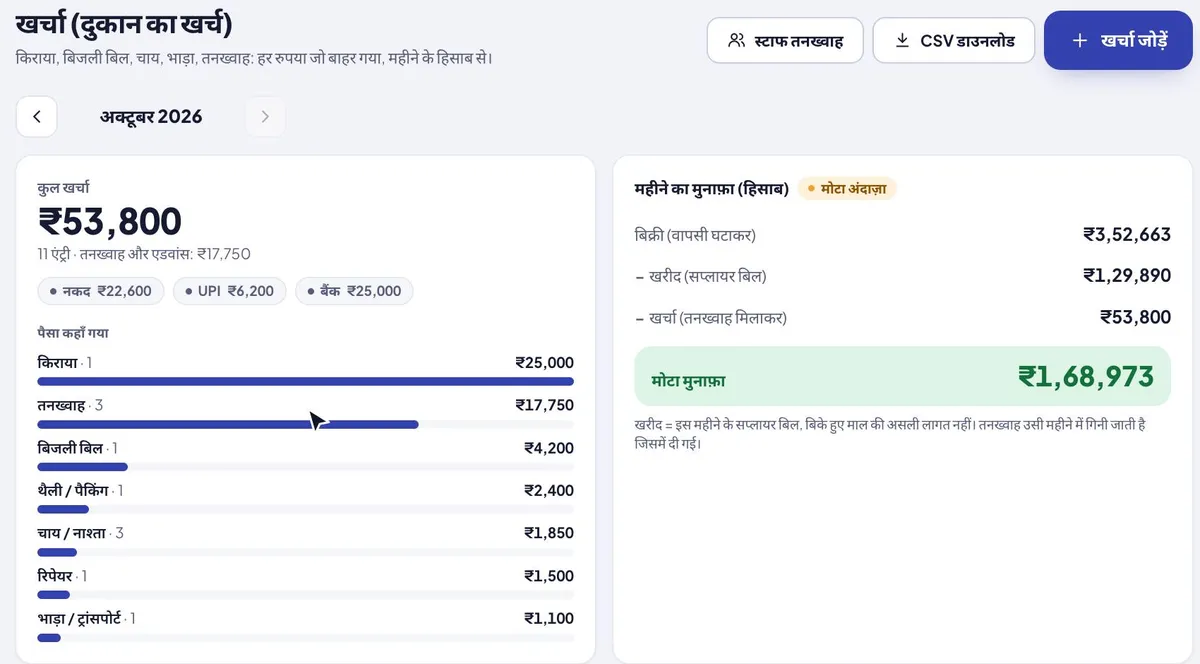
Owner login, on the Android app or the computer. The month’s total is on top, then where the money went.
Add kharcha
Tap Add kharcha: amount, what for (rent, electricity, tea / snacks, transport, salary, repairs, packing / bags, other, or your own category like “Gas cylinder”), cash, UPI or bank, and a note if you like. Five seconds.
Salary goes in by itself
Salary you pay and advances (upaad) you give in Staff salary are added to Kharcha automatically, under Salary.
See the month’s hisaab
The Month profit (Hisaab) card shows sales after returns, minus purchases (supplier bills), minus kharcha: your rough profit for the month.
Example: one month of a clothing shop’s kharcha
Shree Fashion, October 2026: 11 entries, written as they were paid. Tap & Bill adds them up like this:
| Where the money went | Entries | Amount |
|---|---|---|
| Rent | 1 | ₹25,000 |
| Salary and advances (upaad) | 3 | ₹17,750 |
| Electricity | 1 | ₹4,200 |
| Packing / bags | 1 | ₹2,400 |
| Tea / snacks | 3 | ₹1,850 |
| Repairs | 1 | ₹1,500 |
| Transport | 1 | ₹1,100 |
| Total kharcha | 11 | ₹53,800 |
Paid by: cash ₹22,600, UPI ₹6,200, bank ₹25,000. The ₹17,750 under salary is one salary paid (₹12,750 to Suresh) and two advances (₹3,000 and ₹2,000); they came from the salary sheet, nobody typed them twice.
The month’s hisaab (rough profit)
| October 2026 | Amount |
|---|---|
| Sales (after returns) | ₹3,52,663 |
| − Purchases (supplier bills of the month, less goods sent back) | ₹1,29,890 |
| − Kharcha (with salary) | ₹53,800 |
| Rough profit | ₹1,68,973 |
Why “rough”: purchases here are the supplier bills dated this month, not the cost of the pieces you actually sold. In a month you stock up for Diwali, purchases are high and the profit looks low; the next month it looks high. Look at two or three months together, or ask your CA for the real profit with stock. Salary counts in the month you pay it. The app says the same on the card.
Kharcha, galla or supplier bills: where does each payment go?
| You paid… | Write it in | Why |
|---|---|---|
| Shop rent, light bill, internet, chai, tempo, carry bags, repairs | Kharcha | The shop’s running cost for the month |
| Salary or an advance (upaad) to staff | Staff salary (goes to Kharcha by itself) | The salary sheet takes the advance back from the next salary |
| A wholesaler’s or company’s bill for goods | Supplier bills | It is purchase, not kharcha; it counts as purchases in the hisaab |
| Cash taken out of the drawer during the day | Galla → paid from the drawer | So the cash count matches; for a shop expense, also write it in Kharcha |
The galla’s “paid from the drawer” lines are only for that evening’s cash count; they don’t go to Kharcha by themselves.
Free expense register format (PDF, Excel)
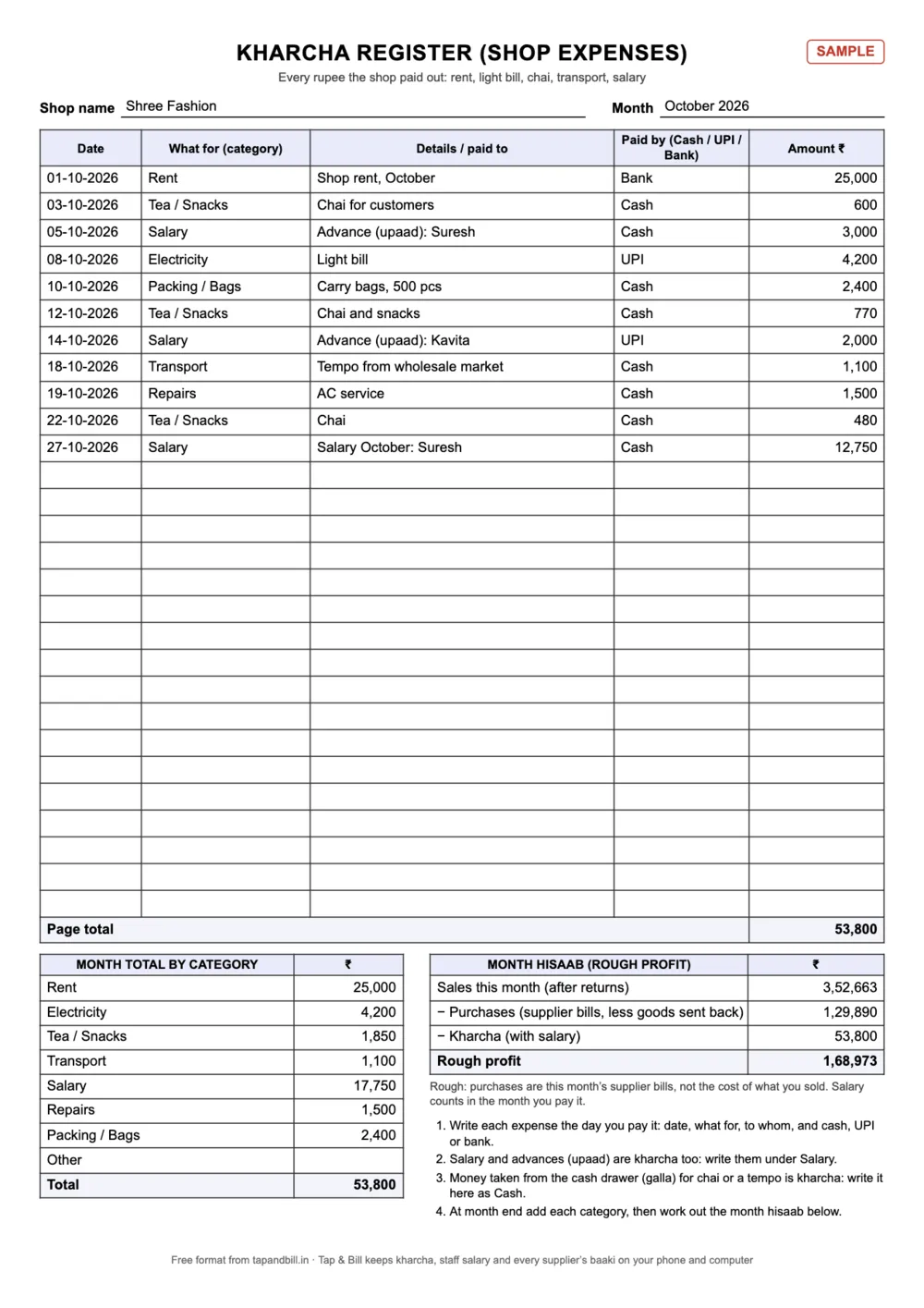
Prefer a book on the counter? Print the A4 kharcha register: date, what for, details, paid by and amount, 28 lines a page, with a box for the month total by category and the month hisaab. The Excel adds every category and cash / UPI / bank by itself and works out the rough profit; the example sheet is the month above.
| Format | English | हिंदी |
|---|---|---|
| Kharcha (expense) register: A4, 28 lines, month total by category and the month hisaab (rough profit) | PDF · 156 KB | PDF · 235 KB |
| Excel with formulas: totals by category and by cash / UPI / bank, month hisaab, and a filled example | Excel · 11 KB | Excel · 11 KB |
How to keep a kharcha register
- Write it the same day. Small cash (chai, tempo, tape) is what gets forgotten, and it adds up to thousands.
- Always a category. “Where did the money go?” is answered by categories, not by a long list.
- Cash, UPI or bank on every line. At month end it shows how much went out of the drawer and how much from the account.
- Salary and advances are kharcha. Write them under Salary, with the person’s name.
- Supplier bills are not kharcha. Keep them in the supplier khata; they are purchases.
What it does not do
- It is not accounting software: no cash book with a running balance, bank reconciliation, profit and loss statement or balance sheet. Give your CA the CSV.
- The month profit is rough: purchases are supplier bills, not the cost of goods sold; there is no stock valuation in it.
- No GST input credit on expenses, and no photo of the expense receipt.
- Galla “paid from the drawer” and Kharcha are separate: one is the cash count, the other the month’s expenses.
- Staff can’t add kharcha: it is owner only.
Kharcha (shop expenses): questions
What is an expense register for a shop?
A book or sheet where the shop writes every rupee it pays out: date, what for, how it was paid and the amount. At month end the totals by category show where the money went. Shop owners also call it a kharcha register or kharcha book.
What columns should a shop expense register have?
Date, what for (category), details or paid to, paid by (cash, UPI or bank) and amount. Add a month total by category at the bottom. The free PDF and Excel above have exactly these.
Is there an app to track shop expenses with sales?
Yes. Tap & Bill is a billing app with a Kharcha register inside, so the month’s expenses sit next to the month’s sales and supplier bills, and the Month profit (Hisaab) card works out the rough profit. Every paid plan, from ₹199 a month, 14-day free trial.
How is the monthly profit worked out?
Sales of the month after returns (cancelled bills left out), minus purchases (supplier bills dated in the month, less goods sent back), minus all kharcha including salary. It is a rough figure: purchases are bills, not the cost of the pieces you sold.
Does salary show in kharcha?
Yes. When you pay a salary or give an advance (upaad) in Staff salary, it is added to Kharcha under Salary by itself, with the person’s name. You can’t change its category there; change it in the salary sheet.
Can I add my own expense categories?
Yes. Next to the built-in ones (rent, electricity, tea / snacks, transport, salary, repairs, packing / bags, other) you can add up to 30 of your own, like “Gas cylinder” or “Advertising”.
Can my staff see or add kharcha?
No. Kharcha, the month hisaab and salaries are owner only, on the Android app and the computer.
Can I download my expenses to Excel?
Yes. On the computer, Kharcha has a CSV download for the month; it opens in Excel or Google Sheets.
Which plan has Kharcha?
Every paid plan and the 14-day free trial: from Basic at ₹199 a month (or ₹1,499 a year), no GST added.
Free demo: set up Kharcha for your shop
We call you within one working day and show Tap & Bill on your own items and prices.
- 10-minute demo on phone or video call
- 14-day free trial, no card
- We set up your categories and prices with you
Prefer to talk now? Call +91 73838 34343.
Know where the money went this month
Write each kharcha in 5 seconds; Tap & Bill adds it up and shows the month’s rough profit. 14-day free trial, no card.