What a printed label looks like
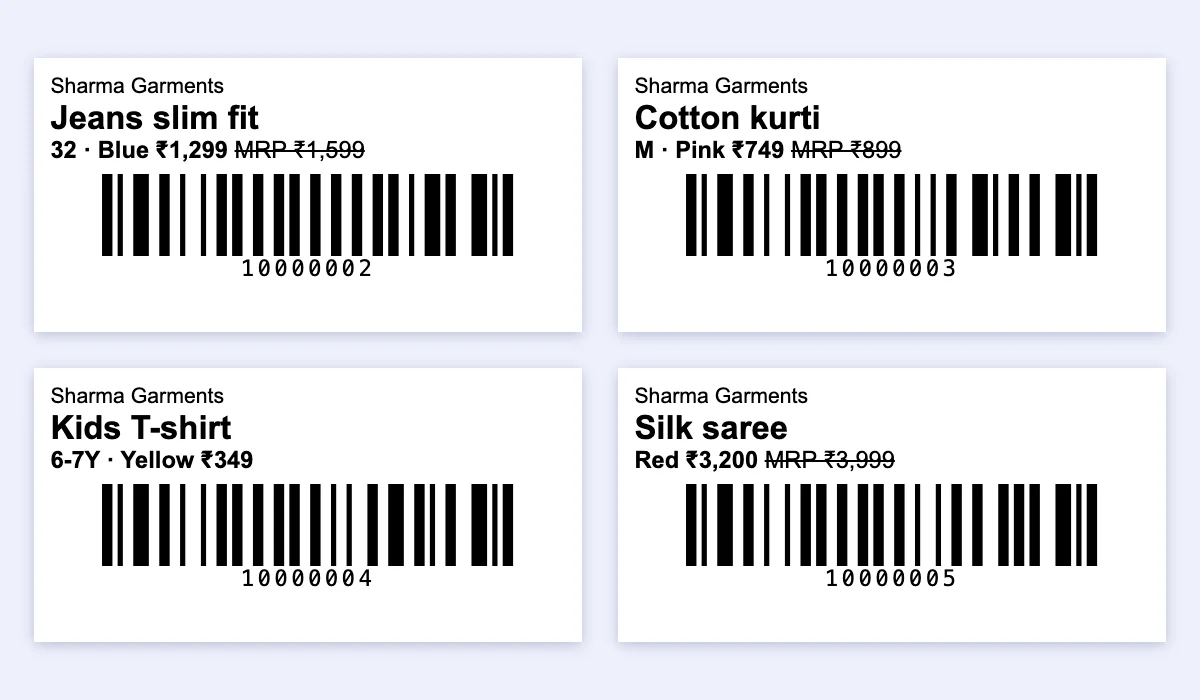
Four labels from the example list at 50 × 25 mm, with the shop name on. The bars are real Code 128: scan them from the screen with a phone or a handheld scanner.
How to make barcode labels for clothes, step by step
List each size and colour
One line per size and colour: name, size, colour, price, MRP, copies. A jeans design in 3 sizes is 3 lines, because each size needs its own code to count stock by size.
Choose the code
Leave the code empty and the tool numbers them 10000001, 10000002 and so on (8 digits, short enough for a small label). If the piece already carries the brand’s barcode, type that code instead, or skip the label.
Pick the label size
A4 sticker sheet with 65 labels (38 × 21 mm) or 40 labels (52 × 30 mm) on any printer; a 50 × 25 mm or 38 × 25 mm roll on a barcode label printer; or the 58 mm bill printer.
Print one test page on plain paper
Hold it behind the sticker sheet against light. In the print dialog choose the same paper size, margins “None” and scale 100% (not “Fit to page”).
Stick and scan
Stick the label on the tag or the poly bag. Scan once with your scanner or phone to check it reads before you tag the whole lot.
What to print on a clothing price tag
| On the label | Why | Example |
|---|---|---|
| Item name | Staff and customers see what it is | Jeans slim fit |
| Size and colour | Each size and colour has its own code, so stock is counted per size | 32 · Blue |
| Selling price | The price you bill at | ₹1,299 |
| MRP (if higher) | Shows the saving; the MRP includes GST | |
| Barcode + the number under it | Scan to bill; the number lets staff type it if a label is torn | 10000002 |
| Shop name (optional) | Useful on gifts and exchanges | Sharma Garments |
GST on clothes depends on the price of each piece (5% up to ₹2,500 before GST, 18% above), so set the MRP with the markup to MRP calculator and check a tag with the GST calculator for clothes.
Which barcode: Code 128, EAN-13 or QR?
| Type | Good for | Needs | Use it for clothes when |
|---|---|---|---|
| Code 128 | Your own shop codes; letters and digits; prints small | Nothing: any scanner or phone reads it | Tagging stock in your own shop (this tool) |
| EAN-13 | The 13-digit code brands print on packs | GS1 India membership (paid) for your own numbers | You make or pack goods sold in other stores or marketplaces |
| QR code | More text, links | A camera scanner or phone | You want customers to scan; slower at a busy counter |
Label sizes and printers
| Label | Printer | Good for |
|---|---|---|
| A4 sheet, 65 labels (38 × 21 mm) | Any inkjet or laser printer | Starting out, a few hundred tags a month |
| A4 sheet, 40 labels (52 × 30 mm) | Any inkjet or laser printer | Bigger text, sarees and suits |
| 50 × 25 mm roll (1 or 2 across) | Barcode label printer (TSC, TVS, Zebra, Xprinter) | New stock every week, hundreds of tags |
| 38 × 25 mm roll | Barcode label printer | Small tags: kids wear, socks, accessories |
| 58 mm roll | Your thermal bill printer, installed on the computer | A few labels now and then, no new printer |
A half-used A4 sheet? Enter how many labels are already used and the tool starts printing at the next free place.
Jewellery tags are not in this free tool. Its sizes are for clothes. The Tap & Bill app (Growth and Pro) also prints a 95 × 12 mm barbell tag for rings and chains and a 25 × 15 mm QR sticker for earring cards: see them at actual size.
One design, many sizes: how many codes?
Every size and colour needs its own code. In the example list, one jeans design in sizes 30, 32 and 34 is 3 codes and 7 labels (2 + 3 + 2 pieces); the kurti in M and L is 2 codes and 6 labels; 7 codes and 18 labels in all. That is what lets a scanner say “Jeans slim fit, 32, Blue” at the counter, and a stock report say which sizes sell.
Free label generator or Tap & Bill?
| This free tool | Tap & Bill (Growth and Pro) | |
|---|---|---|
| Print barcode labels | Yes, A4 sheets, label rolls, 58 mm | Yes, the same sizes from the computer (up to 1,000 a print); from the Android app on the bill printer or a TSPL label printer over Wi-Fi or Bluetooth LE (up to 200 a print), with a QR code too |
| Jewellery tags | No | Barbell tag 95 × 12 mm (barcode or QR) and tiny QR sticker 25 × 15 mm |
| Codes saved | No: you keep your list | Yes, with each size and colour; brand barcodes (EAN) work too |
| Scan to bill | No | Yes: handheld scanner on the computer, or the phone camera in the Android app |
| Stock by size | No | Stock in of goods received, sold, returned, shelf count, sizes that sell, dead stock |
| Price | Free | ₹999/month (Growth); 14-day free trial |
Read more: Stock and barcodes for clothing shops (with a video), in Hindi: बारकोड स्टिकर कैसे बनाएं (this tool) and स्टॉक कैसे मेंटेन करें. Shops that don’t want stock can bill by tapping categories, with no barcodes at all.