Feature
Rental billing software for clothes on rent: deposit, return date and late fee
How do I bill clothes given on rent, with a deposit?
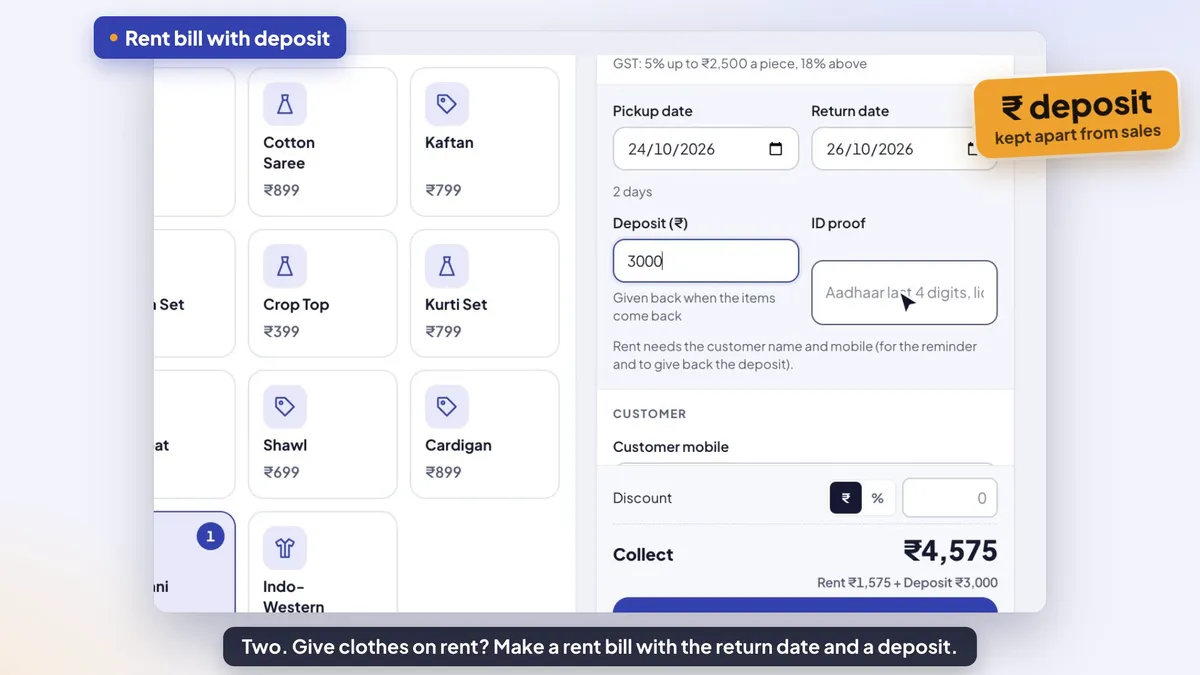
Make a rent bill, not a sale: the rent is the bill, and the refundable deposit is kept apart so it never counts as sales. In Tap & Bill, switch on “We also give items on rent”, pick Rent on the new bill, set the pickup and return dates, type the deposit and an ID note, and collect rent + deposit. The On rent list shows what is booked, out, due and late; at return the late fee and any damage come out of the deposit and the app shows what to give back. On every paid plan, from ₹199 a month.
In the wedding season one sherwani can go out four times in a month, a lehenga is booked weeks ahead, and the counter holds thousands of rupees of other people’s deposits. A diary and a sales bill book mix it all up: the deposit lands in the day’s sales, nobody sees that the same lehenga is promised to two brides, and at return the late fee is argued from memory.
Tap & Bill keeps rent and deposit apart from the first tap. The rent is a normal bill with its own number, GST as your shop is set up, a PDF and WhatsApp; the deposit sits on the rental until the items come back, and the app works out the late fee, the damage and what goes back to the customer.
What you get
- Sale or rent on the new bill, on the computer and the Android app
- Pickup and return dates; a later pickup date is an advance booking and blocks those dates
- Token / advance booking: take part now, the rest at pickup; the bill and PDF show advance paid and balance due
- Rent per day (optional): rate × days worked out, the formula on the screen and the PDF; extra days charged on extend
- Cancel a booking: give the advance back, or keep it (owner’s choice), shown clearly in reports and the galla
- Calendar on the computer: booked and free days per piece (and size), plus Check dates before you book
- Cleaning days after return (0–3, optional): the piece stays blocked for dry cleaning
- Refundable deposit kept apart: never in sales, while the galla still expects deposit cash in the drawer
- ID proof note on the bill (for example “Driving licence 7788”)
- Double-booking check: “Already on rent for these dates”, with the bill and customer that hold it
- RENTAL BILL on the PDF, the print and WhatsApp: dates, rent total, deposit and total collected
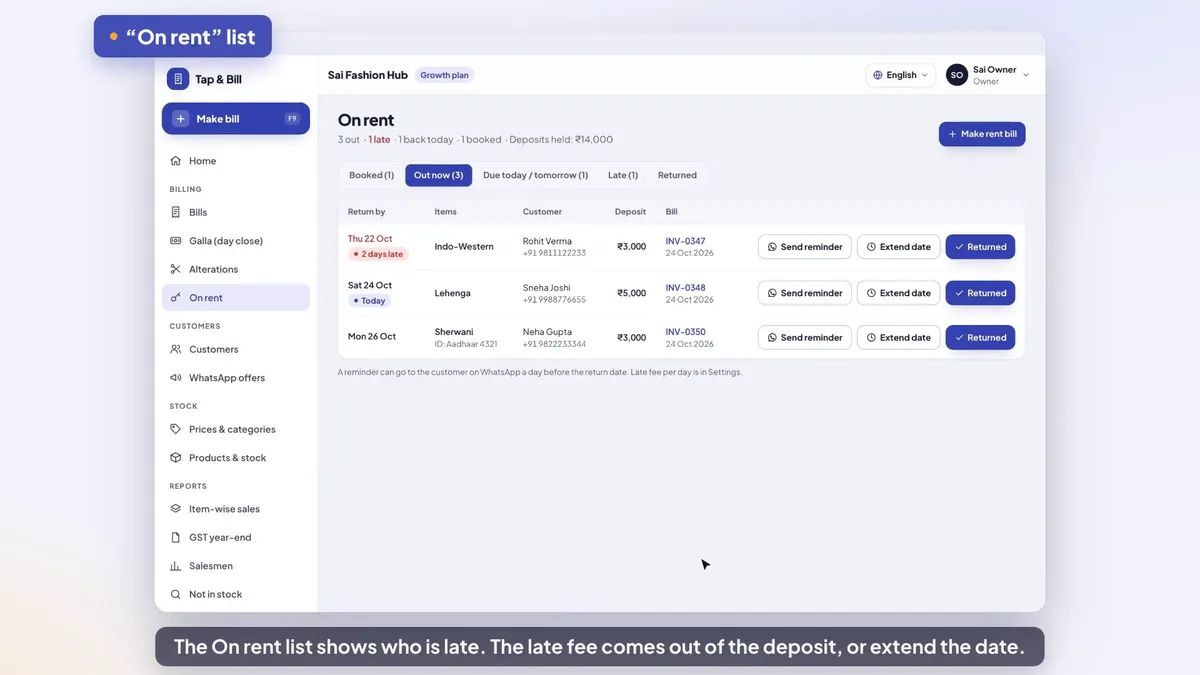
- On rent list: Booked, Out now, Due today / tomorrow, Late, Returned
- Return checklist, late fee suggested from days late × your fee per day, damage charge
- Give back the rest of the deposit, or collect the extra now or on udhaar
- Extend the return date (checked against other bookings)
- Rental block in reports: rent, late and damage fees, deposits taken, held and given back
- Rent bills on every paid plan; advance booking, rent per day and the calendar on Starter and up; screens and bills in English, Hindi or Gujarati
How it works
Switch rent on
Settings → We also give items on rent (owner). Set Late fee per day (₹), the fee the app suggests when something comes back late. In Prices & categories, give each rent item its Pieces for rent (how many you have).
Make the rent bill
New bill → Sale or rent → Rent. Tap the items (the price on each line is its rent; change it on the bill), pick the Pickup date and Return date, type the Deposit (₹) and an ID proof note, add the customer’s name and mobile, and collect “Rent + Deposit” by cash, UPI, card or split. Booking ahead? Take only a token / advance now; the rest shows as Balance due at pickup. Rent by the day? Tick Rate is per day and the app works out rate × days.
Watch the On rent list
On rent shows every rental in five tabs: Booked, Out now, Due today / tomorrow, Late and Returned, with the deposits you are holding. Picked up collects the balance of a token booking; Send reminder opens WhatsApp with the reminder typed; Extend date moves the return date. On the computer, Calendar shows which days each piece is booked or free.
Mark it returned
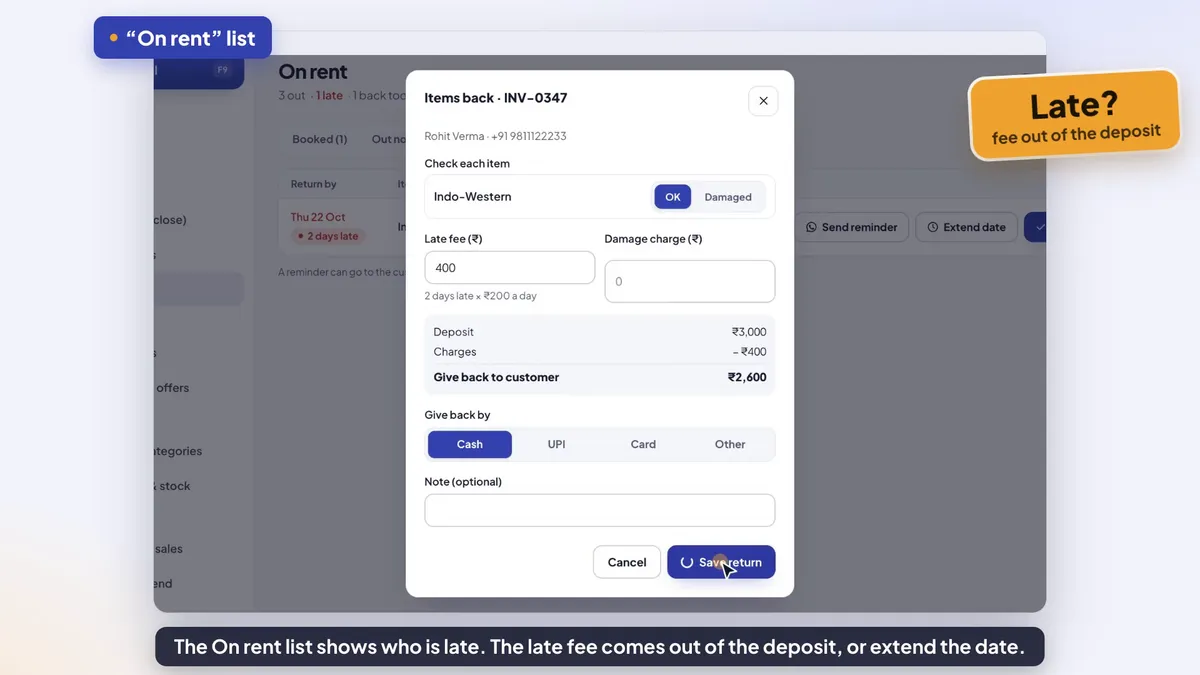
Tap Returned, mark each item OK or Damaged, keep or change the suggested late fee, add a damage charge, and Save return. The app shows what to give back from the deposit, or what the customer still pays (now, or on udhaar). Print or WhatsApp the return receipt.
Example: a sherwani set for a wedding
Rahul books a maroon sherwani (size 40) with a safa, a mala and mojari for a wedding on Sunday 22 November. He picks it up on Saturday 21 November and should bring it back on Monday 23 November. The shop’s late fee is ₹200 a day.
| Step | What happens | In the app |
|---|---|---|
| Booking (2 Nov) | Rent ₹2,500 + ₹300 + ₹200 + ₹300 = ₹3,300, ₹300 off: rent ₹3,000. Deposit ₹5,000. He pays ₹8,000 by UPI and shows his driving licence. | Rent bill with pickup 21 Nov and return 23 Nov (“2 days”), Deposit ₹5,000, ID proof “Driving licence 7788”. It sits in Booked, and the sherwani can’t be promised to anyone else for 21–23 Nov. |
| Sales that day | ₹3,000 rent is a sale. The ₹5,000 deposit is not. | Sales by payment mode show ₹3,000 UPI; the deposit shows under “Deposits taken” in the Rental block. |
| 21 Nov | He collects the set. | It moves to Out now by itself on the pickup date. |
| 23 Nov | He doesn’t come. | Morning: it is in Due today / tomorrow. Next day: Late, “1 day late”. Send reminder opens WhatsApp on your phone with the reminder typed. |
| 25 Nov | He returns it 2 days late, with a stain on the safa that needs dry cleaning (₹150). | Returned: safa marked Damaged, late fee filled in as 2 × ₹200 = ₹400, damage ₹150. Charges ₹550; Give back to customer ₹4,450, by cash. |
| November report | Rental income ₹3,550 = rent ₹3,000 + fees ₹550. | Rent is inside total sales; late and damage fees and deposits are not. The galla expects ₹4,450 less cash that evening, because the refund left the drawer. |
Had the safa been burnt and the shop charged ₹6,000, the charges (₹6,400) would be more than the deposit: the app shows Customer pays more ₹1,400, collected now or added to his udhaar. Rent and deposit themselves can’t go on udhaar: they are collected when the rent bill is made.
Free rent receipt and agreement slip (PDF, Excel)
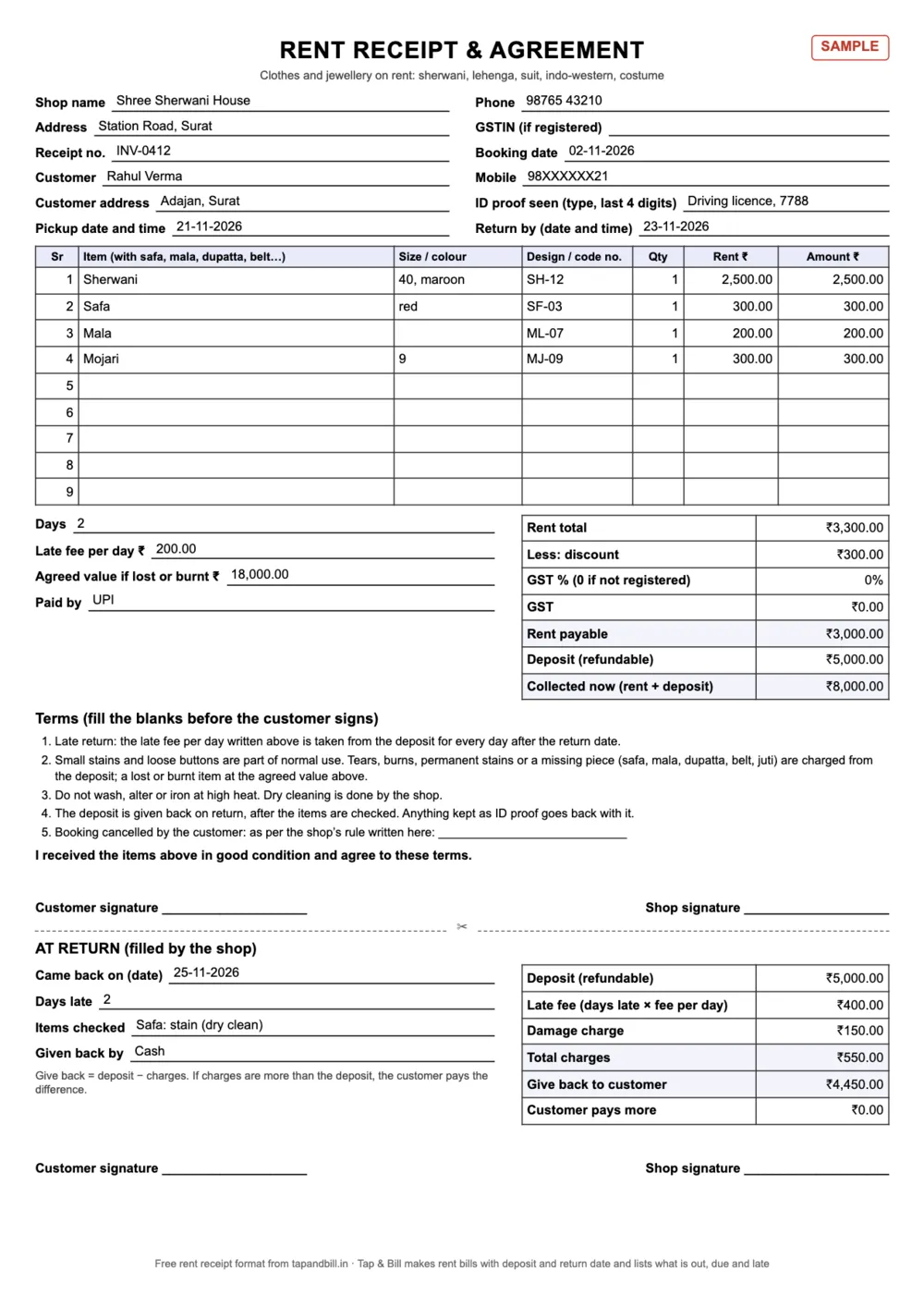
Not using an app yet, or want a signed slip for costly pieces? Print this A4 slip. The top half is the receipt and the terms the customer signs; the bottom half is filled in at return. The Excel works out the days, rent, deposit, late fee and what to give back, and has the sherwani example above filled in.
| Format | English | हिंदी | ગુજરાતી |
|---|---|---|---|
| Rent receipt and agreement slip: A4, items, deposit, dates, late fee, damage terms and a return part | PDF · 189 KB | PDF · 318 KB | PDF · 341 KB |
| Excel with formulas: days, rent, deposit, late fee and what to give back, plus a filled sherwani example | Excel · 9 KB | Excel · 10 KB | Excel · 9 KB |
What to write on a rent receipt
- Every piece of the set on its own line: sherwani, safa, mala, dupatta, belt, juti. A missing mala is easy to prove when it was listed.
- Size, colour and a design or code number, so the piece that comes back is the piece that went out.
- Pickup and return date and time, and the late fee per day, written before the customer signs.
- Deposit as its own line, not added to the rent, and how it was paid.
- ID proof seen: the type and the last 4 digits are enough; give back anything you keep.
- Damage terms: what counts as normal use, what is charged, and the agreed value if a piece is lost or burnt.
- Return part: date it came back, items OK or damaged, late fee, damage, deposit given back, signatures.
Is the deposit sales? And what GST applies on rent?
A refundable deposit is not payment for the rent. Under the CGST Act, section 2(31), a deposit is not payment for a supply “unless the supplier applies such deposit as consideration”. So the deposit stays out of your sales and your GST, and the part you keep for a late fee or damage becomes a charge. Tap & Bill follows this: the deposit is never in sales, and late and damage fees carry GST inside them at the rent bill’s rate (none on a Bill of Supply or a bill without GST).
The GST rate on renting clothes is not one simple number. Heading 9973 of the services rate list (Notification 11/2017-Central Tax (Rate)) has an entry for transfer of the right to use goods, taxed at the rate of the same goods when sold (clothes: 5% or 18% by price), and a separate entry for leasing or rental services without operator at 18%. Which one fits your rentals is a question for your CA. In Tap & Bill the rent bill uses your shop’s GST setting, like a sale; if your CA says 18%, put your rent items in a category with a fixed 18% rate.
Not registered? Renting is a supply of services, so the ₹40 lakh limit for shops that sell only goods may not apply to you: the usual limit for services is ₹20 lakh a year (₹10 lakh in Manipur, Mizoram, Nagaland and Tripura), under section 22. Ask your CA before you cross it. Below it, choose No GST and your rent bills carry no tax lines.
How the double-booking check works
| Your item | How many can be out at once |
|---|---|
| An item tile with Pieces for rent set (for example “Sherwani maroon SH-12”: 1) | That number |
| An item tile without it, in a shop with Stock & barcodes on | The stock of its sizes |
| A product size from Stock & barcodes (for example Lehenga red, size M) | Its stock count (at least 1) |
| Any other item tile | 1 |
| An item typed by hand (Other item, Quick bill) | Not checked |
A rental holds its pieces from the pickup date to the return date, both days included, and a late rental keeps holding them until it comes back. When a new rent bill or a new return date would need more pieces than you have on any of those days, the app stops it with “Already on rent for these dates” and names the bill and customer holding it. A rent bill made offline on the phone is saved anyway (it already happened), so check the list when the phone is back online.
The return day counts as booked. Need time for dry cleaning? Set Cleaning days after return in Settings (1, 2 or 3 days): a sherwani due back on the 23rd, with 1 cleaning day, can be booked for pickup on the 25th, not the 24th. At 0 (the default) it can go out again the next day.
What it does not do
- Return reminders are not sent automatically yet: Send reminder opens WhatsApp on the shop’s phone with the message typed, and you press send. Staff need permission to message customers.
- Udhaar is not allowed on a rent bill: the rent and deposit are collected when you book, or as a token now and the balance at pickup. The deposit amount can’t be changed later.
- No photo catalogue and no online booking for customers.
- A rent bill needs the customer’s name and mobile; walk-in rent bills are not allowed.
- On the Android app, Returned, Extend date and Send reminder need internet.
- Rent is up to 1 year a booking. To drop a booking, cancel the rent bill; once the items are returned the bill can’t be cancelled.
The On rent list
Rental billing (kiraya): questions
How do I make a bill for clothes given on rent?
Switch on “We also give items on rent” in Settings once. Then on a new bill pick Rent instead of Sale, tap the items (the price on each line is the rent), set the pickup and return dates, type the deposit and an ID proof note, add the customer’s name and mobile, and save. The bill prints and goes on WhatsApp as a RENTAL BILL with the dates, rent total, deposit and total collected.
Is the security deposit counted in sales or GST?
No. A refundable deposit is not payment for the rent until you keep part of it (CGST Act, section 2(31)). Tap & Bill keeps the deposit on the rental, out of sales; reports show deposits taken, held and given back. A late fee or damage charge taken from it is income, and carries GST at the bill’s rate if you charge GST.
What is the GST rate on clothes given on rent?
It depends on how the rental is read: heading 9973 has “transfer of the right to use goods” at the rate of the goods themselves (clothes 5% or 18% by price) and “leasing or rental services without operator” at 18%. Ask your CA which fits. Tap & Bill’s rent bill follows your shop’s GST setting; a category can have a fixed 18% if needed.
Can it stop me booking the same lehenga twice?
Yes. Set Pieces for rent on the item (or use Stock & barcodes counts by size). If a new rent bill or a new return date needs more pieces than you have on any day of the booking, the app says “Already on rent for these dates” and shows which bill and customer hold it. Items typed by hand are not checked.
How is the late fee worked out?
Set Late fee per day (₹) in Settings. When you mark a rental returned, the app fills in days late × that fee (2 days × ₹200 = ₹400); you can change it. Late fee and damage come out of the deposit and the app shows what to give back.
What if the damage costs more than the deposit?
The app shows “Customer pays more” with the difference. Collect it now by cash, UPI or card, or add it to the customer’s udhaar, and it appears in their balance like any other udhaar.
Does it send return reminders on WhatsApp?
Send reminder on the On rent list opens WhatsApp on your phone with the reminder typed (customer, items, bill number and return date); you press send. It is not sent automatically today. The list itself shows what is due today, tomorrow and late.
Can I take an advance booking for a wedding next month?
Yes. Pick a later pickup date: the rental waits in Booked and those dates are blocked for that item. Take the full rent and deposit, or only a token / advance: the bill shows the advance paid and the balance due at pickup, and Picked up collects the rest when the customer takes the clothes. If the booking is cancelled, the owner gives the advance back or keeps it.
Can the app work out rent per day?
Yes, if you want it to. Tick Rate is per day on the rent bill: the rent is the rate × the days from pickup to return (the return day is not counted; same day = 1 day), and the screen and PDF show the formula, for example “₹1,350 a day × 3 days = ₹4,050”. If the customer keeps it longer, Extend date adds the extra days at the same rate, paid then or taken from the deposit at return. Leave it unticked and the price on each line is the rent for the whole booking, as before.
Is there a calendar of bookings?
Yes, on the computer: On rent → Calendar shows each rent piece (and size, with Stock & barcodes) for a week or a month, with the days it is booked, out or free. Tap a day to see the bookings and open the bill. Check dates tells you before booking whether a piece is free on those dates, and which bill holds it if not.
Which plan has rental billing?
Rent bills with deposit and return date are on every paid plan, from Basic at ₹199 a month (or ₹1,499 a year). Advance (token) booking, rent per day and the bookings calendar are on Starter (₹499 a month) and up. All of it is in the 14-day free trial. Counting pieces by size and colour with barcodes needs Stock & barcodes (Growth and Pro).
Is there a free rental receipt or agreement format?
Yes: the rent receipt and agreement slip above, as a PDF to print and an Excel with formulas, in English, Hindi and Gujarati. It has the items, size, rent, deposit, ID note, dates, late fee, damage terms and a part to fill in at return.
Free demo: set up rent bills for your shop
We call you within one working day and show Tap & Bill on your own items and prices.
- 10-minute demo on phone or video call
- 14-day free trial, no card
- We set up your categories and prices with you
Prefer to talk now? Call +91 73838 34343.
Rent bills with deposit, ready for the wedding season
Switch rent on, set your late fee, and make the first rent bill in minutes. 14-day free trial, no card.