Feature
Staff salary app for shops: salary sheet, upaad (advance) and salary slip
How do I keep my shop staff’s salary, advances and salary slips?
Work out each person’s month as: salary − absent days × salary per day + incentive + bonus − advance (upaad) taken back = salary to pay. In Tap & Bill, Staff & salary does this on a monthly salary sheet: absent days (half days too), advances given during the month taken back by themselves (the rest carried to next month), the salesman incentive added from sales, Pay (it goes to Kharcha), Settle month when the advance took the whole salary, and a salary slip to print or share on WhatsApp. Owner only. For up to 3 staff on Starter (₹499 a month), 10 on Growth, any number on Pro. Free salary slip format below.
In most shops the salary account is the back page of a diary: “Suresh 15,500, 5 Oct advance 3,000, 2 chhutti”. On the 1st, the owner works it out on a calculator while Suresh waits, forgets the advance he gave on the 20th, and there is no slip when Suresh needs one for a loan or a rent agreement.
Tap & Bill keeps that diary for you, on the same phone you bill from: one row per person per month, the advance (upaad) taken back automatically, the salesman incentive pulled from the bills, and a slip ready to send. Only the owner can see salaries.
What you get
- Monthly salary sheet: salary, absent days, incentive, bonus, other cut, advance cut, to pay, paid and balance for each person
- Salary per day = salary ÷ days in the month, or ÷ 30 if your shop counts every month as 30 days
- Absent days in halves (1.5 days); the cut is rounded to the rupee
- Advance (upaad) given any day, taken back from the next salary by itself; type a smaller amount to take back less; the rest is carried forward
- Salesman incentive added from the incentive report when the person is linked to a salesman (Growth and Pro), or typed
- Pay in full or in parts (date, cash / UPI / bank): it goes to Kharcha by itself
- Settle month: when the advance took the whole salary, close the month without a payment
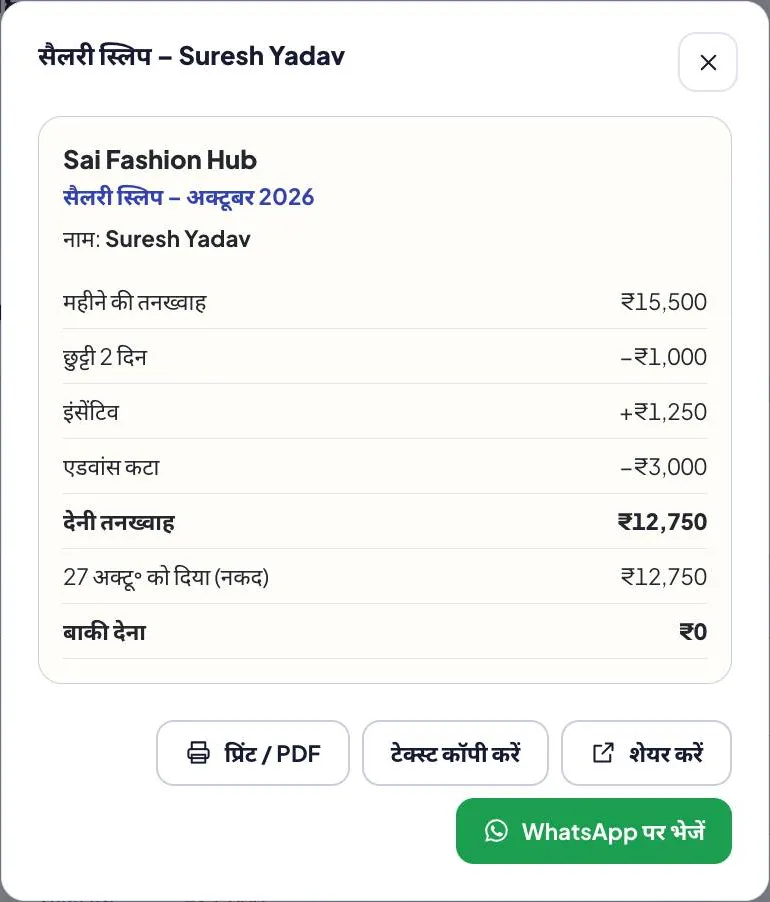
- Salary slip: print or PDF, share on WhatsApp from your phone, or copy the text
- Each person’s account: salary paid and advances given, all time; staff who left stay in history
- Owner only. Starter: up to 3 staff · Growth: 10 · Pro: any number
How it works
Add your staff
In Staff & salary (owner login, Android app or computer), add each person with the monthly salary. Mobile, joining date and a link to their salesman name are optional. They don’t need a login.
Give advances any day
Tap Give advance (upaad) when someone takes money. It goes into Kharcha, and it is taken back from the next salary by itself.
Fill the month
On the salary sheet, enter absent days (half day = 0.5). Incentive comes from the salesman report when the person is linked to a salesman; add a bonus or another cut if you like.
Pay and share the slip
Tap Pay: amount, date, cash, UPI or bank. It goes to Kharcha. Open the salary slip to print it, save the PDF or share it on WhatsApp from your phone.
Example: October salary for three staff
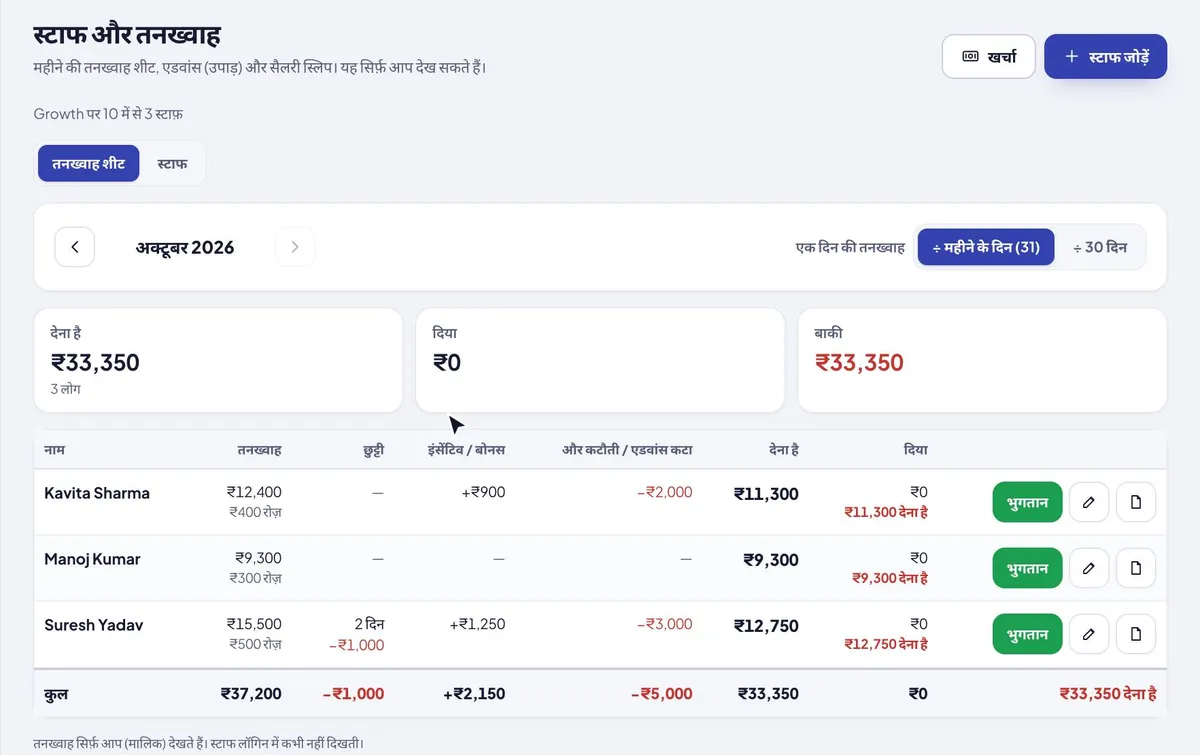
A clothing shop, October 2026 (31 days, so salary per day = salary ÷ 31). Kavita and Suresh sell, so they are linked to their salesman names and get the incentive from their sales.
| Name | Salary | Absent | Incentive | Advance taken back | To pay |
|---|---|---|---|---|---|
| Kavita Sharma | ₹12,400 | — | +₹900 | −₹2,000 | ₹11,300 |
| Manoj Kumar | ₹9,300 | — | — | — | ₹9,300 |
| Suresh Yadav | ₹15,500 | 2 days (−₹1,000) | +₹1,250 | −₹3,000 | ₹12,750 |
| Total | ₹37,200 | −₹1,000 | +₹2,150 | −₹5,000 | ₹33,350 |
Suresh, worked out: ₹15,500 ÷ 31 = ₹500 a day; 2 days absent = −₹1,000; earned ₹14,500; incentive +₹1,250 = ₹15,750; advance of 5 October −₹3,000; to pay ₹12,750. When the owner taps Pay (₹12,750, cash), it is added to Kharcha, and the slip shows paid, balance ₹0, advance left ₹0.
When the advance is bigger than the salary
In November Manoj takes ₹12,000 for a family wedding; his salary is ₹9,300 and he is absent nothing. The sheet takes back ₹9,300 (all of the salary), so there is ₹0 to pay. Tap Settle month to close November without a payment; the remaining ₹2,700 shows again in December and is taken from that salary. Want to give him something in hand? Type a smaller advance cut, say ₹6,000: he gets ₹3,300 and ₹6,000 is carried forward.
The salary slip
Every row has a slip: shop name, month, the person’s name, then monthly salary, absent cut, incentive, bonus, other cut, advance taken back, net salary, what was paid (date and mode) and the balance.
- Print / PDF from the computer
- Share on WhatsApp from your phone: the slip text, or the PDF from the Android app
- Copy text to paste anywhere
- In the language of the app screen: English, Hindi or Gujarati
A slip helps staff when a bank, landlord or loan app asks for proof of salary, and it ends “you cut too much” arguments, because the absent days and the advance are written on it.
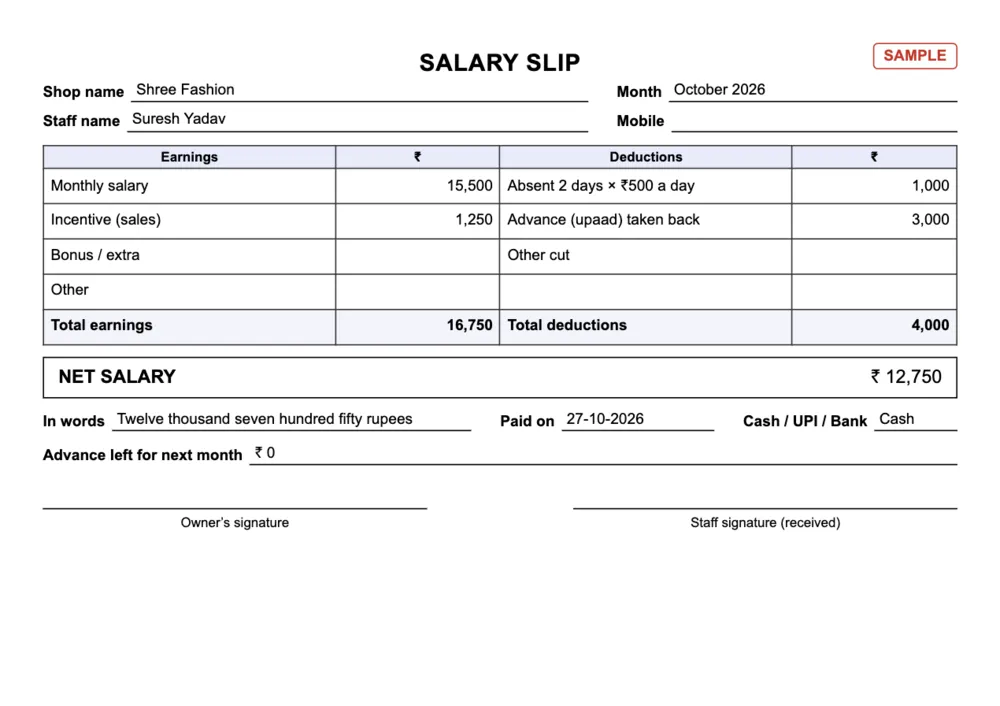
Free salary slip format (PDF, Excel)
Not ready for an app? The PDF has two salary slips on one A4 to cut: earnings (salary, incentive, bonus) and deductions (absent days × per day, advance / upaad taken back, other cut), net salary, paid on, cash / UPI / bank, advance left and two signatures. The Excel is a full salary sheet with the same maths as the app, an upaad (advance) register with each person’s balance, and a salary slip sheet that fills itself when you type a name.
| Format | English | हिंदी |
|---|---|---|
| Salary slip: A4 with two slips to cut (earnings, absent days, advance / upaad taken back, net salary, signatures) | PDF · 146 KB | PDF · 176 KB |
| Excel with formulas: salary sheet (absent days, incentive, bonus, advance cut), upaad register, a slip that fills itself, and a filled example | Excel · 20 KB | Excel · 21 KB |
How to keep staff advances (upaad) straight
- Write every advance the day you give it, with the date and the name. Most salary fights are about an advance one side forgot.
- Decide how much to take back each month before the person leaves with nothing; a big advance can be taken back over two or three salaries.
- Write the advance taken back on the slip, and what is still left.
- Pay against a slip and keep a copy; in the app, the slip and the payment stay with the month.
What it does not do
- No attendance punch-in or biometric: you enter absent days for the month.
- No PF, ESI, professional tax or TDS: it is a shop salary sheet, not payroll software. Ask your CA if your shop has to file those.
- No overtime or hourly wage calculation: add it as a bonus.
- No bank transfer from the app: you pay the way you always do and record it.
- Not on the Basic plan: staff salary starts on Starter (₹499 a month). The free trial has it (on Growth, up to 10 staff).
Staff salary & salary slip: questions
How do I calculate salary for absent days?
Salary per day = monthly salary ÷ the days in the month (31 in October), or ÷ 30 if your shop counts every month as 30 days. Absent cut = salary per day × absent days. Example: ₹15,500 ÷ 31 = ₹500 a day, so 2 days absent = ₹1,000 less. Tap & Bill does this for you and takes half days too.
What is upaad?
Upaad (also uchak or advance) is money a staff member takes before salary day. It is taken back from the next salary. In Tap & Bill, Give advance records it in Kharcha, and the salary sheet takes it back from the next salary by itself; whatever the salary can’t cover is carried to the month after.
Can I take back only part of an advance in a month?
Yes. The sheet takes back as much as the salary allows, but you can type a smaller amount in the advance cut for that month. The rest shows as advance left and is taken back later.
What if the advance is more than the salary?
The whole salary goes to the advance, so there is nothing to pay. Tap Settle month to close the month without a payment; the rest of the advance moves to next month.
How do I send a salary slip on WhatsApp?
Open the person’s slip and tap Share or WhatsApp: the Android app shares the slip text or the PDF through your phone, and the computer opens WhatsApp with the slip text. It goes from your own WhatsApp, free.
Is the salesman incentive added to salary?
Yes, when the staff member is linked to their salesman name: the month’s incentive from the salesman incentive report (Growth and Pro) is added to the salary row. You can type a different amount instead.
Can my staff see salaries?
No. Staff & salary, advances and slips are owner only. Staff logins never see them.
How many staff can I keep on the salary sheet?
Starter: up to 3 people, Growth: up to 10, Pro: any number. Basic does not include staff salary. People on the salary sheet don’t need a login.
Is there a free salary slip format?
Yes: a printable A4 PDF with two slips and an Excel salary sheet with an upaad register and a slip that fills itself, in English and Hindi, above on this page.
Free demo: move your salary diary to Tap & Bill
We call you within one working day and show Tap & Bill on your own items and prices.
- 10-minute demo on phone or video call
- 14-day free trial, no card
- We set up your categories and prices with you
Prefer to talk now? Call +91 73838 34343.
Pay salaries without the diary
Advances taken back by themselves, a slip for every month. 14-day free trial with staff salary, no card.