Feature
Salesman incentive: worked out from every bill
How do I calculate salesman incentive in a shop?
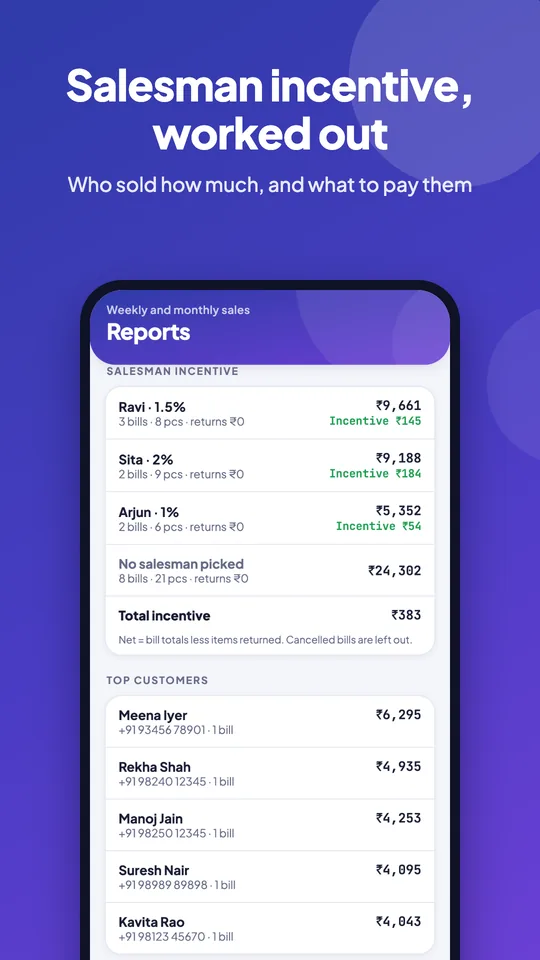
Incentive = (sales after discount − items returned) × the salesman’s incentive %. In Tap & Bill, add your salesmen once with their % (they don’t need a login), pick Sold by on each bill, and the Salesman incentive report shows each person’s bills, pieces, returns, net sales and incentive for the day, week or month. Cancelled bills are left out. It is on every plan, including Basic at ₹199 a month.
In most clothing shops the person at the billing counter is not the person who sold the saree. The salesman showed twenty pieces, the customer chose one, and the cashier made the bill. At month end the owner adds up slips or a notebook to work out each salesman’s incentive, and someone always says a sale was theirs.
Tap & Bill puts the salesman on the bill itself. The cashier taps Sold by: Ravi before saving, and from then on the bill, any return against it, and the incentive all follow Ravi. No slips, no adding up, and the same figure on the owner’s phone and the counter computer.
What you get
- Salesmen without a login: just a name and an incentive % (0 to 50, decimals allowed)
- “Sold by” chips on the bill screen, in the Android app and on the computer
- Optional rule: no bill saves without a salesman
- Report per salesman: bills, pieces, returns, net sales, incentive, and the shop total
- Returns come off the salesman who made the original sale
- Cancelled bills are left out automatically
- A “No salesman picked” row, so missed picks show up
- Salesman column in the bills Excel (CSV) export
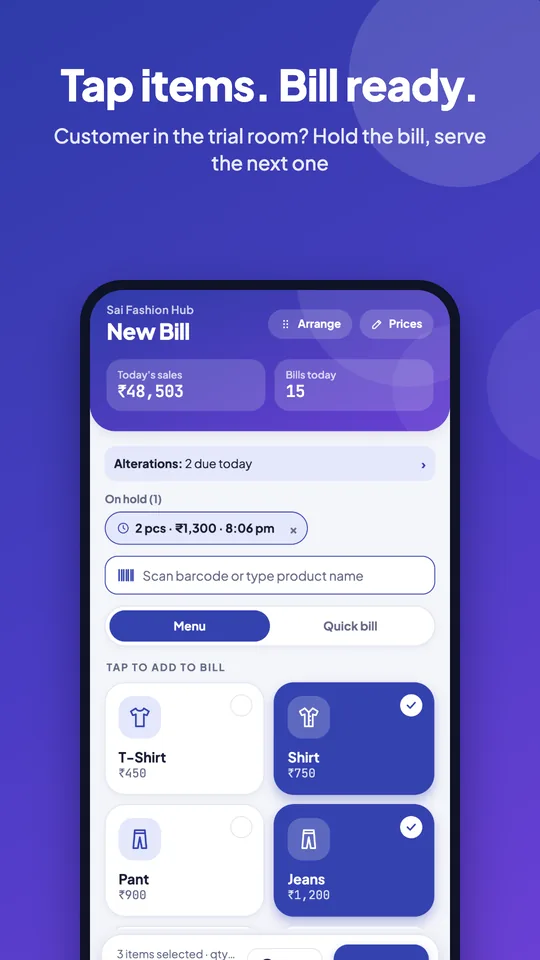
- Hold a bill while the customer is in the trial room, and bill the next one
How it works
Add your salesmen
Settings → Salesmen & incentive (or Salesmen on the computer): name and incentive %, for example 1 or 1.5. Up to 50 people; they don’t need a login.
Link a login (optional)
If a salesman also bills on their own phone, link their staff login. Bills made on that login pick them by themselves.
Pick “Sold by” on each bill
Tap the salesman’s name on the bill screen before saving. Turn on Salesman needed on every bill and a bill can’t be saved until someone is picked.
Open the report
Reports → Salesman incentive in the app (weekly or monthly) or the Overview on the computer (today, week or month): bills, pieces, returns, net sales and incentive per person.
The incentive formula, with a worked month
Tap & Bill uses the most common shop formula: incentive = net sales × incentive %, where net sales are the bill totals after discount, less the value of pieces returned. Here is October at a family clothing shop with three salesmen:
| Salesman (incentive %) | Bills | Pieces | Sales | Returns | Net sales | Incentive |
|---|---|---|---|---|---|---|
| Ravi (1.5%) | 142 | 318 | ₹2,46,800 | ₹6,200 | ₹2,40,600 | ₹3,609 |
| Meena (1%) | 118 | 254 | ₹1,92,450 | ₹3,450 | ₹1,89,000 | ₹1,890 |
| Imran (1%, no login) | 64 | 131 | ₹88,300 | ₹0 | ₹88,300 | ₹883 |
| No salesman picked | 37 | 52 | ₹21,900 | ₹0 | ₹21,900 | — |
| Shop total | 361 | 755 | ₹5,49,450 | ₹9,650 | ₹5,39,800 | ₹6,382 |
Ravi’s incentive: ₹2,40,600 × 1.5% = ₹3,609. The ₹6,200 he loses to returns is the value of pieces customers brought back from his bills this month, so an exchange that was really a size swap does not inflate anyone’s figure. The 37 bills with nobody picked are worth checking: at a busy counter they are usually walk-in bills where the cashier forgot to tap a name.
Other ways shops pay incentive
| Scheme | Example | How to do it with the report |
|---|---|---|
| % of net sales | 1.5% of everything sold | Built in: the Incentive column |
| Different % per person | Senior 1.5%, new joiner 1% | Built in: set each salesman’s own % |
| Amount per piece | ₹10 a piece | Pieces column × ₹10 (Ravi: 318 × ₹10 = ₹3,180); set the % to 0 if you only pay per piece |
| Target slab | 2% once net sales cross ₹2,00,000 | Read net sales and apply the slab by hand (Ravi: ₹2,40,600 × 2% = ₹4,812, or 2% of the ₹40,600 above target = ₹812, whichever your rule says) |
| % per category | 2% on sarees, 1% on the rest | Not built in: one % per salesman |
Net sales are the amounts customers paid, GST included. If you pay incentive on the value before GST, use the bills export: it has a Salesman column next to each bill’s tax and total, so the sum takes a minute in Excel.
Want to try a scheme before you set it up? The free salesman incentive calculator works out % of net sales, ₹ per piece and both kinds of target slab for each salesman, with the Excel formulas.
Customer in the trial room? Hold the bill
A customer picks two kurtas, then goes to try a third. The next customer is waiting. Tap Hold: the bill, its lines, sizes and the salesman you picked wait on that phone or computer, and the screen is clear for the next bill. When the first customer is back, tap their held bill to open it; whatever you were making goes on hold in its place.
- Up to 10 bills on hold at once, each showing pieces, amount and time.
- Held bills stay on the phone or computer they were made on, and are cleared after a day.
- A held bill is not a saved bill: no bill number, no stock or sales change until you save it.
What it does not do
- One salesman per bill. If two people sold to one family, pick the one who closed the sale, or settle the split by hand.
- One incentive % per salesman; no % per category or item and no built-in target slabs (use the table above).
- It does not pay anyone or keep salary, attendance or advances. It gives you the figure; you pay as you do today.
- The salesman list and percentages can be changed only by the owner. Staff can pick a salesman but not change the %.
- The incentive is not part of the daily WhatsApp sales report; open the report in the app or on the computer.
Worried about discounts rather than incentive? Mol-Bhav Guard stops staff selling below your lowest price without your PIN, and its report shows discount given per staff login.
Hold a bill, bill the next customer
Salesman incentive: questions
What is the formula for salesman incentive?
The usual formula is incentive = (sales after discount − returns) × incentive %. For example, a salesman who sold ₹2,46,800 in a month, with ₹6,200 returned, has net sales of ₹2,40,600; at 1.5% the incentive is ₹3,609. Tap & Bill works this out per salesman from the bills.
Does every salesman need a login or a phone?
No. A salesman can be just a name and an incentive %; the cashier picks them on each bill. If a salesman also bills on their own phone, link their staff login and their bills pick them by themselves. A shop can have up to 50 active salesmen.
Can each salesman have a different incentive %?
Yes. Each salesman has their own %, from 0 to 50, with up to two decimals (for example 1.25). Set 0 for someone you pay a fixed amount, and they still show in the report with their sales.
Is incentive worked out before or after discount, returns and GST?
After discount and after returns: net sales are the bill totals customers paid, less pieces returned from that salesman’s bills. GST is included in the bill totals. Cancelled bills are left out. A piece returned next month comes off next month’s figure.
Can I make staff pick a salesman on every bill?
Yes. Turn on “Salesman needed on every bill” and a bill can’t be saved until someone is picked. If you leave it off, bills without a pick show in a separate “No salesman picked” row so you can follow up.
Which plan has the salesman incentive report?
Every plan: Basic ₹199, Starter ₹499, Growth ₹999, Pro ₹1,999 a month (Basic also ₹1,499 a year), with a 14-day free trial. Salesmen without a login don’t count against your staff logins.
How do I calculate staff commission in a salon?
The same way: add each stylist as a salesman with their commission %, pick who did the work on each bill, and read the incentive report. See billing for salons and parlours for a worked stylist example.
What is a hold bill?
Hold parks a bill you are still making, so you can bill the next customer and come back to it. Up to 10 bills can wait on a phone or computer for a day. Nothing is saved or counted until you open the held bill and save it.
See the salesman incentive report on a demo
We call you within one working day and show Tap & Bill on your own items and prices.
- 10-minute demo on phone or video call
- 14-day free trial, no card
- We set up your categories and prices with you
Prefer to talk now? Call +91 73838 34343 or WhatsApp us.
Stop adding up incentive slips
Pick the salesman on each bill and the month’s incentive is ready. 14-day free trial, no card.