Guide
Mobile shop bill format: free Word, Excel and PDF with an IMEI column
What is the bill format for a mobile shop?
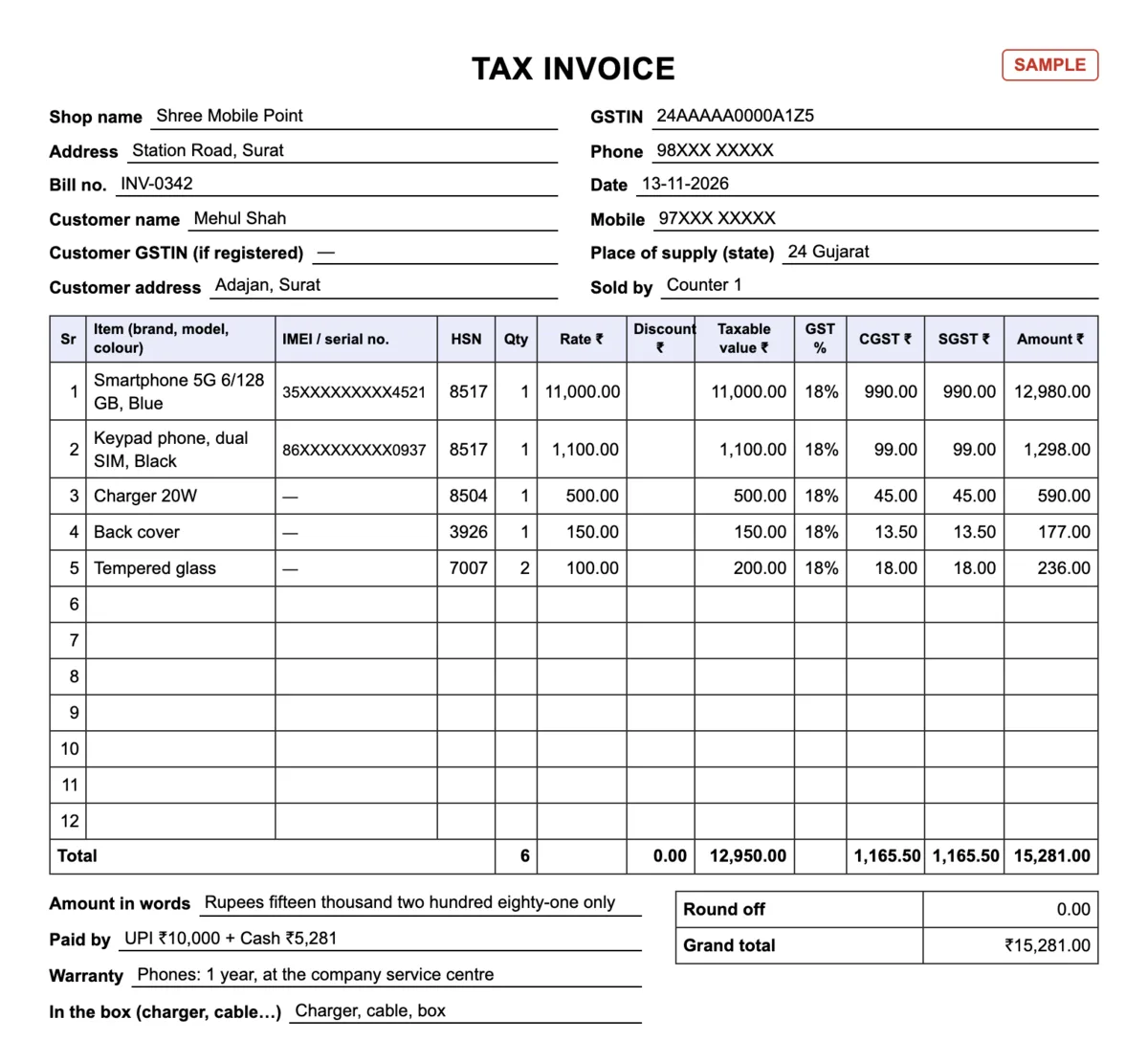
A mobile shop bill shows the shop’s name, address and phone, a bill number and date, the customer’s name and mobile number, and one line per item: brand and model, the 15-digit IMEI of each phone, quantity, rate and amount, then the total, how it was paid and the warranty terms. A GST-registered shop gives a tax invoice that adds its GSTIN, the HSN code (8517 for phones), the taxable value and CGST + SGST at 18%. Download both formats free below in Word, Excel and PDF, in English, Hindi or Gujarati, or make the same bill on your phone with Tap & Bill’s Free plan (60 bills a month at ₹0).
No card · no ads in the app · your bills, customers and udhaar stay yours: nothing is deleted if you stop paying
Download the mobile shop bill formats (free, no sign-up)
| Format | English | हिंदी | ગુજરાતી |
|---|---|---|---|
| GST tax invoice: A4, IMEI / serial no. column, HSN, GST % per line (18% filled in), customer address, warranty (18 lines) | PDF · 131 KB | PDF · 202 KB | PDF · 216 KB |
| Bill / cash memo without GST: A5 bill book size, IMEI / serial no. column, warranty line (12 lines) | PDF · 116 KB | PDF · 172 KB | PDF · 188 KB |
| Excel with formulas: GST bill (18% filled in), bill without GST, HSN list for phones and accessories, and a filled example | Excel · 12 KB | Excel · 13 KB | Excel · 13 KB |
| Word: both bills, type your shop name once and print | Word · 4 KB | Word · 5 KB | Word · 5 KB |
The PDFs are blank forms to print and fill in by hand, or to take to a printing press for a numbered bill book. The Excel file works out the taxable value, CGST, SGST, round off and grand total, with GST filled in at 18% on every line; its other sheets are a bill without GST, an HSN list for phones and accessories, and the filled example above. The Word file has both bills, so you can type your shop name, logo and terms once before printing. Use them as you like in your shop. In Hindi: मोबाइल दुकान का बिल फ़ॉर्मेट.
What goes on a mobile phone bill
| Field | Needed on a GST tax invoice? | Why mobile shops write it |
|---|---|---|
| Shop name, address, GSTIN | Yes (Rule 46) | The customer shows the bill at the service centre and to an insurer. |
| Bill number and date | Yes: one series, no number used twice in a financial year | The warranty runs from the bill date. |
| Customer name and mobile number | Name: for a registered buyer, and for any buyer at ₹50,000 or more | To find the bill again when the customer comes back without it. |
| Customer address and state | Yes, when an unregistered buyer’s bill is ₹50,000 or more (Rule 46(e)) | Costly phones cross ₹50,000 often: keep an address line on the format. |
| Brand, model, RAM / storage, colour | Description of goods: yes | Proves which phone was sold. |
| IMEI (15 digits) or serial number | No: Rule 46 does not ask for it | Warranty, insurance and a lost or stolen phone: all of them start from the IMEI on the bill. |
| HSN code | Yes | 8517 for phones; accessories have their own headings (table below). |
| Quantity, rate, discount, taxable value | Yes | GST is worked out on the value after discount. |
| GST rate, CGST and SGST | Yes | Phones and the common accessories are 18% (9% + 9%). |
| Warranty terms, what was in the box | No | Stops “the charger was missing” and “you said two years” arguments. |
| Signature | Yes | Sign every copy you give. |
Rule 46 of the CGST Rules lists what a tax invoice must show. The IMEI is not on that list, so no GST rule makes you write it; you write it because your customer will need it. If you are not registered under GST, use the A5 bill without GST: no GSTIN and no tax lines (bill without a GST number).
The IMEI on the bill
- Every phone has a 15-digit IMEI; a dual-SIM phone has two. It is printed on the sticker on the box, and the phone shows it when you dial *#06#.
- Copy it from the box of the phone you are handing over, not from a display piece, and read it back once: one wrong digit makes the bill useless for a warranty claim.
- One phone per line. Two phones of the same model are two lines, each with its own IMEI.
- For a dual-SIM phone write IMEI 1; add IMEI 2 if the column has room.
- Earbuds, smartwatches and power banks have a serial number instead: the same column takes it.
Filling the format: the sample bill
Download the format
Pick the A4 GST tax invoice (PDF), the A5 bill without GST (PDF), the Excel with formulas or the Word file, in English, Hindi or Gujarati.
Fill your shop details once
Shop name, address, phone and GSTIN at the top (type them once in Excel or Word; for a printed bill book, ask the press to print them).
Write the customer
Name and mobile number on every phone bill. For a GST bill of ₹50,000 or more, write the customer’s address and state too.
One phone per line, with its IMEI
Brand, model, RAM / storage and colour in the item column, the 15-digit IMEI in its own column (dial *#06# or read the sticker on the box), HSN 8517, quantity 1 and the rate before GST. Accessories go on their own lines without an IMEI.
Total, payment and warranty
In Excel the taxable value, CGST, SGST, round off and grand total fill in at 18%. Write how it was paid (cash, UPI, card or udhaar), the warranty and what was in the box, sign, and give the customer copy.
In the sample above the rates are written before GST. The smartphone is ₹11,000 + 18% = ₹12,980, the keypad phone ₹1,100 + 18% = ₹1,298, and with a charger, a back cover and two tempered glasses the bill comes to ₹12,950.00 taxable, CGST ₹1,165.50 + SGST ₹1,165.50, total ₹15,281, paid as UPI ₹10,000 + cash ₹5,281.
Selling at MRP? Work the GST back out
Phones and accessories are sold at a price that already includes GST. On a tax invoice the rate column needs the price before GST: divide the MRP by 1.18.
| Sold at (GST inside) | Rate before GST | GST 18% inside | CGST + SGST |
|---|---|---|---|
| Keypad phone, MRP ₹1,300 | ₹1,101.69 | ₹198.31 | ₹99.16 + ₹99.16 |
| Smartphone, MRP ₹12,999 | ₹11,016.10 | ₹1,982.90 | ₹991.45 + ₹991.45 |
| Smartphone, MRP ₹42,999 | ₹36,439.83 | ₹6,559.17 | ₹3,279.59 + ₹3,279.59 |
| Charger, MRP ₹399 | ₹338.14 | ₹60.86 | ₹30.43 + ₹30.43 |
The GST calculator does this for any price. A billing app does it on every line by itself once prices are set as “with GST”.
GST and HSN for the lines on the bill
| Item | HSN / SAC | GST |
|---|---|---|
| Mobile phones: smartphones and keypad (feature) phones | 8517 | 18% |
| Chargers and adapters | 8504 | 18% |
| Earphones, headphones, earbuds, neckbands, Bluetooth speakers | 8518 | 18% |
| Data and charging cables | 8544 | 18% |
| Power banks and phone batteries | 8507 | 18% |
| Memory cards and pen drives | 8523 | 18% |
| Back covers and cases of plastic or silicone | 3926 | 18% |
| Flip covers and pouches of leather, rexine or cloth | 4202 | 18% |
| Tempered glass (toughened glass screen protector) | 7007 | 18% |
| Screen guard film (self-adhesive plastic) | 3919 | 18% |
| Repair and service labour | SAC 9987 | 18% |
Every line on a mobile shop bill is 18%, so one rate covers the bill. Where each rate comes from, with the notification entries: GST on mobile phones and accessories.
Bills of ₹50,000 and above, and cash
- ₹50,000 or more, buyer not GST-registered: a tax invoice must carry the buyer’s name, address, delivery address and state (Rule 46(e)). The formats have a customer address line for this.
- A business buying phones: write its GSTIN on the bill, so it can claim the GST you charged.
- Cash: a shop may not take ₹2,00,000 or more in cash for one sale (Income Tax Act, Section 269ST): take the rest by UPI, card or bank transfer. More in the ₹2 lakh cash limit.
Second-hand mobile bill format
The same format works for a used phone: write “Used” or “Second-hand” before the model, the IMEI, the condition (“screen changed, battery 82%”) and “no company warranty” or your own shop warranty in the warranty line. Keep a copy of the seller’s ID and the old bill when you buy a phone in; this format is for the sale, not the purchase.
GST on used phones can work differently. A registered dealer who buys and sells second-hand goods and took no input tax credit on the purchase may pay GST only on the margin, selling price minus purchase price (Rule 32(5) of the CGST Rules). The Excel file here, and Tap & Bill, work out GST on the full selling price, so if you use the margin scheme ask your CA how to bill it.
Mobile repairing bill
For a repair, write the phone’s model and IMEI on the first line and then one line per part (display, battery, charging port) and one line for labour. Labour is a service: SAC 9987, 18% for a GST-registered shop. This is the bill for the finished repair. It is not the slip you give on the day the phone is left with you (phone received, fault, estimate): keep a separate slip book for that.
Mobile shop bill book (to get printed)
Take the A5 or A4 PDF to a printing press and ask for numbered sets (customer copy on top, shop copy below, carbonless paper), your shop name, address and GSTIN printed at the top, the brands you deal in along the header if you like, and 50 or 100 sets a book. A GST-registered shop should print the A4 tax invoice; a shop without GST, the A5 bill. Ask for the terms you actually follow in the footer, for example “Warranty by the company service centre only. No return after the box is opened.”
The same bill from an app, and where the IMEI goes
This is how the bill prints from Tap & Bill on a 58 mm thermal printer for a shop without GST (the model and IMEI are typed in the line’s “IMEI / model” box and print under the item):
       SHREE MOBILE POINT
      Station Road, Surat
--------------------------------
Bill: INV-0342    13/11/26 18:40
Cust: Mehul Shah
Mob : +91 97xxxxxx14
--------------------------------
Item          Qty  Rate   Amount
Smartphone      1 12999    12999
  Redmi 13C 35XXXXXXXXX4521
Keypad Phone    1  1300     1300
  86XXXXXXXXX0937
Charger         1   399      399
--------------------------------
Subtotal                   14698
--------------------------------
TOTAL                   Rs 14698
Paid by                      UPI
--------------------------------
  Warranty at company service
centre. Keep this bill.- IMEI: every bill line of a mobile shop has an “IMEI / model” box (30 characters, so one IMEI and a short model name fit; two IMEIs do not). It is a printed note, not a tracked IMEI field.
- Finding a bill again: by the customer’s mobile number, name or bill number. Bills cannot be searched by IMEI.
- Phones: a mobile shop starts with ready Smartphone and Keypad Phone tiles (HSN 8517), 10 accessory tiles and a Mobile Repair tile (SAC 9987); change the rate on each bill, or keep one item per model. A shop that signed up before 13 November 2026 adds the two phone items once.
- GST: “Same rate on everything”, 18%, prices with or without GST; CGST + SGST for sales in your state.
- Udhaar, UPI QR with the exact amount, split payment and the bill on WhatsApp on every plan, Free included; returns from Basic (₹199 a month); stock and barcodes for accessories on Growth.
- Not available: IMEI-wise stock, a warranty register, old-phone exchange value, finance-company EMI or loan entries (your own kist dates go in Reminders, shown as “Kist (EMI)” in a mobile shop’s menu), recharge commission, GST on the margin for used phones, bills to another state (IGST).