Guide
CCTV camera quotation and bill format: free Excel, Word and PDF, with GST
What should a CCTV quotation or bill have?
A CCTV quotation lists each item (cameras, DVR or NVR, hard disk, power supply, cable, connectors) with brand and model, quantity and rate, adds installation as its own line, shows GST at 18% and the total, and ends with a valid-till date, payment terms and warranty. The bill is the same list as a tax invoice with a bill number, HSN codes (8525 for cameras, SAC 9987 for installation) and CGST + SGST. Download both below in Excel (with formulas), Word or PDF, in English, Hindi or Gujarati, free and without sign-up.
No card · no ads in the app · your bills, customers and udhaar stay yours: nothing is deleted if you stop paying
Download the CCTV quotation and bill formats (free, no sign-up)
| Format | English | हिंदी | ગુજરાતી |
|---|---|---|---|
| Quotation: A4, item with brand and model, HSN / SAC, GST % per line, site address, valid till, payment terms, warranty, customer acceptance (18 lines) | PDF · 123 KB | PDF · 184 KB | PDF · 202 KB |
| GST tax invoice: A4, the same columns, technician, warranty and DVR / camera serial no. (18 lines) | PDF · 130 KB | PDF · 203 KB | PDF · 210 KB |
| Bill / cash memo without GST: A5 bill book size, unit column and site address (12 lines) | PDF · 114 KB | PDF · 171 KB | PDF · 185 KB |
| Excel with formulas: quotation, GST bill (18% filled in, change per line), bill without GST, HSN / SAC list and a filled 4-camera example | Excel · 15 KB | Excel · 17 KB | Excel · 17 KB |
| Word: quotation and both bills, type your shop name once and print | Word · 5 KB | Word · 6 KB | Word · 6 KB |
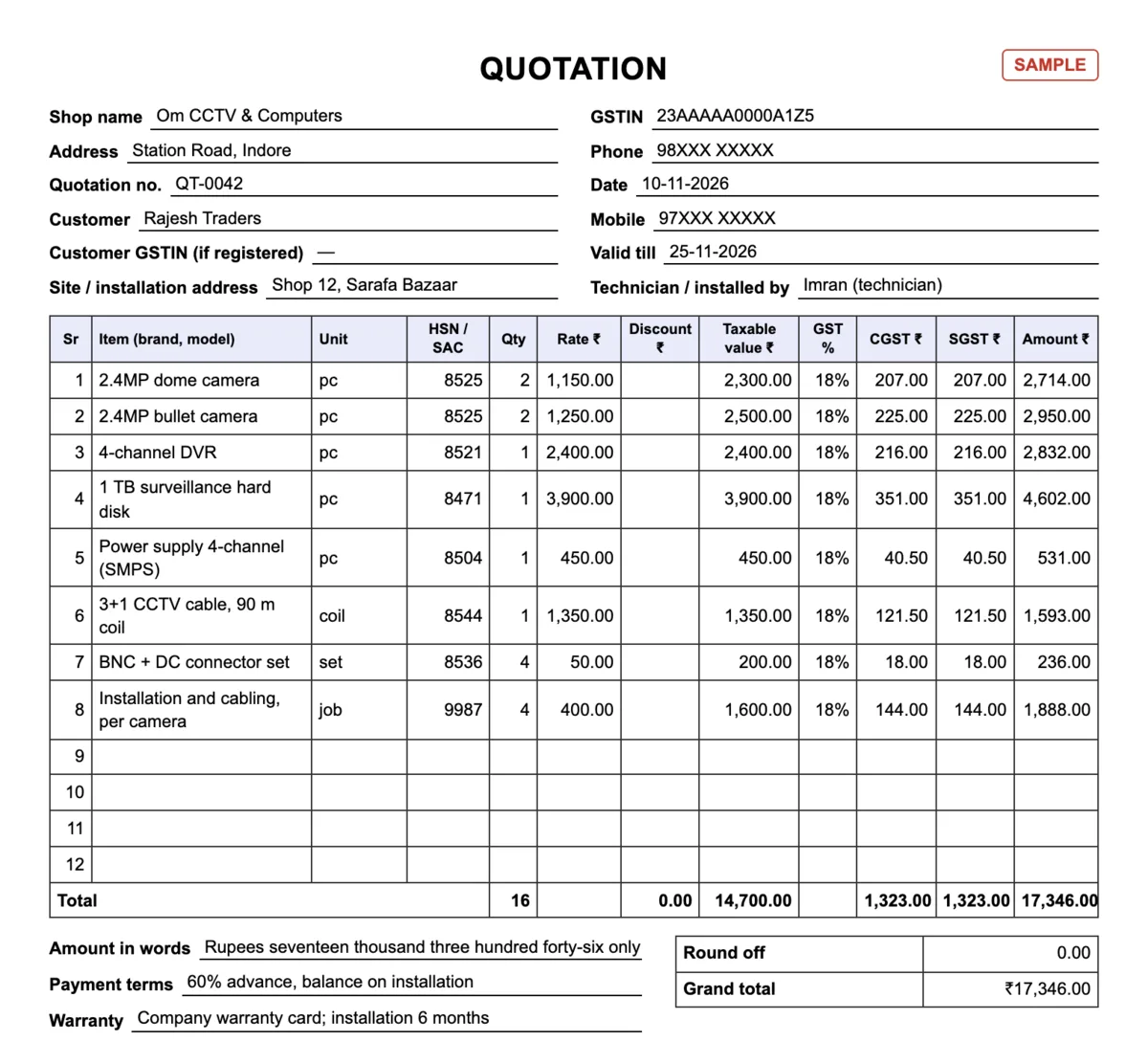
The PDFs are blank forms to print and fill in by hand, or to take to a printing press for a quotation pad or a numbered bill book. The Excel file works out the taxable value, CGST, SGST, amount, round off and grand total; GST % is filled in with 18% on every line. Its sheets are the quotation, the GST bill, a bill without GST, an HSN / SAC list for CCTV goods and the filled example shown above. The Word file has the quotation and both bills, to type your shop name or logo before printing.
What goes on a CCTV quotation
| Part | What to write | Why |
|---|---|---|
| Top | “Quotation” (or “Estimate”), your shop name, address, phone, GSTIN if registered | So nobody takes it for a bill, and the customer can call you back. |
| Number and dates | A quotation number from its own series (QT-0001), the date and a valid-till date | Prices of cameras and hard disks change; the date protects you. |
| Customer and site | Name, mobile, GSTIN if they want it on the bill later, and the address where the cameras go | The site decides the cable length and the labour. |
| Goods | Each item with brand and model, quantity, rate before GST: cameras, DVR or NVR, hard disk, power supply, cable, connectors | The customer compares your quotation line by line with another shop’s. |
| Installation | Its own line: per camera or a lump sum, SAC 9987 | It is a service, and customers ask what the labour is. |
| GST | 18% on each line, CGST + SGST and the total; or “prices include GST”; or no tax lines if you are not registered | Offices and shops with a GSTIN want the tax shown. |
| Terms | Advance, warranty, what is extra, what the customer arranges | Most disputes on CCTV jobs are about these four. |
| Bottom | Grand total in figures and words, “this is a quotation, not a tax invoice”, your signature, a line for the customer to accept | A signed quotation or a WhatsApp “OK” is your order. |
Sample: a 4-camera CCTV quotation
The filled example in the picture and in the Excel file, with rates before GST. The prices are made up for the example; use your own:
| Item | HSN / SAC | Qty | Rate (before GST) | Value | GST 18% |
|---|---|---|---|---|---|
| 2.4MP dome camera | 8525 | 2 | ₹1,150 | ₹2,300 | ₹414 |
| 2.4MP bullet camera | 8525 | 2 | ₹1,250 | ₹2,500 | ₹450 |
| 4-channel DVR | 8521 | 1 | ₹2,400 | ₹2,400 | ₹432 |
| 1 TB surveillance hard disk | 8471 | 1 | ₹3,900 | ₹3,900 | ₹702 |
| Power supply 4-channel (SMPS) | 8504 | 1 | ₹450 | ₹450 | ₹81 |
| 3+1 CCTV cable, 90 m coil | 8544 | 1 | ₹1,350 | ₹1,350 | ₹243 |
| BNC + DC connector set | 8536 | 4 | ₹50 | ₹200 | ₹36 |
| Installation and cabling, per camera | 9987 | 4 | ₹400 | ₹1,600 | ₹288 |
| Total | ₹14,700 | ₹2,646 |
Taxable value ₹14,700, CGST ₹1,323 + SGST ₹1,323, grand total ₹17,346. With ₹10,000 taken as the advance, the balance on installation is ₹7,346. A shop that is not registered for GST quotes the same job at ₹14,700 with no tax lines.
Terms and conditions for a CCTV quotation
Keep them short enough that the customer reads them. These are the ones CCTV shops usually need; change the numbers to your own:
- Validity. “This quotation is valid for 15 days.” Camera and hard disk prices move, so always put a date.
- Payment. “60% advance with the order, balance on the day of installation.” Write your own split; without it the balance waits.
- Warranty. “Cameras, DVR and hard disk: company warranty as per the warranty card. Installation and cabling: 6 months.” Say that damage from voltage, lightning, water or tampering is not covered.
- What is extra. “Rates are for the items and quantities listed. Extra cable, pipe, casing and fittings are charged as used.” This saves the argument when the cable run is longer than it looked.
- What the customer arranges. “Power point near the DVR, internet for mobile viewing and a monitor, unless listed above.”
- Work not included. “Civil work, false-ceiling repair and work above a safe ladder height are not included unless written.”
- GST. “GST at 18% as shown” (or “Prices include GST”, or nothing at all if you are not registered).
How to fill the format
Download the format
Pick the A4 quotation (PDF), the Excel with formulas or the Word file, in English, Hindi or Gujarati. The same files hold the GST bill and the bill without GST.
Fill your shop details once
Shop name, address, phone and GSTIN (if you are registered) at the top. In Excel or Word type them once and save the file as your own template.
Write the customer and the site
Customer name and mobile, their GSTIN if they want to claim the GST, and the address where the cameras go. Give the quotation its own number (QT-0001, QT-0002…) and a valid-till date.
One line per item, one line for installation
Cameras, DVR or NVR, hard disk, power supply, cable and connectors, each with brand and model, quantity and rate before GST. Add installation and cabling as its own line with SAC 9987. In Excel the taxable value, CGST, SGST and amount fill in; GST % starts at 18%.
Terms, total and acceptance
Payment terms (how much advance), warranty, what is charged extra, then the grand total in figures and words. Sign it, send it, and ask the customer to sign or reply “OK” on WhatsApp.
After the job, make the bill
Copy the lines to the GST bill sheet (or the bill without GST), change what was really used, and write the DVR serial number and the warranty.
What goes on a CCTV bill (tax invoice)
| Field | On a GST tax invoice? | Why CCTV shops write it |
|---|---|---|
| Shop name, address, GSTIN | Yes (Rule 46) | A registered customer needs it to claim the GST. |
| Bill number and date | Yes: one series, no number used twice in a financial year | Your CA matches every bill in the GST return. |
| Customer name, and GSTIN if registered | Yes, GSTIN for a registered buyer | Offices, shops and societies claim the GST you charge. |
| Item with brand and model | Description: yes; brand and model: your choice | Proves what was fitted when a warranty claim comes. |
| HSN / SAC code | Yes | 8525 cameras, 8521 DVR / NVR, 8471 hard disk, 8544 cable, SAC 9987 installation. |
| Quantity, rate, discount, taxable value | Yes | The tax is worked out on the value after discount. |
| GST rate, CGST and SGST | Yes | 18% on cameras, recorders, cable and installation. |
| Site / installation address | No | Shows where the system is, for service calls. |
| Serial number of the DVR and cameras, warranty | No | The company asks for the serial number on a warranty claim. |
| Signature | Yes | Sign every copy you give. |
Rule 46 of the CGST Rules lists what a tax invoice must show; serial numbers, warranty and the site address are not in it, so they are your choice. Not registered under GST? Use the A5 bill without GST: no GSTIN and no tax lines (bill without a GST number).
CCTV AMC and service bills
An AMC (annual maintenance contract) quotation or a service bill uses the same format with service lines instead of goods. For AMC work there is a separate free set, CCTV AMC formats: comprehensive and non-comprehensive quotation, an agreement sample, a service visit report with a checklist, a renewal letter and an Excel tracker for renewal dates. In short:
- What is covered: “AMC, 8 cameras + 1 DVR, 1 year” with the start and end dates in the line or the terms.
- How many visits are included, and the charge for a visit beyond them.
- Whether parts are included (a comprehensive AMC) or charged extra as used.
- SAC 9987 on the service line, 18% GST. Parts you replace go on their own lines with their HSN.
- A one-off repair: a “Service visit” line plus the parts changed (“BNC connector × 2”, “Power supply”).
GST rate and HSN code for CCTV cameras and accessories
CCTV cameras are 18% under HSN heading 8525. They were 18% before 22 September 2025 too, so the 2025 change did not alter a CCTV bill, except that television sets and monitors (8528) came down from 28% to 18%.
| Item | HSN heading / SAC | GST from 22 Sep 2025 | Just before |
|---|---|---|---|
| CCTV cameras: dome, bullet, IP, PTZ, Wi-Fi | 8525 | 18% | 18% (no change) |
| DVR and NVR (video recorders) | 8521 | 18% | 18% (no change) |
| Hard disk drive (surveillance HDD) | 8471 | 18% | 18% (no change) |
| Memory card (SD card), pen drive | 8523 | 18% | 18% (no change) |
| Power supply (SMPS), adaptor, UPS | 8504 | 18% | 18% (no change) |
| Cable: 3+1 CCTV cable, coaxial, CAT6 LAN cable | 8544 | 18% | 18% (no change) |
| BNC and DC connectors, RJ45 connectors | 8536 | 18% | 18% (no change) |
| Monitor or LED TV for viewing | 8528 | 18% | 28% on some sets (in the 28% to 18% list) |
| Network switch (PoE switch), Wi-Fi router | 8517 | 18% | 18% (no change) |
| Burglar alarm, siren, fire alarm | 8531 | 18% | 18% (no change) |
| PVC pipe and casing for cable | 3917 | 18% | 18% (no change) |
| Installation, cabling labour, repair, AMC (a service) | SAC 9987 | 18% | 18% (no change) |
CCTV bill book or quotation pad (to get printed)
For a printed pad, take the A4 PDF to a printing press and ask for numbered sets (customer copy on top, shop copy below, carbonless paper), your shop name, GSTIN and address printed at the top, and 50 or 100 sets a book. A GST-registered shop prints the A4 tax invoice; a shop without GST, the A5 bill. Keep quotations on a separate pad with their own numbers.
Making the same quotation and bill in Tap & Bill
Tap & Bill makes this quotation and bill on an Android phone or any computer and sends the PDF on WhatsApp:
- Pick “CCTV / security cameras” at sign-up and the bill screen starts with 14 ready tiles (cameras, DVR and NVR, hard disk, power supply, cable per metre and a 90 m coil, BNC connectors, Installation Charge, Service Visit), each with its HSN or SAC and 18%.
- Quotation with its own number (QT-0001), up to 50 lines, discount, GST, valid-till date and a note for your terms (up to 300 characters); Make bill turns it into the bill. On paid plans and the free trial.
- Installation: the ready Installation Charge tile carries SAC 9987; or type a line with any amount. The ready cable tile is priced per metre (quantity = whole metres) and is in the quotation’s item list.
- GST: “Same rate on everything”, 18%, prices with or without GST; HSN on every line of the tax invoice; or No GST.
- Advance by UPI with a QR for the exact amount, the balance on the customer’s udhaar, a WhatsApp reminder with your UPI ID.
- Serial number: every bill line of a CCTV shop has a “Serial no. / model” box (30 characters); what you type prints under the item. It is a printed note: bills cannot be searched by it.
- AMC renewal and service-visit dates: AMC / Service in the menu (the Reminders tool): on that day at the top of Home, one morning notification on the Android app, WhatsApp to the customer from your own phone.
- Not available: a warranty or serial-number register, an AMC contract register, job cards and technician visits, IGST bills to another state, e-way bills.
Free plan: 60 bills a month at ₹0 (bills, GST, UPI QR, udhaar; no quotations). Quotations start on Basic, ₹199 a month, no GST added; 14 days free with every feature. More: billing for CCTV and security camera shops.