“4 camera ka full set kitne ka?”
Make a quotation with the cameras, DVR, hard disk, cable and installation, with GST and a valid-till date, and send the PDF on WhatsApp. When the customer says yes, tap Make bill. See a worked job.
Wedding season 2026 · weddings from 21 Nov · fast bills in the rush, udhaar with limits · 14 days free, then the ₹0 Free plan or ₹199/month · Shop checklist · Free sale poster
For CCTV, security camera and computer accessory shops
Which billing software suits a CCTV or security camera shop?
A small CCTV shop needs three things: a fast bill for cameras, DVRs, hard disks and cable with 18% GST, a quotation for an installation job that becomes the bill, and a khata for customers who pay after the work. Tap & Bill does these on an Android phone or any computer and sends the PDF on WhatsApp. AMC and service-visit dates go in AMC / Service: on the day, the Android app notifies you and one tap opens WhatsApp with the message. It has no serial-number or warranty register, no AMC contract register and no job cards. Free plan: 60 bills a month at ₹0 (bills, GST, UPI QR, udhaar); quotations are on paid plans, from ₹199 a month; 14 days free with every feature.
No card · no ads in the app · your bills, customers and udhaar stay yours: nothing is deleted if you stop paying
Make a quotation with the cameras, DVR, hard disk, cable and installation, with GST and a valid-till date, and send the PDF on WhatsApp. When the customer says yes, tap Make bill. See a worked job.
Keep “Installation (per camera)” as an item with SAC 9987, or type a one-off labour line with any amount. It sits on the same bill as the goods.
One split payment: the advance by UPI (your QR asks for the exact amount) and the balance on the customer’s udhaar. On every plan, the Free plan too.
Keep them in the item name, 40 characters. Search finds any part of the name on the phone or the computer.
Type the serial number in the line’s “Serial no. / model” box and it prints under the item. There is no serial-number register or search: what works and what doesn’t.
A tax invoice with HSN on each line, CGST + SGST and the buyer’s GSTIN, as an A4 PDF or a thermal print. Not registered? Choose No GST and the bill has no tax lines.
Pick “CCTV / security cameras” at sign-up (“CCTV & security” in the Android app) and the bill screen starts with these 14 tiles, each with its HSN or SAC and 18%. The prices are placeholders: change them, add brand and model to the names, or paste your own list, one “name price” per line (“2.4MP dome camera 1150”). On paid plans and the trial you can also import your rate list from Excel on the computer or read it from a supplier’s bill photo.
A CCTV shop’s menu has AMC / Service (the Reminders tool, on from sign-up). After an installation bill, tap Remember the AMC date, or add one: “8 camera AMC”, the next visit in 6 months, repeating every 6 months; the warranty end or the yearly renewal the same way. On the day it is at the top of Home, the Android app sends you one notification that morning, and one tap opens WhatsApp with “please tell us a time that suits you” in the customer’s language. Mark it Done and the next visit is set. It keeps dates, not the AMC contract: terms and visits used stay in the free AMC tracker. Free plan: 20 running dates; paid plans no limit.
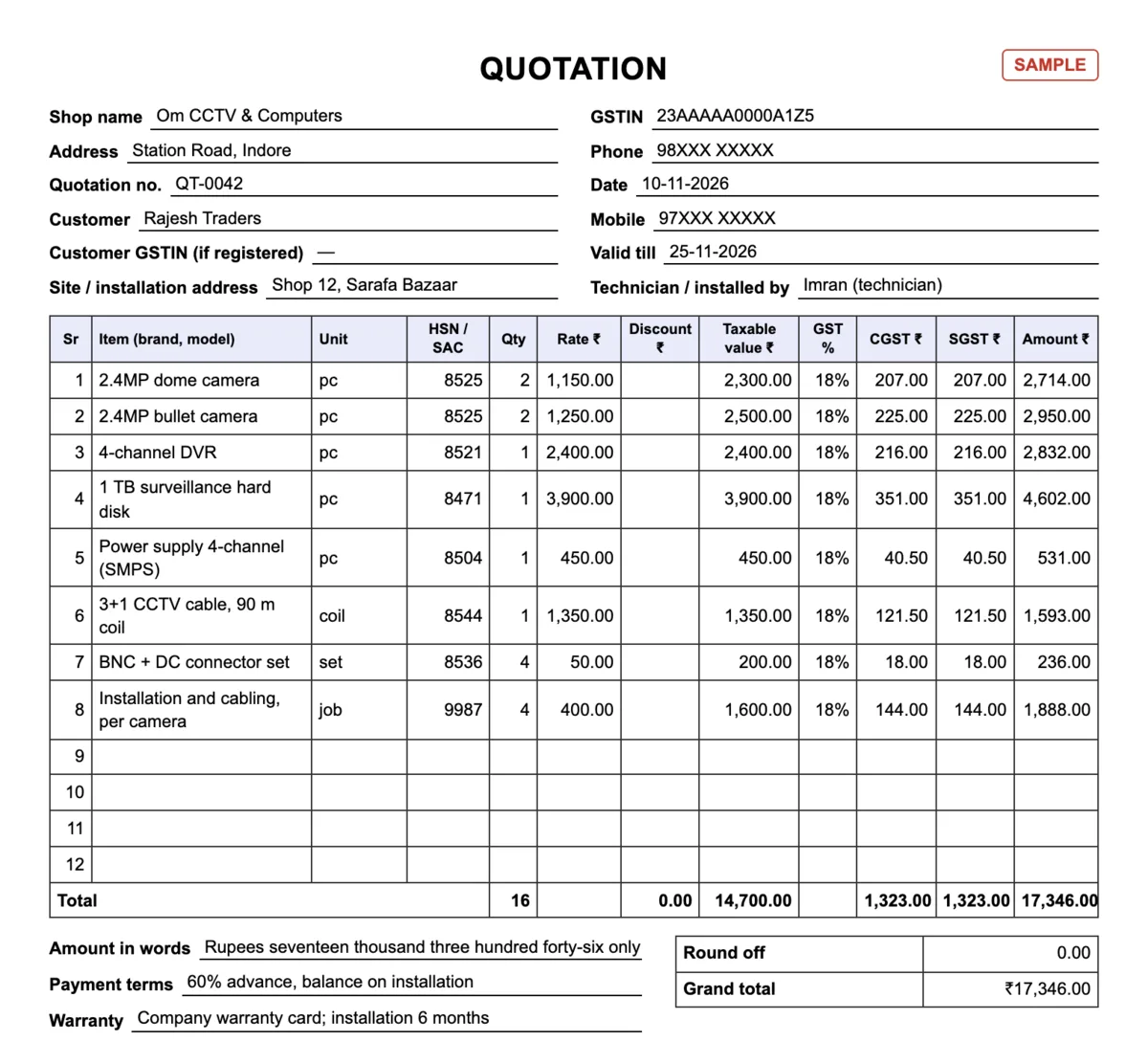
A shop owner asks for four cameras with recording. CCTV quotations are usually written with rates before GST, so the shop’s GST setting here is “same rate on everything”, 18%, prices without GST. The prices are made up for the example:
| Item | HSN / SAC | Qty | Rate (before GST) | Value | GST 18% |
|---|---|---|---|---|---|
| 2.4MP dome camera | 8525 | 2 | ₹1,150 | ₹2,300 | ₹414 |
| 2.4MP bullet camera | 8525 | 2 | ₹1,250 | ₹2,500 | ₹450 |
| 4-channel DVR | 8521 | 1 | ₹2,400 | ₹2,400 | ₹432 |
| 1 TB surveillance hard disk | 8471 | 1 | ₹3,900 | ₹3,900 | ₹702 |
| Power supply 4-channel (SMPS) | 8504 | 1 | ₹450 | ₹450 | ₹81 |
| 3+1 CCTV cable, 90 m coil | 8544 | 1 | ₹1,350 | ₹1,350 | ₹243 |
| BNC + DC connector set | 8536 | 4 | ₹50 | ₹200 | ₹36 |
| Installation and cabling, per camera | 9987 | 4 | ₹400 | ₹1,600 | ₹288 |
| Total | ₹14,700 | ₹2,646 |
Taxable value ₹14,700, CGST ₹1,323 + SGST ₹1,323, so the customer pays ₹17,346.
| Step | What happens | In Tap & Bill |
|---|---|---|
| 1. Quotation | You visit the shop, count the cameras and the cable run | Quotation QT-0042 with the eight lines above, valid 15 days, your terms in the note (“60% advance, balance on installation. Warranty as per company card.”), PDF on WhatsApp |
| 2. Order | The customer confirms on WhatsApp | Open the quotation, tap Make bill. He pays ₹10,000 by UPI (your QR asks for exactly ₹10,000); the remaining ₹7,346 goes on his udhaar |
| 3. Installation | Cameras fitted, DVR set up on his phone | If you used more cable or an extra camera, the owner edits the bill (paid plans), or you make a second bill for the extras |
| 4. Balance | He pays the ₹7,346 | Take the payment against his udhaar; a reminder opens WhatsApp with the amount and your UPI ID if he is late |
Not registered for GST? Choose No GST in Settings and the same job is a plain ₹14,700 quotation and bill with no tax lines (bill without a GST number). Quotations are A4 PDFs, need internet, and are on paid plans and the free trial (not on the Free plan); the bill, UPI QR and udhaar are on every plan.
Still on a letterhead or a bill book? These formats have HSN / SAC, GST % per line (18% filled in), site address, technician, warranty and serial no. fields, and the quotation has valid-till, payment terms and a customer acceptance line. No sign-up.
| Format | English | हिंदी | ગુજરાતી |
|---|---|---|---|
| Quotation: A4, item with brand and model, HSN / SAC, GST % per line, site address, valid till, payment terms, warranty, customer acceptance (18 lines) | PDF · 123 KB | PDF · 184 KB | PDF · 202 KB |
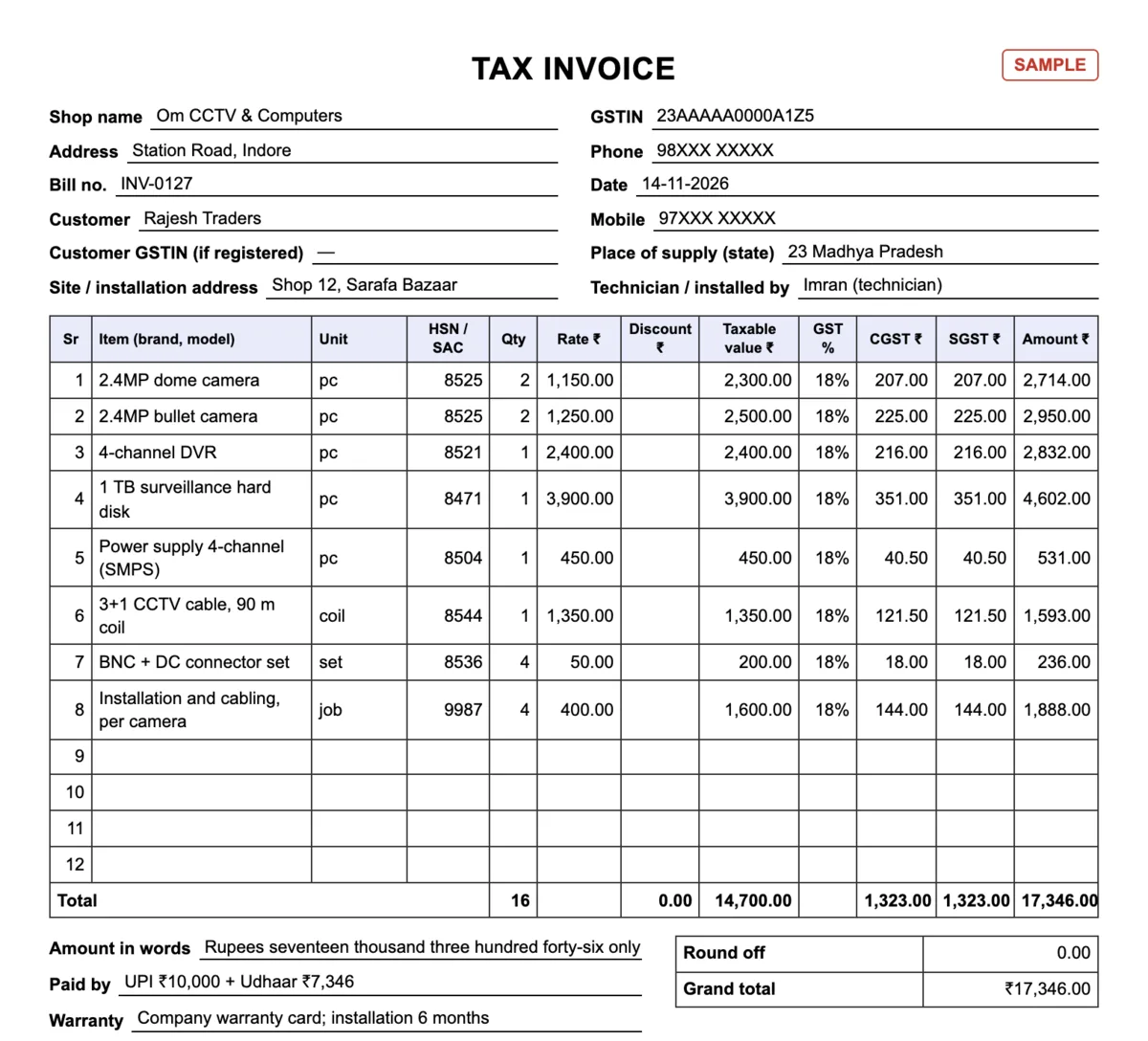
| GST tax invoice: A4, the same columns, technician, warranty and DVR / camera serial no. (18 lines) | PDF · 130 KB | PDF · 203 KB | PDF · 210 KB |
| Bill / cash memo without GST: A5 bill book size, unit column and site address (12 lines) | PDF · 114 KB | PDF · 171 KB | PDF · 185 KB |
| Excel with formulas: quotation, GST bill (18% filled in, change per line), bill without GST, HSN / SAC list and a filled 4-camera example | Excel · 15 KB | Excel · 17 KB | Excel · 17 KB |
| Word: quotation and both bills, type your shop name once and print | Word · 5 KB | Word · 6 KB | Word · 6 KB |
How to fill it, what the terms should say and the same format in Hindi and Gujarati: CCTV bill and quotation format guide.
CCTV cameras are 18% GST under HSN heading 8525, and so is almost everything else on a CCTV bill. The September 2025 rate change did not move CCTV cameras: they were 18% before 22 September 2025 and are 18% after. Installation, repair and AMC labour is a service under SAC heading 9987, also 18%.
| Item | HSN heading / SAC | GST from 22 Sep 2025 | Just before |
|---|---|---|---|
| CCTV cameras: dome, bullet, IP, PTZ, Wi-Fi | 8525 | 18% | 18% (no change) |
| DVR and NVR (video recorders) | 8521 | 18% | 18% (no change) |
| Hard disk drive (surveillance HDD) | 8471 | 18% | 18% (no change) |
| Memory card (SD card), pen drive | 8523 | 18% | 18% (no change) |
| Power supply (SMPS), adaptor, UPS | 8504 | 18% | 18% (no change) |
| Cable: 3+1 CCTV cable, coaxial, CAT6 LAN cable | 8544 | 18% | 18% (no change) |
| BNC and DC connectors, RJ45 connectors | 8536 | 18% | 18% (no change) |
| Monitor or LED TV for viewing | 8528 | 18% | 28% on some sets (in the 28% to 18% list) |
| Network switch (PoE switch), Wi-Fi router | 8517 | 18% | 18% (no change) |
| Burglar alarm, siren, fire alarm | 8531 | 18% | 18% (no change) |
| PVC pipe and casing for cable | 3917 | 18% | 18% (no change) |
| Installation, cabling labour, repair, AMC (a service) | SAC 9987 | 18% | 18% (no change) |
The services list puts installation under group 99873, “Installation services (other than construction)”: 998734 is installation of radio, television and communications equipment, 998736 installation of electrical machinery and apparatus not classified elsewhere, and 998739 other goods. Repair and maintenance (AMC) sit in group 99871. All of heading 9987 is 18%, so the tax is the same; ask your CA which 6-digit code to print. When you sell the cameras and fit them for one price, ask your CA too whether to show it as one line or as goods plus an installation line: the rate is 18% either way.
One more thing to check: the ₹40 lakh turnover limit for GST registration is for shops that sell goods only. A shop that also charges for installation or repair supplies a service, and its limit is ₹20 lakh a year in most states.
In Tap & Bill: Settings → GST → “Same rate on everything”, 18%, and say whether your prices include GST. Add the HSN to each item (and 9987 to your installation item) so it prints on the tax invoice; lines typed on Quick bill follow the shop rate and carry no HSN. More: GST billing.
Check this list against your work before you sign up. Tap & Bill is a counter billing app with quotations, not service-management software.
| You need | How it works in Tap & Bill | Status |
|---|---|---|
| Quotation for a camera job | A quotation (QT-0001 series, titled Quotation or Estimate) with up to 50 lines, discount, GST, a valid-till date and a note of up to 300 characters for your terms; A4 PDF on WhatsApp; Make bill turns it into the bill. | Today, paid plans and the free trial |
| Installation, cabling or service visit charge | Keep “Installation (per camera)” or “Service visit” as an item with SAC 9987 in the HSN box, or type a one-off line (“Rewiring, 2 cameras”) with any amount. | Today, every plan |
| Brand and model on the bill | Put them in the item name (up to 40 characters). Search finds any part of the name, so “dome” or the brand is enough. | Today, every plan |
| Advance now, balance after installation | Split payment on the bill: the advance by UPI or cash, the rest on the customer’s udhaar; collect it later in parts and send a WhatsApp reminder with your UPI ID. | Today, every plan (Free too) |
| GST tax invoice with HSN and the customer’s GSTIN | HSN on each item, CGST + SGST, the buyer’s GSTIN for offices and shops that claim the GST; GST report for your CA. | Today, every plan (GST report on paid plans) |
| Cable by the metre or by the coil | The ready “CCTV Cable (per m)” tile is priced per metre: type the metres as the quantity (35), in whole metres, on a bill and on a quotation. A full coil is its own tile, “CCTV Cable 90 m Coil”. Need 7.5 m? Switch on items sold by weight / length and set a cable item to metres; such an item is billed but is left out of the quotation list. | Today |
| DVR or camera serial number on the bill | Every bill line of a CCTV shop has a “Serial no. / model” box (up to 30 characters): what you type prints under the item. A shop that signed up earlier as “Other shop” uses the Size / colour box (Sizes on in My tools). It is not a register: you can’t search bills by serial number. | Today, as a printed note |
| Warranty register, warranty-expiry reminders | Not available. Put your warranty rule as the bill’s last line (Settings, up to 80 characters); the customer’s bill is found again by mobile number, name, bill number or amount. | Not available |
| AMC renewal and service-visit dates | Reminders, called AMC / Service in a CCTV shop’s menu: write the renewal or the next visit once, repeating every 6 months or a year. On that day it is at the top of Home, the Android app sends you one notification that morning, and one tap opens WhatsApp on your phone with the message. It is not an AMC contract register: keep the terms in the free Excel tracker with the CCTV AMC formats. | Today, every plan (Free: 20 running dates) |
| Job cards, technician visits, complaint tracking | Not available. | Not available |
| Scan the barcode on camera and DVR boxes; stock | Stock & barcodes: save the box barcode, scan to bill, stock in, shelf count. Stock is counted per item, not per serial number. | Growth and Pro (and the free trial) |
| Bill to another state (IGST), e-way bill, e-invoice | Not available: bills are CGST + SGST, for sales within your state. | Not available |
A CCTV business that runs on AMC contracts, technician schedules and serial-wise stock is better served by service-management or inventory software today. A shop that sells cameras, DVRs, cable and accessories over the counter and does installation jobs on a quotation can start now.
Free plan: 60 bills a month for ₹0, owner only (no quotations, returns or stock). Paid plans: Basic ₹199, Starter ₹499, Growth ₹999, Pro ₹1,999 a month, no GST added; Basic is also ₹1,499 a year and includes quotations. See pricing and the Free plan.
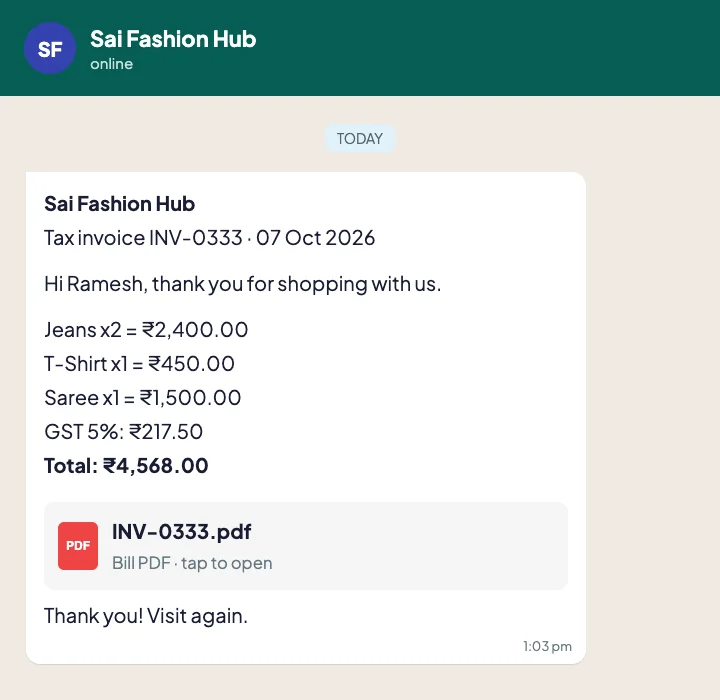
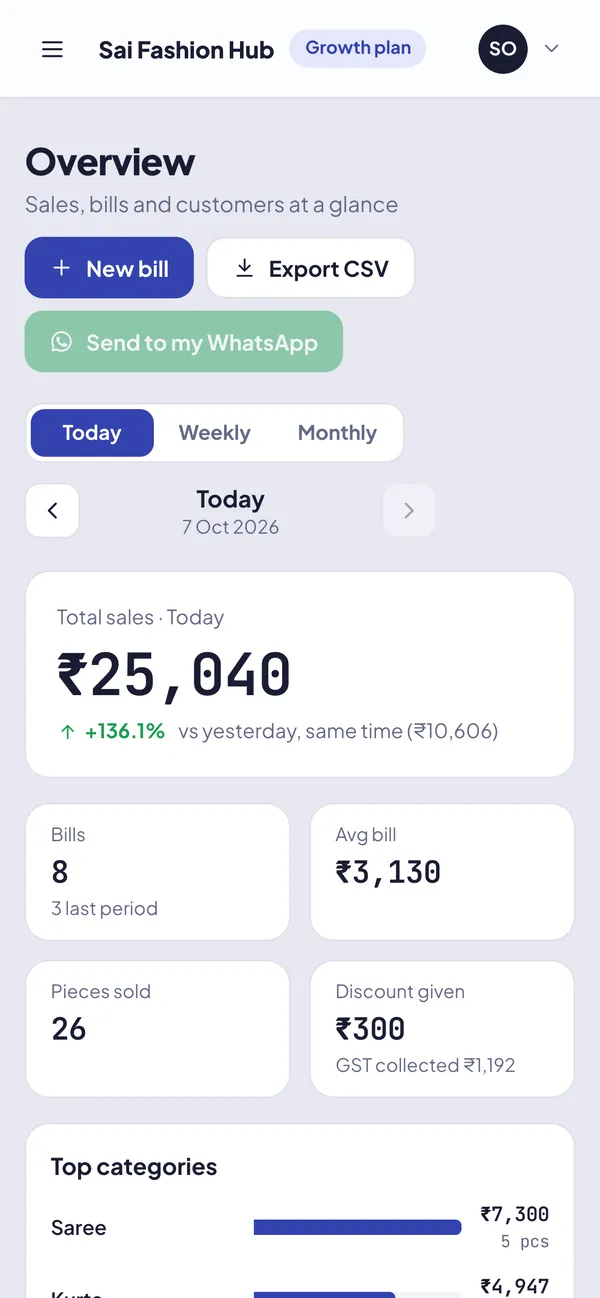
For a shop that sells cameras, DVRs and cable and does installation jobs: one that makes a quotation and turns it into the bill, puts 18% GST and the HSN on each line, takes an advance with the balance on udhaar and sends the PDF on WhatsApp. Tap & Bill does this on an Android phone or any computer from ₹199 a month (or 60 bills a month free, without quotations). If you need AMC contracts, technician job cards or serial-number tracking, pick service-management or inventory software instead.
List each item with quantity and rate (cameras, DVR or NVR, hard disk, power supply, cable, connectors), add installation as its own line, show GST at 18%, and write a valid-till date and your terms: advance, warranty, what is charged extra. In Tap & Bill it is a quotation that goes as a PDF on WhatsApp and becomes the bill in one tap; on paper, use the free CCTV quotation format in Excel, Word or PDF.
18%, HSN heading 8525. Notification 9/2025-Integrated Tax (Rate), in force from 22 September 2025, lists “Closed-circuit television (CCTV)” under heading 8525 in its 18% schedule (S. No. 497). Your supplier’s tax invoice shows the full 8-digit code. Confirm with your CA.
No. CCTV cameras were 18% before and are 18% after. Of the things a CCTV shop sells, the 2025 change lists include television sets, monitors and projectors (heading 8528), which moved from 28% to 18%.
The headings are 8521 for DVRs and NVRs (video recording apparatus), 8471 for hard disk drives, 8544 for coaxial, 3+1 and LAN cable, 8504 for power supplies and adaptors and 8536 for BNC and DC connectors. All are 18%. Add the code to the item in Tap & Bill and it prints on every GST bill.
Installation, repair and AMC labour is under SAC heading 9987 (maintenance, repair and installation services) at 18%: 9% CGST + 9% SGST. Installation services are group 99873 (998734 for television and communications equipment, 998736 for electrical apparatus); ask your CA which 6-digit code to print. Source: Notification 11/2017-Central Tax (Rate).
Yes, as a note: type the serial number in the line’s “Serial no. / model” box (up to 30 characters) and it prints under the item on the receipt, PDF and WhatsApp bill. Your warranty rule can be the bill’s last line. There is no warranty register or serial-number search.
Yes, as a service line on a bill or a quotation (“AMC 8 cameras, 1 year”, SAC 9987, 18%). Write the renewal or next visit date in AMC / Service (Reminders) and the app shows it on that day, with one morning notification on the Android app; it does not keep the AMC contract itself. Free AMC quotation, agreement sample, service report and renewal letter formats, with an Excel tracker: CCTV AMC format.
Yes, on this page and in the format guide: an A4 quotation, an A4 GST tax invoice and an A5 bill without GST (PDF), Excel with GST formulas, an HSN / SAC list and a filled example, and Word, in English, Hindi and Gujarati. No sign-up.
Yes. The Free plan is ₹0 with no end date for 60 bills a month, owner only, with GST bills, UPI QR, udhaar and WhatsApp bills. Quotations, returns and stock are on paid plans. Every new shop first gets a 14-day free trial with every feature, no card.
Yes. Choose No GST in Settings: the bill and the quotation show your shop name, the items, the total and the payment, with no GSTIN or tax lines. A shop that also charges for installation should check the ₹20 lakh registration limit with a CA.
We call you within one working day and show Tap & Bill on your own items and prices.
Prefer to talk now? Call +91 73838 34343.